


Why Arch-Viz Walkthroughs Take Days to Render (And How to Speed Them Up)
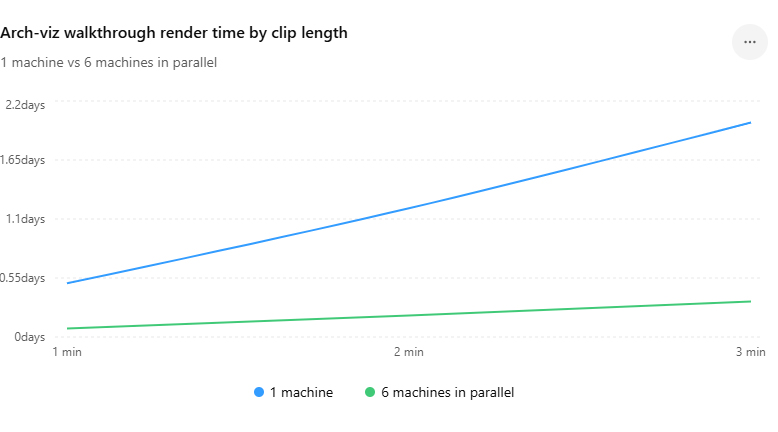
A walkthrough takes days because a few minutes of footage is thousands of frames, and one machine renders them in a queue. A two minute flythrough at 30 frames a second is 3,600 frames. At a minute or two each, which is normal once you add depth of field and vegetation, that single machine is busy for a day or more without stopping. Speeding it up is less about a faster card and more about not relying on one card at all.
This is the project that quietly destroys schedules, because the still images that came before it rendered in minutes and lulled everyone into thinking the animation would behave. It will not. The jump from stills to a multi-minute walkthrough is where arch-viz timelines go to die.
The frame count is the whole story
Nothing about a walkthrough is individually slow. Each frame is just a render, no harder than a still from the same scene. The problem is volume, multiplied by a per frame time that climbs the moment the camera moves through anything detailed. Here is the scale, and the days appear quickly:
| Walkthrough length | Frames at 30 fps | One machine, ~90 sec/frame | Split across 6 machines |
|---|---|---|---|
| 1 minute | 1,800 | about 1.9 days | about 8 hours |
| 2 minutes | 3,600 | about 3.75 days | about 15 hours |
| 3 minutes | 5,400 | about 5.6 days | about 23 hours |
Treat those per frame times as a rough middle. A camera that drifts past a glass facade with reflections, or through a planted courtyard, can push individual frames well past two minutes, while a clean corridor shot might land under one. The Lumion or D5 estimate you see is an average, and averages hide the heavy frames that actually decide when you finish.
Before you throw hardware at it, cut the frame cost
Two cheap moves shrink the whole job. First, question the frame rate and length. Plenty of client walkthroughs play perfectly well at 24 or 25 frames a second instead of 30, and a tighter edit that drops ten seconds of slow drifting saves hundreds of frames outright. Second, attack the per frame cost the same way you would a heavy still: sensible texture sizes, leaner vegetation, and a render preset tuned for playback rather than pixel peeping, since motion hides a lot of what high settings add. Render a short test pass over the heaviest section of the path, not the easiest, so your time estimate reflects reality.
Real-time tools and offline renderers change the playbook
How you speed up the final render depends entirely on what you built the walkthrough in, and this is where the distinction matters more than a neat pitch. If the walkthrough lives in a real-time app, Lumion, Enscape, Twinmotion or D5, it renders on a single GPU and cannot go to a node-based render farm at all. The way to parallelize it is to rent several GPU machines and give each a slice of the frame range. If instead your animation comes out of an offline engine like V-Ray or Corona inside 3ds Max, a SaaS render farm is purpose built for it and will spread those frames across a large pool of nodes for you.
For the offline route, the farms each have a character worth knowing. GarageFarm is the gentlest on-ramp, with human support that actually answers, which counts when a 3,600 frame job throws an error at frame 2,000. RebusFarm runs an automated scene checker that flags missing assets before they cost you a re-render, and it handles CPU-heavy Corona work well. Fox Renderfarm is usually the cheapest on a big batch, which is why it shows up so often for high-volume offline work.
For the real-time route, the parallel machines come from IaaS providers. iRender is the one I reach for, since you can boot several RTX 4090 servers and hand each a chunk of the timeline. On a multi-thousand-frame walkthrough, reliability is worth more than a slightly lower hourly rate, so run a test batch on any service before you commit a deadline to it. Xesktop and AWS EC2 also serve this role, with AWS carrying the heaviest setup burden. The discipline that saves you money is shutting each machine down the instant its slice is done, because every running server bills whether it is working or idle.
FAQ
- Why does a short walkthrough take days to render?
Because a few minutes of footage is thousands of frames. A two minute flythrough at 30 frames a second is 3,600 individual renders, and one machine processes them in sequence. At a minute or two per frame, common once reflections and vegetation are in shot, that machine is occupied for several days. The frames are not hard one by one, there are simply thousands of them in a queue.
2. How can I speed up an arch-viz walkthrough render?
Cut the frame cost first: drop from 30 to 24 or 25 frames a second where the client will not notice, tighten the edit, lean out vegetation and textures, and use a preset tuned for playback. Then parallelize the final. For real-time tools like Lumion, rent several GPU machines and split the frame range. For offline engines like V-Ray, send the job to a render farm that distributes frames across many nodes.
3. Can a render farm speed up a Lumion or D5 walkthrough?
Not a traditional one. SaaS farms like GarageFarm, RebusFarm and Fox distribute frames across nodes for offline engines, but Lumion and D5 render live on a single GPU and cannot be split that way. To parallelize a real-time walkthrough you rent multiple GPU machines on an IaaS service like iRender and give each part of the timeline. Offline animations from V-Ray or Corona, by contrast, suit those farms perfectly.
4. How many machines do I need to render a walkthrough overnight?
That hinges on the per frame time, but the relationship is roughly linear minus overhead. A two minute clip that takes about 3.75 days on one machine drops to around 15 hours across six, and to overnight with eight or more, once you account for setup and stitching the parts together. Render a test pass over the heaviest section first so your estimate reflects the slow frames, not the fast ones.
Related post: Why Your Old GTX 1070 Can’t Keep Up with Lumion 2026 Anymore


