Twinmotion Video Export Is Too Slow: Here’s the Real Bottleneck
A slow Twinmotion video export usually comes down to three things stacked together: Path Tracer quality, the frame count, and the fact that your single GPU renders every frame in sequence. Real-time preview is fast, but a Path Tracer export computes far more per frame, and a two minute clip at 30fps is 3,600 of them, one after another. The real bottleneck is that GPU, and the fixes that work are to right-size the export settings, cut the frame count where you can, and move the render to a faster card. One thing that does not help on current hardware: adding a second consumer GPU, since the RTX 40 series dropped the NVLink that used to combine cards. Figures below are illustrative.
Preview is fast, export is a different job
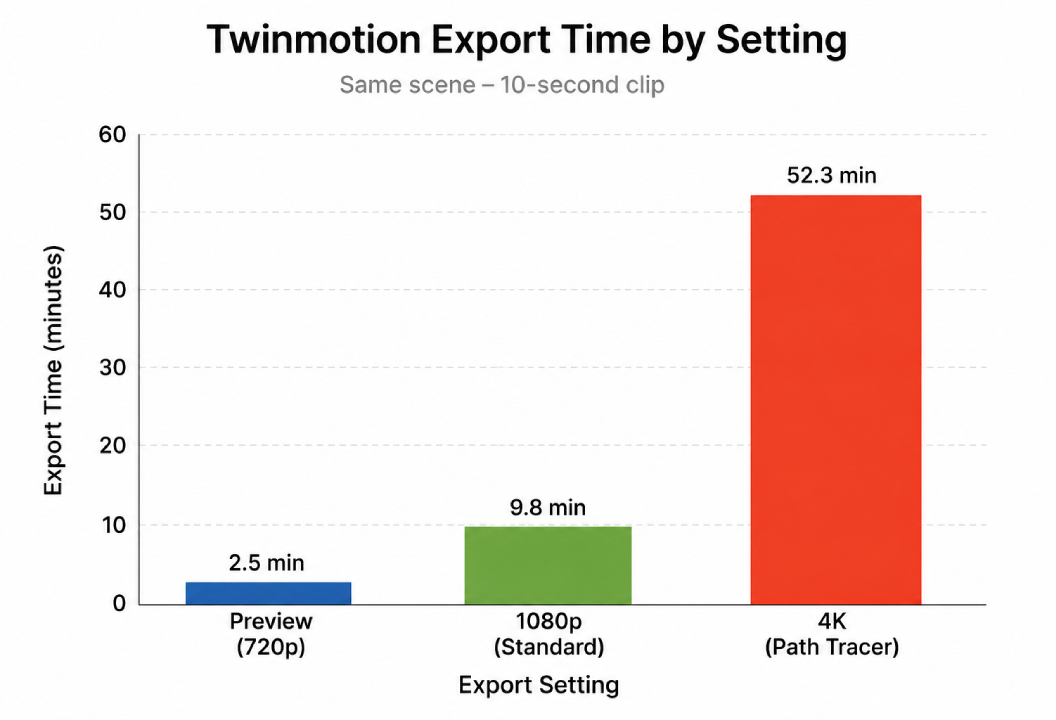
Twinmotion feels instant while you fly around, and that sets a false expectation for export. The live viewport renders at real-time quality, cutting corners you never see in motion. When you export a video, especially with Path Tracer on for that photoreal, ray-traced look, the engine does far more work per frame: more light bounces, cleaner reflections, higher sampling. So each frame that took a fraction of a second to preview can take many seconds, or longer, to export. Multiply that by thousands of frames and the export stretches into hours. Nothing is broken. Preview and final export were never the same workload.
The three things stacking up
| Bottleneck | What is happening | What to do |
|---|---|---|
| Path Tracer quality | Ray-traced export samples heavily per frame for clean output | Use a lower quality for drafts; reserve full Path Tracer for the final |
| Frame count | Length times frame rate; a 2 min clip at 30fps is 3,600 frames | Trim the edit, and consider 24 or 25fps instead of 30 to cut frames |
| Resolution | 4K is four times the pixels of 1080p per frame | Export drafts at 1080p; keep 4K for the approved final |
| Single GPU in sequence | One card renders every frame back to back | Use a faster GPU, or run several machines to split the frame range |
The first three you control inside Twinmotion, and getting them right often halves an export before you touch hardware. The fourth is the structural one, and it is where the biggest misunderstanding lives.
How to actually speed it up
Start inside Twinmotion, because the free wins are there. Export drafts at a lower Path Tracer quality and 1080p so review cycles are quick, and save the heavy 4K Path Tracer pass for the version the client signed off on. Tighten the edit and drop to 24 or 25fps where the motion allows, since fewer frames is a direct time saving. Optimize the scene so each frame is lighter. Done together, these can turn a multi-hour export into something far shorter without spending anything.
When the settings are as lean as they can be and the export still takes too long, the bottleneck is the card, and the answer is more GPU. Because Twinmotion is a real-time app, a traditional render farm cannot run it: GarageFarm, RebusFarm and Fox distribute frames for offline engines like V-Ray and Corona, not Twinmotion. The route that works is a cloud GPU machine you control. iRender is the one I use for Twinmotion, giving you a remote RTX 4090 that renders each frame faster, and for a long clip you can run several machines and split the frame range so the whole export finishes in a fraction of the wall-clock time. Your own machine stays free while it runs. It is RTX 4090 rather than the 5090, the per-hour meter runs until you shut down, and a free trial lets you time your own export first. If leaving your PC on overnight is the concern, that setup is in rendering an animation overnight without leaving your PC on.
Settings lean and it still crawls?
FAQ
- Why is my Twinmotion video export so slow?
Because export is a much heavier job than the live preview, and a single GPU renders every frame in sequence. With Path Tracer on, each frame samples heavily for a clean ray-traced look, taking many seconds instead of the fraction a preview frame takes. A two minute clip at 30fps is 3,600 of those frames back to back, so the export stretches into hours. The main levers are Path Tracer quality, frame count, resolution, and the speed of the GPU doing the work.
2. Does adding a second GPU speed up Twinmotion export?
Not on current consumer hardware. The RTX 40 series dropped NVLink, so two consumer cards in one machine do not combine to render a single Twinmotion export faster, since the real-time export runs on one GPU. A stronger single card renders each frame quicker, and the way to use more than one card is to run several separate machines, each rendering part of the frame range, then combine the output. That scales the wall-clock time down where a second card in the same box does not.
3. How can I make Twinmotion export faster without new hardware?
Export drafts at a lower Path Tracer quality and 1080p so review is quick, and keep the full 4K Path Tracer pass for the approved final only. Trim the edit and drop from 30fps to 24 or 25fps where the motion allows, since fewer frames saves time directly. Optimize the scene so each frame is lighter. These settings usually cut a multi-hour export sharply on the same card before you consider renting a faster GPU.
4. Can I render a Twinmotion export on a render farm?
Not a traditional one. Twinmotion is a real-time app that needs a live GPU and desktop session, so SaaS farms like GarageFarm, RebusFarm and Fox cannot run it. To render a Twinmotion export faster in the cloud you rent a whole machine on an IaaS service like iRender, which gives you an RTX 4090, and for a long clip you can run several machines and split the frame range. Those per-frame farms remain useful for offline engines only.
Related post: Best Render Farm for Twinmotion Video Export: Render Walkthrough Faster