



My Lumion Animation Takes All Night to Render. How to Cut It to an Hour
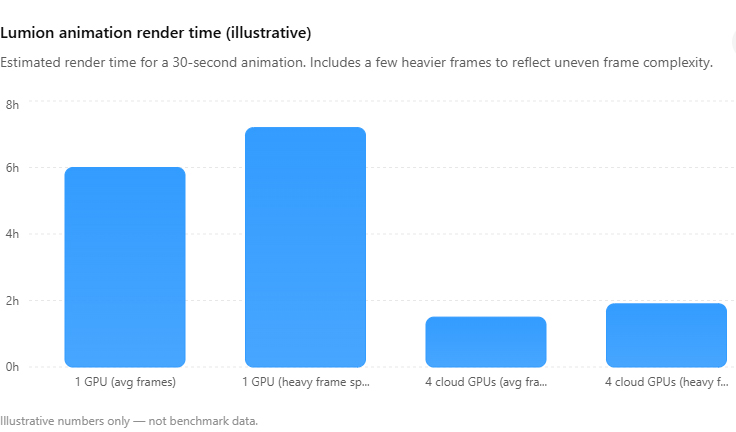
A Lumion animation runs all night because your GPU renders the frames in a line, one after another, and an animation is hundreds of them. A thirty second clip at 25 frames a second is 750 frames, so even at a brisk thirty seconds each, that is over six hours of the card doing nothing else. A faster single card trims that but does not break the pattern, because the work is still a queue. The way to bring an overnight job down to an hour is to render the frames in parallel, splitting the timeline across several GPU machines that all run at once. Since Lumion is a real-time app, ordinary render farms cannot do this for you, so the parallel route runs on rented GPU servers you control. Times below are illustrative.
Why an animation is so much heavier than a still
One Lumion still feels quick because it is one image. An animation is the same image rendered again and again with the camera nudged along a path, and Lumion processes those frames sequentially on a single card. The card is not the bottleneck so much as the sheer count. Run the numbers on a typical clip and the overnight wait stops being a mystery:
| Clip length | Frames at 25 fps | At ~30 sec/frame (one card) | At ~20 sec/frame (faster card) |
|---|---|---|---|
| 10 seconds | 250 | about 2 hours | about 1 hour 20 |
| 30 seconds | 750 | about 6.25 hours | about 4 hours |
| 60 seconds | 1,500 | about 12.5 hours | about 8 hours |
Those per frame numbers are not fixed, which is the part worth internalizing. A frame full of moving vegetation, reflections and depth of field can take two or three times longer than a clean interior frame in the same clip, so a real animation rarely renders at one steady pace. The overnight estimate you get from Lumion is an average across frames that vary a lot.
The fixes that actually move the needle
Start with the free ones, because they help every route after. Trim the scene the same way you would for a heavy still: lighter vegetation, sensible texture sizes, nothing off camera left loaded. Drop the render preset to the lowest setting that still looks right at playback size, since the top quality tiers add time per frame that the viewer often cannot see in motion. And render one full quality test frame from the middle of your path before you commit the whole clip, so you are not discovering a lighting problem at frame 600.
After that, the real lever is parallelism. Splitting a 750 frame clip across four machines, each rendering a quarter of the range, brings a six hour job down to somewhere near ninety minutes once you account for setup and stitching the parts back together. It is not a clean divide by four, because moving files and starting machines costs you a little on each end, but it is the difference between a ruined night and a coffee break.
Why a render farm cannot just take this off your hands
The obvious thought is to hand the clip to a render farm. For Lumion that does not work, and the reason is structural rather than a limitation anyone could patch. Farms like GarageFarm, RebusFarm and Fox Renderfarm distribute frames across automated nodes, which is perfect for offline engines such as V-Ray or Corona where each frame computes on its own. Lumion renders live on a single GPU with a desktop session, so there is nothing for a node farm to pick up. Those farms remain genuinely good tools, GarageFarm for its beginner friendly support, RebusFarm for its scene checking and Corona strength, Fox for cheap bulk offline jobs, but none of them opens a Lumion file.
So the parallel approach for Lumion lives on IaaS services, where you rent whole GPU machines and run several at once. I default to iRender for this because you can boot multiple RTX 4090 servers, hand each one a slice of the frame range, and shut them down when the clip is done. Reliability matters on an animation, since one corrupt frame at 3am means re-rendering and re-stitching, so run a test batch on any service before you trust it with a deadline. Xesktop and AWS EC2 can do the same job, with AWS demanding far more manual setup. The one habit to build is shutting every machine off the moment its slice finishes, because the billing clock runs on each one until you do, and four idle servers add up fast.
Running a clip overnight on one card? On iRender you can split the frame range across several RTX 4090 servers and bring it down to roughly an hour. New accounts get a 100 percent first-deposit bonus plus Credit Back on every session. Check the Lumion GPU servers
If your bottleneck is a single heavy still rather than a clip, the same hardware logic applies, and we covered it in how long a Lumion exterior render should take. For the broader “render the whole thing overnight without leaving your PC on” setup, see rendering an animation overnight in the cloud, and for where Lumion sits against a permanent cloud workflow, Lumion Pro versus a cloud GPU. The whole deadline picture lives in why render times eat client deadlines.
FAQ
- Why does my Lumion animation take so much longer than a still?
Because an animation is hundreds of stills rendered in sequence. A thirty second clip at 25 frames a second is 750 separate frames, and Lumion renders them one after another on a single GPU. Even at a quick thirty seconds per frame that is over six hours. Individual frames also vary a lot, so a shot full of vegetation and reflections can take two or three times longer than a clean interior frame in the same clip.
2. How do I cut a Lumion animation render from all night to an hour?
Render the frames in parallel instead of in one queue. Split the frame range across several GPU machines so they each handle a slice at the same time, which turns a six hour job into roughly ninety minutes once you allow for setup and stitching. Trim the scene and lower the preset first, and approve one full quality test frame before committing, so you are not parallel-rendering a mistake across every machine.
3. Can I send a Lumion animation to a render farm like RebusFarm?
No. SaaS farms like RebusFarm, GarageFarm and Fox distribute frames across automated nodes for offline engines such as V-Ray and Corona. Lumion renders live on a single GPU with a desktop session, so those farms cannot open the file. To render a Lumion animation in parallel you rent multiple GPU machines on an IaaS service like iRender, Xesktop or AWS EC2 and assign each one part of the timeline.
Related post: Render Farm vs New Workstation: Should You Buy a $4,000 PC or Rent Cloud GPU?


