Why Real-Time Arch-Viz Tools Still Need a Render Farm in 2026
Do real-time arch-viz tools need a render farm in 2026? Yes, but not a traditional one. Applications like Lumion, Enscape, Twinmotion, and D5 Render cannot run on a SaaS render farm because those platforms are built for offline engines such as V-Ray and Corona. Instead, they run on a cloud GPU in the IaaS model, where you rent a dedicated Windows workstation with hardware such as an RTX 4090 with 24GB of VRAM. The need usually appears when production work exceeds what a single GPU can deliver on time, whether that means a 2-minute 4K animation of roughly 3,600 frames, a batch of 50 still images, or a deadline that leaves no room for overnight rendering.
| Service | Model | Real-time Support? | Best Suited For |
| iRender | IaaS (Hourly machine rental) | Yes (Lumion, D5…) | Real-time apps & full control over the machine |
| GarageFarm | SaaS (Per-frame) | No | Beginners needing support for offline batch rendering |
| RebusFarm | SaaS (Per-frame) | No | CPU/Corona rendering, has a built-in scene checker |
| Fox Renderfarm | SaaS (Per-frame) | No | Large offline batch projects looking for budget prices |
iRender’s IaaS model gives you complete control over the machine, but you are responsible for installing your software and shutting the server down when the work is finished.
Why do real-time arch-viz tools still need extra rendering power?
Real-time performance and final rendering are two different workloads. During design, applications like Lumion and Twinmotion prioritize speed so you can navigate and edit scenes smoothly. Final exports, however, must render every frame at full quality, one after another.
The biggest bottlenecks appear during production work. A 2-minute animation at 4K and 30 fps contains about 3,600 frames, which can take hours on a single GPU. Rendering 50 high-resolution stills is another sequential workload that quickly adds up. Tight deadlines leave little room for optimization because one GPU can only render so many frames in a given time. While rendering, your workstation is also tied up, making it difficult to continue working on other projects.
Can I use a render farm with Lumion or Enscape?
Not a traditional render farm. SaaS render farms are built for offline engines like V-Ray and Corona, where frames are distributed across multiple render nodes. Real-time applications work differently. They need a dedicated GPU and a live Windows desktop session, so they cannot run on a per-frame render farm.
This is also a hardware limitation. Lumion, Enscape, Twinmotion, and D5 Render all render on a single GPU. Chaos states that “Enscape will only use one GPU.” Epic notes that multiple GPUs do not speed up Twinmotion’s real-time rendering, and D5 Render does not support multi-GPU rendering.
If you need more performance, the answer is a cloud GPU, not a traditional render farm. With the IaaS model, you rent a dedicated machine, install the application yourself, and use it exactly like your own workstation, only with more powerful hardware.
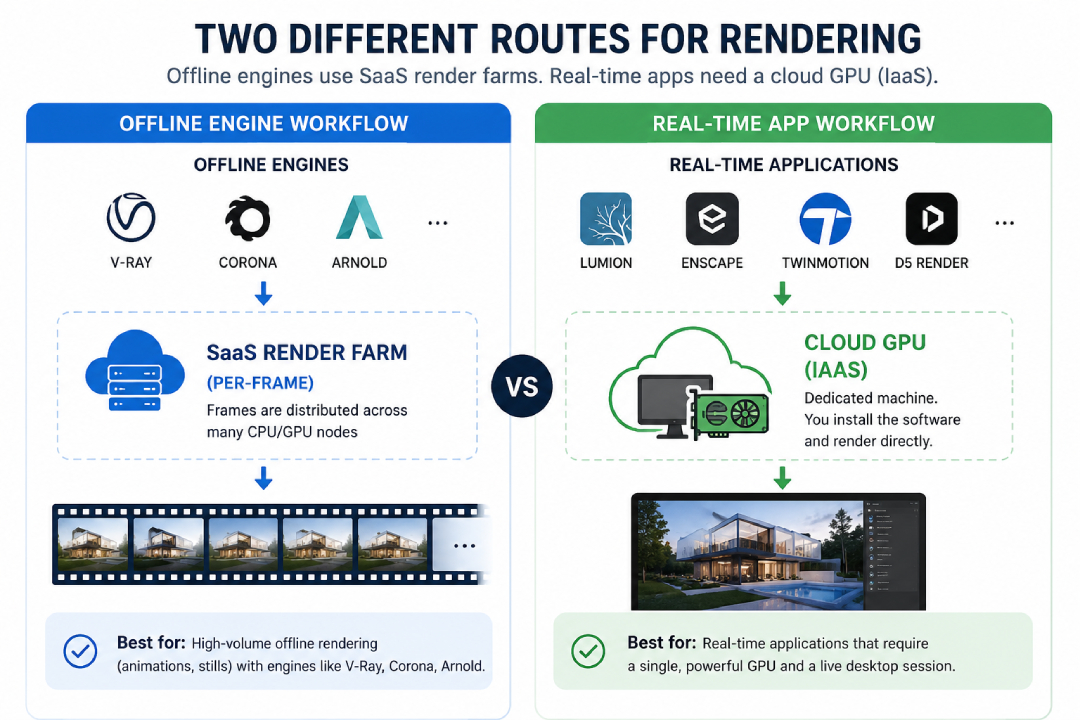
What is the difference between a SaaS render farm and a cloud GPU (IaaS)?
A SaaS render farm and a cloud GPU solve different problems. SaaS platforms process offline rendering jobs by distributing frames across multiple render nodes, while a cloud GPU gives you a dedicated machine that runs your own software. The biggest difference is how they are billed. SaaS render farms charge for completed frames, whereas cloud GPUs charge for the time the machine is running.
| Feature | SaaS (Per-frame Render Farm) | IaaS (iRender Model) |
| Billing | Per rendered frame | Per running hour (boot to shutdown) |
| Runs real-time apps | ❌ No | ✅ Yes (Lumion, Enscape, D5…) |
| Idle billing risk | None | Yes, if the machine is left running |
| Software installation | Not available | Full control |
| Best for | Offline rendering (V-Ray, Corona, Arnold) | Real-time apps & custom workflows |
Why can’t I just add a second GPU instead?
For most real-time arch-viz applications, adding a second GPU to the same workstation delivers little or no performance gain. Lumion, Enscape, Twinmotion, and D5 Render are designed to render on a single GPU, so the extra card often sits idle during real-time rendering.
Modern consumer GPUs also have another limitation. NVIDIA removed NVLink from the RTX 40 Series (Ada Lovelace), so two RTX 4090s cannot combine their memory or share rendering work the way some previous professional setups could.
If one GPU is no longer enough, the practical solution is to use multiple cloud machines, not multiple GPUs in one machine. For animation projects, each machine can render a different frame range in parallel, reducing the total completion time without changing your scene or workflow.
What actually works for real-time tools: a cloud GPU machine
A cloud GPU gives you a dedicated Windows workstation with more powerful hardware than most local PCs. You install your own software, open your project, and render exactly as you would on your workstation. A server with an RTX 4090, 24GB of VRAM, and up to 256GB of RAM can handle larger scenes and speed up final exports without occupying your own computer.
For animations, the biggest advantage is parallel rendering. Instead of rendering all 3,600 frames on one machine, you can split the frame range across multiple cloud servers and finish the project much sooner.
Services like iRender provide dedicated RTX 4090 servers that run Lumion, Enscape, Twinmotion, and D5 Render directly. Because it uses the IaaS model, you have full control over the machine, but billing continues until you shut it down. The initial setup also takes a few minutes, and the current GPU option is RTX 4090, not RTX 5090.
So do you actually need a cloud GPU?
Not always. If you mainly work interactively, test materials, or render an occasional still image, your local workstation is usually enough.
A cloud GPU becomes worthwhile when your workload exceeds what one GPU can finish in the time available. Typical examples include long animations, large batches of 4K stills, tight deadlines, or situations where you need to keep working while your project renders in the background.
The goal is not to replace your workstation. It’s to add extra GPU power only when your production workload demands it.
Real-time tools, production-scale projects? While a traditional SaaS farm can’t run Lumion or Enscape, a cloud GPU machine handles them with ease. iRender grants you full access to a dedicated RTX 4090 with 24GB of VRAM to run your real-time apps directly. Sign up today to claim your free trial and first-deposit bonus.👉 See iRender’s real-time GPU servers.
Frequently Asked Questions
- Can I use a render farm with Lumion or Enscape?
Not a traditional SaaS render farm. Lumion and Enscape require a live Windows desktop session and render on a single GPU, while SaaS render farms are designed to distribute offline rendering jobs from engines such as V-Ray and Corona across multiple render nodes. If you need more rendering power, the practical solution is a cloud GPU using the IaaS model. It gives you a dedicated workstation where you install and run the application exactly as you would on your own computer.
2. Why do real-time arch-viz tools still need extra rendering power?
Real-time navigation and final rendering are different workloads. During design, applications prioritize smooth viewport performance. Final exports must render every frame at full quality, which quickly becomes time-consuming. For example, a 2-minute animation at 4K and 30 fps contains about 3,600 frames. Large batches of still images and tight deadlines can easily exceed what a single GPU can finish, making additional GPU resources useful even in real-time workflows.
3. What is the difference between a SaaS render farm and a cloud GPU?
A SaaS render farm processes offline rendering jobs and typically charges per completed frame, making it a good choice for V-Ray, Corona, or Arnold projects with no idle billing. A cloud GPU rents you a dedicated workstation by the hour, allowing you to run any software, including Lumion, Enscape, Twinmotion, and D5 Render. The trade-off is that you are responsible for shutting the machine down when your work is finished.
4.How do I render a long real-time animation faster?
The most effective approach is to split the animation across multiple cloud workstations. Instead of rendering all frames on one GPU, each machine renders a different frame range in parallel, significantly reducing the overall completion time. This method works well for long animations while keeping your local workstation free for other tasks. When using a cloud GPU, remember to shut down each machine after rendering to avoid unnecessary hourly charges.
Related post: GPU Overheating During Arch-Viz Renders: Causes and the Cloud Alternative