



Why Your Old GTX 1070 Can’t Keep Up with Lumion 2026 Anymore
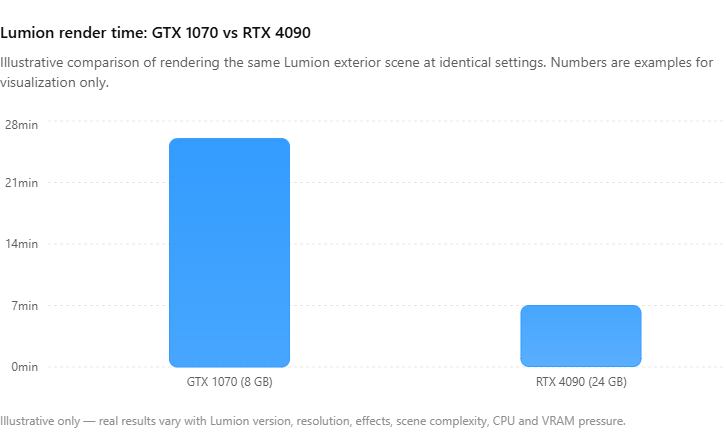
Your GTX 1070 has not gotten slower. The Lumion features you want to use have moved past it. The 1070 launched in 2016 with 8GB of VRAM and no hardware ray tracing. It still meets Lumion’s minimum GPU spec, so it runs, but current Lumion versions lean on ray traced reflections and lighting it cannot do, and they treat 8GB as the floor for 4K and ray-traced output rather than comfortable headroom. So it falls back to the non ray traced paths, fills its 8GB on detailed exteriors, and crawls on 4K output next to a modern card. For interiors and simple scenes it can still earn its keep. For ray traced exteriors, animations and 4K finals, you are at the point of either upgrading the card or renting a modern GPU for the heavy jobs.
What changed between your 1070 and Lumion 2026
I ran a 1070 well into 2022 and remember the exact moment it started feeling slow, which was not a moment at all. Lumion’s minimum requirements have actually stayed fairly stable across the 2024 and 2025 releases, so it was less about the bar moving and more about the card aging past the features I wanted to use. A few specific things widened that gap.
Ray tracing is the big one. Newer Lumion versions use hardware ray tracing for reflections and lighting, and the 1070 predates the RT cores that accelerate it, so it either skips those effects or emulates them slowly. VRAM is the second. 8GB was generous in 2016 and is now tight, and modern arch-viz textures and vegetation fill it on anything but a simple scene, which is the same wall we describe in why Lumion renders slowly on weak hardware. Raw compute is the third, quieter one: a current mid-range card does several times the work per second of a 1070, so even on effects the old card supports, it simply does fewer of them per minute. Lumion publishes its system requirements per version, so check yours against your card before deciding, since the 1070 sits above the stated minimum but below what the ray traced features need.
| Task in Lumion 2026 | GTX 1070, 8GB |
|---|---|
| Simple interior still, 1080p to 2K | Still fine, a bit slower than it was |
| Modeling and navigating the viewport | Workable for light and medium scenes |
| Ray traced reflections and lighting | Limited or emulated, noticeably slow |
| Vegetated 4K exterior | VRAM fills, render times balloon |
| Animations and walkthroughs | Painful, often overnight or worse |
Squeeze a bit more out of the 1070 first
If a new card is not in the budget yet, you can stretch the 1070 a while longer. Keep the GPU driver current, since Lumion ships performance fixes that the driver delivers. Turn off or dial back the ray traced effects the card struggles with, and accept the slightly flatter look for drafts. Keep textures sane and vegetation light so you stay under 8GB. And use the 1070 for what it is still good at, modeling and interior stills, while sending the ray traced exteriors and animations elsewhere. None of this makes a 1070 a modern card, it just keeps it useful for the parts of the job it can still handle.
Upgrade the card, or skip the upgrade?
When the 1070 finally becomes the thing standing between you and a deliverable, you have the familiar choice. Buying a current GPU, something with 16GB or more and RT cores, fixes it permanently and is the right call if you render heavy work most days. We lay out that buy decision in full in render farm vs new workstation. If your heavy renders are occasional, though, renting a modern card in the cloud for those jobs often costs less than a new GPU and a possible power supply to go with it.
One thing to clear up, since people ask: a render farm of the GarageFarm or RebusFarm kind will not help here, because Lumion is a real-time app those farms cannot run. They are excellent for offline engines like V-Ray or Corona, with GarageFarm leaning on strong human support and RebusFarm on its scene checker, but neither opens a Lumion file. The cloud route for Lumion is an IaaS server. iRender is the one I point 1070 owners to most, because for the price of upgrading you can run your exact Lumion scene on a remote RTX 4090 with 24GB of VRAM, which clears both the ray tracing and the memory wall at once. The cards are RTX 4090 rather than the newer 5090, and you do install your own software on the machine, which takes about fifteen minutes the first time.
Still on a 1070 and only hitting the wall on big exteriors and animations? Rather than buy a new card, you can run those jobs on a remote RTX 4090 (24GB) through iRender, with a student discount if you are still in school and a free trial to test your scene. → See the Lumion cloud servers
If you are weighing whether a laptop upgrade is even the right shape of fix, we compare that in laptop versus desktop for architecture rendering, and the broader local-versus-cloud reasoning sits in Lumion Pro versus a cloud GPU.
FAQ
- Can a GTX 1070 still run Lumion in 2026?
Yes, but with real limits. The 1070 still handles modeling, viewport navigation, and simple interior stills at 1080p to 2K, just slower than it once felt. Where it falls behind is ray traced reflections and lighting, which it lacks the hardware to accelerate, and detailed 4K exteriors that fill its 8GB of VRAM. Animations become an overnight ordeal. For light work it remains useful; for heavy modern scenes it is the bottleneck.
2. Why does Lumion feel slower on my 1070 than it used to?
The card has not changed, but Lumion has. Recent versions use hardware ray tracing the 1070 predates, larger textures, and denser real-time effects that assume a newer GPU underneath. Lumion’s minimum spec has stayed fairly stable, so the card still meets it, but it cannot use the ray traced features and runs out of headroom on detailed 4K scenes. It is a hardware gap that widened over time rather than a sudden fault.
3. Should I buy a new GPU or use the cloud for Lumion on an old PC?
If you render heavy scenes most days, buying a current 16GB-plus card with RT cores fixes it for good. If your heavy jobs are occasional, renting a modern GPU in the cloud for those renders often costs less than a new card plus a possible power supply upgrade. A remote RTX 4090 with 24GB through an IaaS service like iRender clears both the ray tracing and the VRAM limits that hold a 1070 back, without replacing your whole machine.
Related post: Render Farm vs New Workstation: Should You Buy a $4,000 PC or Rent Cloud GPU?


