



Missing Client Deadlines Because of Render Times? Here’s the Real Fix
The last time I lost a deadline to rendering, it was 2am and the progress bar on a flythrough read 41 percent. The client wanted it by nine. I sat there doing the cruel arithmetic everyone in this trade has done at least once, frames left times minutes per frame, watching the answer refuse to fit inside the hours I had. The apology email went out at seven.
That night was not really about the render being slow. It was about the render being the one thing I had left to the very end, on one machine, with no margin if anything went sideways. After a few of those nights you start to see the pattern, and the pattern is the actual problem.
If render times keep eating your deadlines, the durable fix is not just a faster computer. It is a way of working where rendering stops being a single overnight gamble on one machine. Lock the look early with fast test frames, get sign-off before you commit, then clear the final output in parallel instead of in one long queue. For offline engines like V-Ray or Corona that means a render farm spreading frames across many nodes. For real-time apps like Lumion or Enscape it means several rented GPU machines running at once. Hardware buys you speed, but removing the single point of failure is what saves the date.
The render is rarely the real problem
When a project slips, the render gets the blame because it is the part you were staring at when the clock ran out. Look one step back though. The render only became a crisis because everything upstream pushed it into a corner: the look was still changing at midnight, the final was queued on the one workstation you own, and there was no plan B if a frame failed or the client asked for one more tweak. A faster card shortens the queue, but it does nothing about leaving yourself a single, fragile shot at the finish line.
I think of it the way a builder thinks about a site. You would never schedule the concrete pour for the same hour the client walks through. Rendering deserves the same buffer, and the same refusal to depend on one thing going perfectly.
Where the hours actually disappear
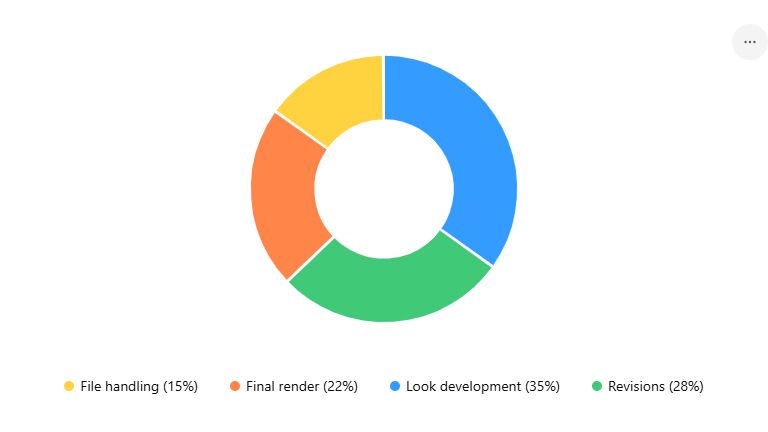
Before you spend money on speed, find out where your time is really going. On most arch-viz jobs I have audited, the render itself is not even the biggest sink. The look development is, all those full quality previews you fire off to check one lighting change. Here is the usual map, with the reclaim move for each stage:
| Stage | Where the time quietly goes | How to reclaim it |
|---|---|---|
| Look development | Re-rendering at full quality to judge small lighting and material tweaks | Use fast or interactive previews; lock the look before you ever start the final |
| Final output | One machine grinding through every frame in a single queue | Render in parallel across several machines or farm nodes |
| Revisions | Client changes landing after the final batch has already started | Get written sign-off on a test frame before committing the full render |
| File handling | Slow uploads and missing assets discovered at midnight | Pack and test-transfer the scene early in the day, not at the deadline |
Buying your way out, or renting your way out
Once you have squeezed the workflow, speed still matters, and you have two ways to buy it. You can put money into your own machine, a stronger GPU or a second workstation, which we cost out in full in render farm vs new workstation. Or you can rent power in the cloud only for the crunch, which keeps your cash free and scales the second a deadline demands it. For deadline work specifically, renting tends to win, because a deadline is exactly the spiky, unpredictable load that owning hardware is bad at covering. If you want the cost angle in depth, we break it down in why cloud rendering feels expensive.
What a render farm will and will not do for a deadline
This is where the choice forks based on your renderer, and it is worth being precise rather than tidy. If your final output runs on an offline engine, V-Ray, Corona, Arnold or Redshift, a traditional SaaS render farm is built for the deadline crunch. It takes your scene, splits the frames across hundreds of nodes, and sends them back, which collapses an overnight batch into a fraction of the time. GarageFarm is the friendliest of these if you are still learning the ropes, with strong human support; RebusFarm pairs a useful automated scene checker with broad plugin support and handles CPU engines like Corona well; Fox Renderfarm tends to be the cheapest on large batches.
The catch is that those farms cannot touch a real-time app. Lumion, Enscape, Twinmotion and D5 render live on a single GPU and need a desktop session, so there is nothing for a node farm to distribute. For those tools the cloud option is an IaaS service, where you rent full GPU machines you control by remote desktop and run several of them in parallel to clear an animation. iRender is the one I lean on here, with dedicated RTX 4090 servers and the ability to spin up multiple machines for a batch. Reliability matters more than raw price when the date is fixed, so test any service with a real batch before you trust it on a deadline. Xesktop and AWS EC2 also work, though AWS asks for a lot of manual setup that you do not want to be learning at 1am.
None of this rescues a broken schedule, and I want to be plain about that. Renting a 4090 the night before will not save you if the look is still unapproved and the client is asleep. The farm and the cloud are accelerators for a plan that already exists, not a substitute for one.
A workflow that stops betting the deadline on one render
The version of this that has kept me out of trouble looks less like a speed trick and more like insurance. I render a full quality test frame on day one, not day five, and I send that single frame for sign-off before I build anything heavy on top of it. I keep the scene packed and test-transferred early so a missing texture surfaces in daylight. And I treat the cloud as burst capacity that is always there, so the final output never depends on my one machine surviving the night. When a client throws a late change, which they will, the damage is a few re-rendered frames rather than a blown date. We go deeper on that exact scenario in surviving last-minute client changes, and on the specific overnight animation case in cutting an all-night Lumion animation down to an hour. For the brutal same-day jobs, see delivering real estate renders in 24 hours and the multi-angle grind in rendering 50 camera angles fast. If you are still deciding whether cloud belongs in your kit at all, start with do you really need a render farm.
Need burst capacity for the crunch without buying a second machine? iRender rents dedicated RTX 4090 servers by the hour, with a free trial so you can test a real deadline scene first and a 100 percent bonus on your first deposit. → See iRender GPU servers
FAQ
- Will a faster computer stop me missing render deadlines?
It helps, but on its own it rarely fixes the problem. Most missed deadlines come from leaving the render to one overnight session on one machine, with the look still changing late and no backup if a frame fails. A faster card shortens the queue, but the durable fix is a workflow that locks the look early, gets sign-off before the final, and clears output in parallel so a single machine is not your only shot at finishing on time.
2. Is a render farm or a cloud GPU better for tight deadlines?
That comes down to your renderer. For offline engines like V-Ray, Corona or Arnold, a SaaS render farm such as GarageFarm, RebusFarm or Fox splits frames across many nodes and is built for crunch output. For real-time apps like Lumion, Enscape or D5, those farms cannot run your scene, so you rent several GPU machines on an IaaS service like iRender and render the parts in parallel. Either way, low failed-frame rates matter more than headline price when the date is fixed.
3. How do I render an animation faster when the deadline is tomorrow?
Split the work. Instead of one machine rendering every frame in a queue, divide the frame range across several machines or farm nodes so they finish together. For Lumion or Enscape that means renting multiple GPU servers and assigning each a chunk of the timeline. Render and approve one full quality test frame first so you are not parallel-rendering a mistake. Done right, an overnight job can come down to an hour or two of wall-clock time.
4. Can the cloud rescue a deadline if my look is not finished yet?
No, and it is worth being clear about that. Cloud rendering accelerates output, it does not approve your lighting or get the client to respond at midnight. If the look is still unsigned, renting a faster card just means you reach the wrong result quicker. The cloud is most valuable when paired with an early sign-off, so the heavy render runs once, on an approved frame, with time to spare.
Related post: Render Farm vs New Workstation: Should You Buy a $4,000 PC or Rent Cloud GPU?


