


Laptop vs Desktop for Architecture Rendering: Why Neither May Be Enough
For everyday arch-viz work a laptop and a desktop are closer than the spec sheets suggest, but for heavy rendering they fail in different ways. A laptop wins on portability and is fine for modeling and light renders, though it throttles under sustained load and cannot be upgraded much. A desktop holds full speed for long renders and lets you swap in a stronger card, but it ties you to a desk and still has a single GPU ceiling. The real answer for a lot of architects is that the real choice is not laptop or desktop. It is how you cover the handful of heavy jobs that outgrow whichever one you own.
I have worked on both for years, and the machine I reach for depends entirely on the task, not on which is objectively “better.” That framing is where most buying advice goes wrong.
What a laptop gives you, and what it costs you
A good arch-viz laptop earns its place on flexibility. You can sketch in a client meeting, model on a train, and present on site without lugging a tower around. For modeling, viewport work and lighter renders, a current laptop with a strong mobile GPU is genuinely capable.
The cost shows up the moment a render runs long. A laptop crams a powerful chip into a thin case that cannot move heat fast enough, so it throttles, dropping clock speed partway through a render to avoid cooking itself. We unpack that whole curve in why your laptop GPU keeps throttling. Mobile cards also run at a lower power limit than the desktop card of the same name, carry less VRAM, and offer almost nothing in the way of upgrades. You buy the laptop you will live with for years, more or less as it is.
What a desktop gives you, and where it still falls short
A desktop is the better render machine, plainly. Bigger heatsinks and proper airflow let it hold full clock speed through a long render rather than sagging like a laptop does. It usually carries more VRAM, runs faster cards at full power, and you can upgrade it, dropping in a new GPU in two years instead of buying a whole new computer.
What it does not solve is the single GPU ceiling. One desktop, however strong, still renders an animation frame by frame in a queue, and that is a different problem from raw speed, which we get into in why one GPU is not enough for modern arch-viz. It also keeps you at the desk, and for an architect who needs to be mobile, that is a real cost rather than a footnote.
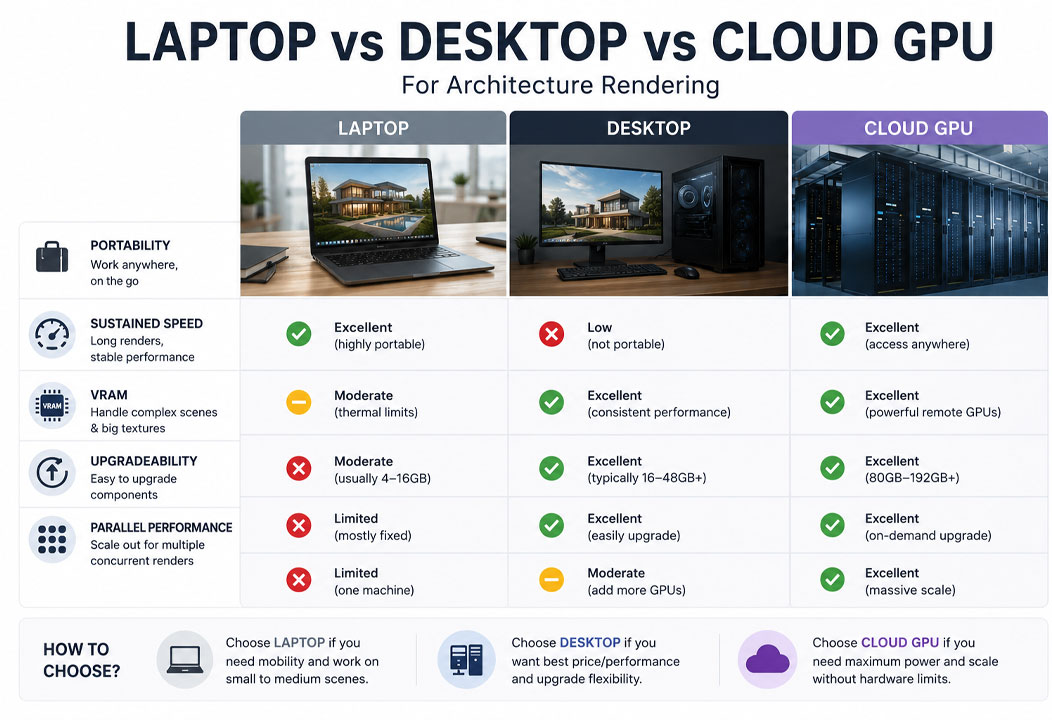
| What matters | Laptop | Desktop | Cloud GPU (rented) |
|---|---|---|---|
| Portability | Best | Tied to a desk | Access from anywhere |
| Sustained render speed | Throttles | Holds full speed | Full speed, no heat limit |
| VRAM ceiling | 6 to 12 GB typical | up to 24 GB | 24 GB on an RTX 4090 |
| Upgradeable | Barely | Yes | Rent a bigger config anytime |
| Parallel renders | No | One machine | Many machines at once |
| Up-front cost | Medium to high | High | Pay per hour |
Why “neither may be enough”
Here is the part the laptop-or-desktop debate misses. Both are single machines, and modern arch-viz keeps producing jobs that a single machine handles slowly: 4K vegetated exteriors that fill VRAM, animations of thousands of frames, a dozen stills due tomorrow. You can buy the strongest desktop on the market and still watch it grind through a walkthrough overnight. The ceiling is not the choice between two boxes, it is owning one box at all.
That is why I stopped thinking of this as a binary. The setup that actually works for most working architects is a sensible machine for daily work, laptop or desktop depending on how mobile you need to be, plus rented cloud power for the heavy renders that either one would labor over. You stop overbuying hardware to cover jobs you run a few times a year.
The cloud third option, reviewed plainly
Where you rent depends on your renderer, and it is worth keeping the distinction sharp. If your heavy output is an offline engine like V-Ray or Corona, a SaaS render farm takes the job off your machine entirely. GarageFarm is the most beginner friendly, with support that answers; RebusFarm pairs broad plugin coverage with a scene checker and handles Corona well; Fox Renderfarm is usually the cheapest on big batches. If your heavy output is a real-time app like Lumion or Enscape, those farms cannot run it, and you rent a full GPU machine on an IaaS service instead. iRender is the one I point people to first there, with dedicated RTX 4090 servers you reach by remote desktop and the option to run several in parallel. It does ask you to set the machine up, roughly fifteen minutes the first time, and the billing clock runs until you shut it down.
Own a modest machine for daily work, rent power for the heavy jobs? iRender’s RTX 4090 servers bill by the hour, with Credit Back on every session and a free trial to test your own scene.
If you want the pure cost side of buying versus renting, that is the whole of render farm vs new workstation. And if a laptop is your only machine and it is buckling on renders, the practical fixes are in why your Lumion render is so slow on a laptop.
FAQ
- Is a laptop or desktop better for architecture rendering?
For everyday modeling and light renders they are closer than spec sheets suggest. A laptop wins on portability but throttles on long renders and is hard to upgrade. A desktop holds full speed through long renders, carries more VRAM, and lets you swap in a stronger card, at the cost of mobility. If you render heavy work most days and rarely move, a desktop is the better render machine. If you need to work from anywhere, a laptop plus rented cloud power for the heavy jobs often beats either alone.
2. Why does my desktop still feel slow on big arch-viz renders?
Because even a strong desktop is one machine with one GPU. It holds full speed where a laptop throttles, but it still renders an animation frame by frame in a queue, and a 4K vegetated exterior can fill its VRAM the same as any card. Raw speed and the single GPU ceiling are different problems. The fix for the ceiling is rendering in parallel, which means several machines or a render farm, not simply a faster desktop.
3. Can I just use a cloud GPU instead of buying either?
You still need a local machine for daily modeling, navigating the viewport and working on the move, since rendering everything remotely is slow and impractical for that. The pattern that works is a modest local machine plus rented cloud power for the heavy renders. For real-time apps like Lumion you rent an IaaS GPU server such as iRender. For offline engines like V-Ray you can send batches to a SaaS render farm. That keeps your up-front spend low and gives you serious power on demand.
4. How much VRAM do I need for architecture rendering?


