


Render Farm vs New Workstation: Should You Buy a $4,000 PC or Rent Cloud GPU?
Here is the honest version, before the sales pitch you will get everywhere else: the right choice depends on how many hours you actually render, not on which option is “better.” Buy the workstation if you render heavy scenes most days and plan to keep that machine busy for years. On a single machine, owning usually wins once you pass roughly 15 to 20 hours of active GPU render time a month. Rent a cloud GPU if your work is spiky, you are just getting started, or you only hit a wall during crunch weeks. Renting also wins any time you need more power than one card can give, because you can spin up several RTX 4090 machines for a deadline and shut them off after. iRender is one IaaS option for the rented route. The rest of this guide is the three year math, including the costs nobody prints on a spec sheet.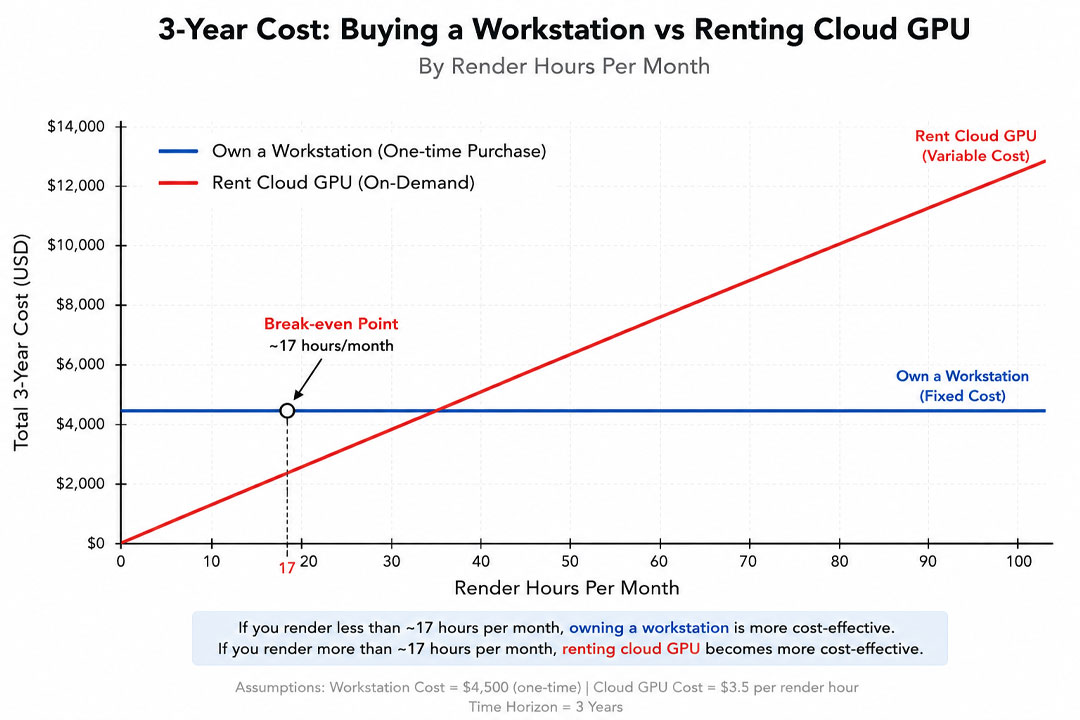
The Question Isn’t Which Is Better. It’s How Often You Render.
I have built three workstations over the last twelve years and rented cloud GPUs for the weeks when a deadline came down like a hammer. The mistake I made early on, and the one I see architects make constantly in forums, is treating this as a tech question. It is not. A 4090 is a 4090 whether it sits under your desk or in a data center. The thing that decides which one saves you money is dead boring: how many hours per month you keep that silicon actually working.
So before you compare spec sheets, be honest with yourself about your last six months. Did you render a couple of evenings a week, then go quiet for a fortnight? Or was the machine pinned at 100 percent every single working day? Those two people should buy completely different things, and most of the “just build a PC” or “just use the cloud” advice online ignores that entirely.
There is a second factor that matters almost as much, and it has nothing to do with money: cash flow and risk. A workstation is four thousand dollars gone today, sitting in a box that loses value the moment you power it on. Renting keeps that money in your account and only bills you when you press render. For a salaried person at a studio that does not matter. For a freelancer who just had a client pay late, it matters a lot.
What a $4,000 Workstation Actually Costs Over Three Years
Let us build the thing first. A workstation that can chew through Lumion, Enscape, D5 and a V-Ray scene without making you wait all day is not cheap in 2026, and the price is messier than the round numbers people quote. Here is a realistic arch-viz build, with the wobble built in because component prices have been all over the place since the GPU generation shift:
- GPU (a high end card such as an RTX 4090, or a 5090 if you can find one at a price that is not insulting): roughly $1,900 to $2,300. Worth reading our take on whether the RTX 5090 is worth it for arch-viz or whether you should rent instead before you commit here.
- CPU (Ryzen 9 class or entry Threadripper): around $600
- 128 GB RAM, because arch-viz scenes are memory pigs and 64 GB fills up faster than you think: about $380
- Motherboard: around $380
- 2 TB NVMe plus extra storage: about $200
- 1000W power supply: roughly $190
- Case and cooling that will not cook the GPU: around $260
- Windows license: about $140
That lands at roughly $4,150, and realistically closer to $4,500 once you add a decent monitor or a UPS so a power flicker does not nuke a six hour render. So “$4,000” in the title is fair, maybe a touch optimistic.
Now the costs nobody puts on the build list. Electricity is the obvious one. A rig like this pulls somewhere between 450W and 650W under a render load, plus the monitor. If you render a few hours a day, you are looking at very roughly $150 to $220 a year in many regions, less in places with cheap power, painfully more in much of Europe. We dig into that in our piece on the hidden electricity cost of rendering arch-viz at home. Then there is the stuff that is easy to forget: a fan dies, you eventually want a bigger GPU, the machine is down for a day while you troubleshoot a driver. And at the end you can sell the parts, but a three year old GPU fetches maybe 40 to 50 percent of what you paid.
Put it together over three years and it looks something like this. Treat the numbers as illustrative, your region and habits will move them around:
| Cost item (3 years) | Buy a ~$4,200 workstation | Rent, light user (~10 h/mo) | Rent, busy user (~35 h/mo) |
|---|---|---|---|
| Up-front hardware | $4,200 | $0 | $0 |
| Electricity (your end) | ~$560 | negligible* | negligible* |
| Render hours (3 yr, ~$8/hr) | included above | ~$2,880 | ~$10,080 |
| Repairs / minor upgrades | ~$300 | $0 | $0 |
| Resale at year 3 | about -$950 | n/a | n/a |
| Rough 3-year total | ~$4,110 | ~$2,900 | ~$10,100 |
Look at the two ends. The light renter pays well under half of what the workstation costs. The busy renter pays more than double. That is the whole argument in one table, and it is why a single answer for everyone is nonsense.
What Renting a Cloud GPU Actually Costs, and Where It Quietly Bleeds You
Renting sounds clean: pay for what you use, walk away. Mostly true, but there is a catch that has cost me real money, so let me be straight about it.
The headline rate for a single RTX 4090 on an IaaS service sits around $9 an hour at list. That number drops in practice. On iRender, new accounts get a 100 percent bonus on the first top up, so the very first batch of credits stretches to roughly $4.50 an hour effective, and their Credit Back programme returns about 20 percent of what you spend on top of that. So the real ongoing rate for one card tends to land somewhere in the $7 to $8 range once the first deposit bonus is used up. I have used $8 an hour in the math above to stay honest rather than quote the best case.
Here is the part that bites. With IaaS you are renting a whole machine, and the billing clock runs until you shut it down, not until your render finishes. The first time I started an overnight batch and forgot to set an alarm, I woke up to a server that had been sitting idle and billing for five hours after the last frame finished. Nobody stole that money from me. I just forgot to flip the switch. So if you go the rented route, treat shutting the machine down like locking your front door. Set an alarm, or use an auto shutdown. We wrote a whole guide on avoiding idle cloud render cost because this trap is so common, and it is the single biggest reason people complain that cloud rendering feels expensive.
The other honest trade-offs with the IaaS model:
- You manage the box. First time setup runs around 15 minutes on iRender, and your configuration is saved so later sessions start in a couple of minutes. Still, it is your job to upload the scene, install the software version you use, and start the render. A traditional automated farm hides all of that, but those farms cannot run real-time apps like Lumion or Enscape at all, which is a separate rabbit hole we cover in why one GPU is not enough for modern arch-viz.
- It is RTX 4090, not 5090. As of mid 2026 the 5090 is not broadly available on the big farms, so do not go in expecting it.
- You need a decent connection. Uploading a 10 GB scene over a weak line is its own kind of pain.
The part that actually changed my mind about cloud
For years I treated cloud rendering as the expensive last resort. What changed my thinking was not the price. It was control. iRender’s whole pitch right now is “your renders, your rules,” and once you have fought with an automated farm that swapped a texture or read your scene differently than your local machine, that phrase stops sounding like marketing. On a full GPU server you install the exact versions and plugins you use, and the scene renders the way you built it, because you set the machine up, not a farm’s pipeline. For arch-viz, where a client signs off on a specific look, that predictability is worth a lot. There is also a free trial, so you can test your own scene before committing a cent, and a student discount if you are still in school.
Want to test the rented route on your own scene first?iRender runs full RTX 4090 GPU servers with remote desktop. New accounts get a 100 percent bonus on the first deposit, plus 20 percent Credit Back, and there is a free trial.
“Out of VRAM” Error in D5 Render: Why 8GB GPUs Fail on Large Scenes
So Where Is the Break-Even?
If you want one number to anchor on, here it is. At roughly $8 an hour for a single RTX 4090, the three year cost of owning a $4,200 workstation (net of resale) is matched by about 500 to 600 hours of cloud render time, which works out to somewhere between 15 and 20 active GPU hours a month. Below that, renting is cheaper. Above it, owning pulls ahead and keeps pulling.
| Active render hours / month | 3-yr cloud cost (~$8/hr) | Cheaper option | Who this usually is |
|---|---|---|---|
| ~5 hours | ~$1,440 | Cloud, easily | Student, hobbyist, very occasional freelancer |
| ~15 hours | ~$4,320 | About even | Steady freelancer with quiet spells |
| ~25 hours | ~$7,200 | Buying | Busy freelancer rendering most weeks |
| ~50 hours and up | ~$14,400+ | Buying, no contest | Studio, daily heavy animation work |
Two honest asterisks on that table. First, “active render hours” means the GPU is genuinely chewing on a render, not the hours you have the app open. People wildly overestimate this. Go look at your actual render logs for last month before you assume you are a 50 hour person. Second, the math assumes one machine. The moment you need four GPUs at once to hit a Friday deadline, the comparison breaks in cloud’s favor, because buying four 4090s to use them three weekends a year is madness. That kind of burst capacity is exactly what we mean in our guide to missing client deadlines because of render times.
When Buying the Workstation Is the Right Call
Buy the machine if most of these sound like you:
- You render most working days, comfortably past that 15 to 20 hour line, and you can see that continuing for a couple of years.
- Your workload is steady, not a feast and famine cycle. Predictable hours reward ownership.
- You want zero clock anxiety. There is something genuinely nice about hitting render and walking away without a billing timer in the back of your head.
- Your internet is shaky, or you handle client files under strict NDAs that make you nervous about uploading anything anywhere.
- The machine doubles as your daily driver for modeling and everything else, which it will, so it is never really “just” a render cost.
That last point is the one the cloud crowd loves to skip. If you are a full timer, the workstation is your main tool eight hours a day, not a render appliance. Charging its whole cost against rendering is unfair to it.
When Renting Wins
Go cloud if this is closer to your reality:
- You are starting out and four thousand dollars is a serious chunk of money you would rather keep liquid.
- Your work is spiky. Slow weeks, then a brutal deadline. You pay for the brutal week and nothing the rest of the month.
- You occasionally need more horsepower than any single card can give, and renting several GPUs for a few days beats owning a render farm you cannot keep busy.
- Your current machine is fine for modeling but folds the second you hit final render. Plenty of people are in this spot, and we wrote it up in why your Lumion render is so slow on a laptop. Renting a GPU only for the heavy lifting is often smarter than replacing a whole laptop.
- You want to try a 4090 before deciding whether to buy one. The free trial makes that basically free homework.
There is also a quieter trend worth naming. More small arch-viz shops are dropping their old local render nodes entirely and renting on demand, partly for the math and partly because they are tired of babysitting hardware. We unpack that in why architects are abandoning local render nodes for cloud GPU.
The Setup Most Working Artists Actually End Up With
Here is the answer almost nobody markets to you, because it does not sell a single product cleanly. Most working arch-viz people I know do not pick one. They own a solid mid range machine that handles daily modeling and light renders without complaint, and they rent cloud GPUs for the crunch. The local box keeps the day to day cheap and private. The cloud handles the nights when one machine would have you waiting until lunchtime tomorrow.
You do not need a $4,500 monster if you are going to rent the heavy jobs anyway. A sensible $1,800 to $2,400 build with a current mid tier GPU and plenty of RAM covers daily work, and then a 4090 server steps in for the 4K animation or the twelve view real estate set. You spend less up front, you keep your money flexible, and you still get desktop class power when it actually counts. If you are genuinely unsure whether you need any of this yet, start with our honest gut check: do you really need a render farm for arch-viz.
Frequently Asked Questions
- Is it cheaper to buy a workstation or rent a cloud GPU for arch-viz?
It depends almost entirely on how many hours a month you render. On a single machine, buying a roughly $4,200 workstation tends to beat renting once you pass about 15 to 20 hours of active GPU render time a month, because the three year cost of owning (net of resale) is matched by around 500 to 600 cloud hours at about $8 an hour. Below that threshold, renting is cheaper and keeps your cash flexible. Renting also wins whenever you need several GPUs at once for a short deadline.
2. How much does it really cost to run a render workstation per year?
Beyond the up-front build, expect very roughly $150 to $220 a year in electricity in many regions if you render a few hours daily, less where power is cheap and more across much of Europe. Add occasional repairs and a fan or two, and budget for a GPU upgrade within two to three years. At resale, a three year old high end GPU usually returns about 40 to 50 percent of its purchase price, which softens the total but does not erase it.
3. What is the catch with renting a cloud GPU?
The main one is the billing timer. With an IaaS service like iRender you rent a whole machine, and the clock runs until you shut it down, not until your render finishes. Forget to turn it off after an overnight batch and you pay for idle hours. Set an alarm or use auto shutdown. The other trade-offs are that you manage the machine yourself (about 15 minutes of first time setup, then saved), you need a decent connection to upload scenes, and the cards are RTX 4090 rather than 5090.
4. Can I use a render farm and a workstation together?
Yes, and that is what most working arch-viz artists actually do. Own a sensible mid range machine for daily modeling and light renders, which keeps day to day work cheap and private, then rent cloud GPUs only for crunch jobs like 4K animations or large multi-view sets. This hybrid spends less up front than a top-end build and still gives you desktop-class power when a deadline demands it. iRender’s free trial and 100 percent first-deposit bonus make it cheap to test this approach on a real scene
Related post: My PC Crashes Every Time I Render in Lumion. Here’s What’s Actually Happening


