



Can You Run Lumion on a Mac? The Real Answer for Architects in 2026
Short version: no, Lumion does not run on macOS. Its real-time engine is built on DirectX 11, a Windows-only graphics technology that Apple’s Metal framework does not support, so there is no Mac version and no plan for one. That leaves Mac architects four real options: run Windows on the Mac through Boot Camp (only on older Intel models), use a virtual machine (too slow for Lumion’s GPU demands), buy a separate Windows PC, or run Lumion on a remote Windows machine in the cloud and control it from your Mac. For most people on a modern Apple Silicon Mac, the last two are the only ones that actually work.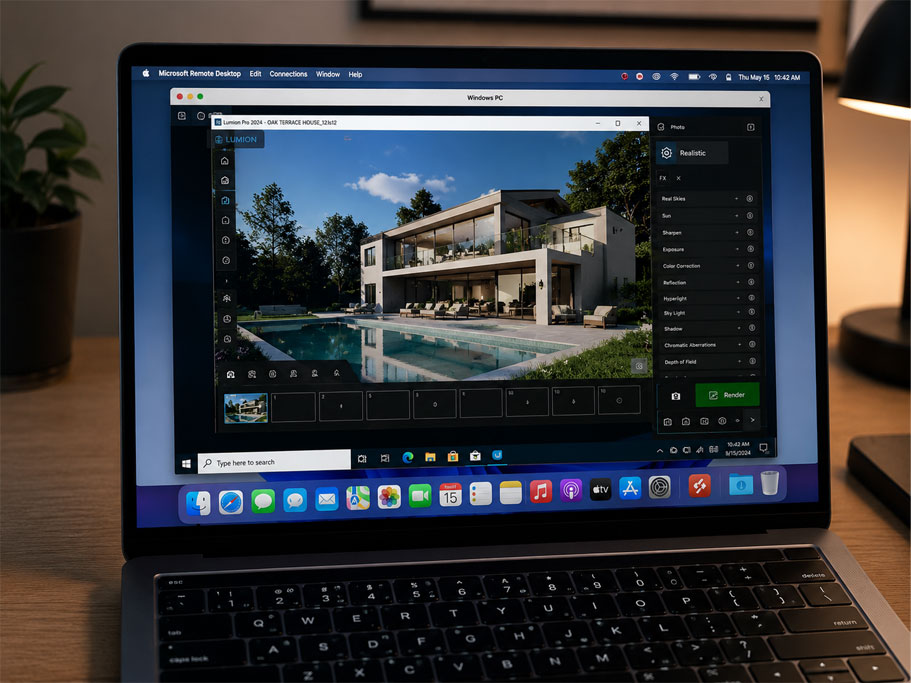
Why there is no Mac version of Lumion
This question comes up constantly, usually from an architect who just switched to a MacBook for everything else and assumed their rendering tool would follow. It does not, and the reason is baked deep into how Lumion is made. Lumion is written for Windows specifically, and its graphics pipeline leans on DirectX 11, which is a Microsoft technology. Apple moved its machines to its own Metal framework and its own silicon, which do not speak DirectX, and no translation layer is fast enough to carry a real-time renderer across that gap. Porting Lumion would mean rebuilding its core, and the company has shown no sign of doing that, as you can confirm on Lumion’s own system requirements page. So an update is not going to close this gap. The divide is built into the architecture of both products.
Worth knowing before you give up on Mac entirely: not every arch-viz tool is in the same boat. Twinmotion runs natively on macOS, including Apple Silicon. Enscape runs on Mac too, but only as a SketchUp plugin on Apple Silicon; its Revit and Rhino hosts stay Windows-only. D5 Render, like Lumion, is Windows only today, with a native Mac build still sitting on a public waitlist rather than shipping. So if you are early enough in choosing a tool, a Mac-native option exists. If you are committed to Lumion, you are choosing a way to run Windows.
The four options Mac architects actually have
Here they are with the parts the forums tend to gloss over, because the gap between “technically possible” and “actually usable” is wide.
| Option | Runs Lumion? | The reality for a Mac user |
|---|---|---|
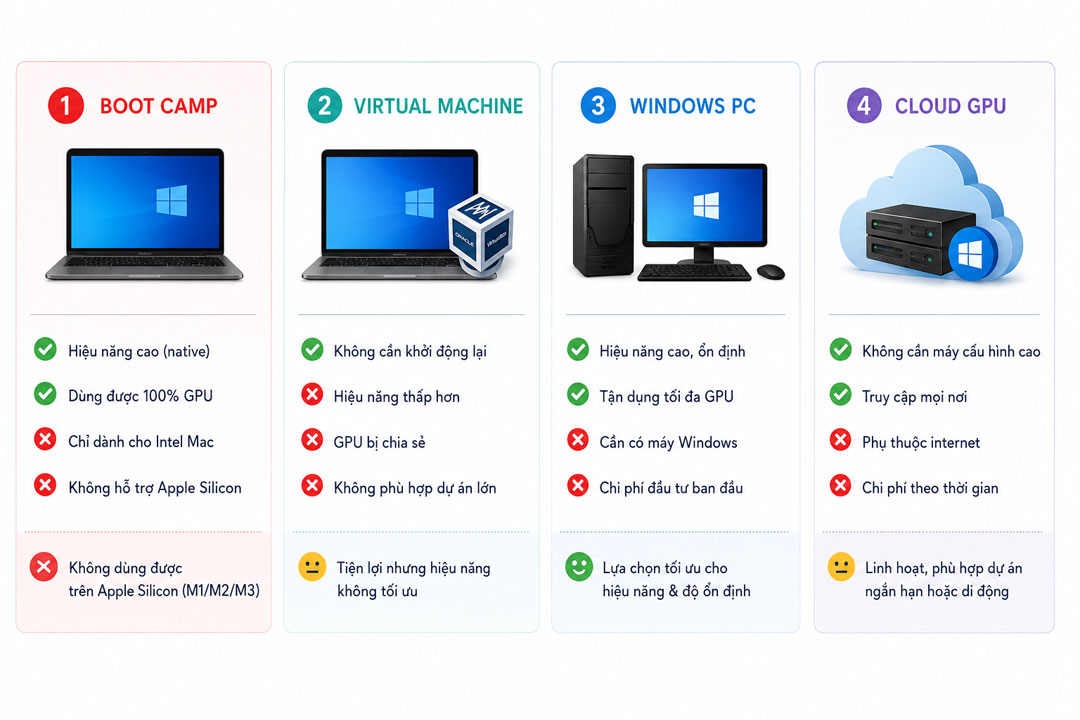
| Boot Camp (Windows on the Mac) | Yes, on the right hardware | Only works on older Intel Macs. Apple Silicon machines (M1, M2, M3 and newer) cannot run Boot Camp at all, which rules out most Macs sold today. |
| Virtual machine (Parallels, VMware) | It will launch, barely | VMs struggle to give an app full GPU access, and Lumion lives and dies by the GPU. Expect poor, often unusable real-time performance. |
| A separate Windows PC | Yes | The reliable route, but it means buying and maintaining a second machine alongside your Mac. |
| Cloud Windows GPU (remote desktop) | Yes | Rent a Windows machine with a real GPU, install Lumion, and control it from your Mac. No second computer to own. |
Boot Camp is the option people reach for first and the one that disappoints fastest, because the moment you mention an M-series Mac it is off the table. A virtual machine sounds clever until you watch Lumion stutter through a viewport that should be smooth. That leaves a real Windows PC or a cloud machine, and which one fits depends on how often you render.
The cloud route, and where render farms fit
For a Mac architect who does not want a second tower humming in the corner, running Lumion on a remote Windows GPU machine is the cleanest path. You connect from your Mac by remote desktop, and the heavy lifting happens on a Windows server with a proper graphics card while your MacBook just shows the screen. One thing to clear up, since people conflate the two: a traditional render farm will not help here. Farms like GarageFarm, RebusFarm and Fox Renderfarm distribute frames across automated nodes for offline engines such as V-Ray or Corona, and Lumion is a real-time app they cannot run at all. Those farms are excellent for what they do, GarageFarm with strong human support for newcomers, RebusFarm with its scene checker and Corona strength, Fox with low pricing on big offline batches, but none of them solves the Mac-and-Lumion problem.
What does solve it is an IaaS service, where you rent a whole Windows machine. iRender is the one I point Mac users to most, since you get a remote RTX 4090 with 24GB of VRAM, install your own Lumion build on it, and work from your Mac as if Lumion were local (RTX 5090 machines are listed as coming soon on the same service). You do set the machine up yourself, around fifteen minutes the first time before your configuration is saved. New accounts get a free trial, so you can confirm Lumion runs smoothly from your specific Mac before committing, plus a bonus on the first deposit.
On a MacBook and tied to Lumion? Skip the second PC and run it on a remote RTX 4090 through iRender, straight from your Mac over remote desktop. There is a free trial to check performance on your machine first. Try Lumion on a cloud GPU
If your render speed is the deeper worry rather than the Mac itself, the fixes carry over from why Lumion renders slowly on weaker hardware, and the broader case for renting versus owning is in Lumion Pro versus a cloud GPU.
FAQ
- Is there a Mac version of Lumion?
No. Lumion runs only on Windows, because its real-time engine is built on DirectX 11, a Windows-only graphics API that Apple’s Metal framework does not support. There is no macOS version and no announced plan for one, so this is a structural limitation rather than a temporary gap. Mac users who need Lumion specifically have to run it through Windows, either on the machine or on a remote one.
2. Can I run Lumion on an M1, M2 or M3 MacBook?
Not natively, and not through Boot Camp, which Apple Silicon Macs cannot use. A virtual machine can launch Windows but cannot give Lumion the full GPU access it needs, so performance is poor. The workable options on a modern Apple Silicon Mac are a separate Windows PC or a cloud Windows GPU machine that you control from the Mac by remote desktop, which lets you run Lumion at full speed without owning a second computer.
3. What arch-viz software runs natively on Mac?
Twinmotion runs natively on macOS, including Apple Silicon. Enscape runs on Mac as well, but only as a SketchUp plugin on Apple Silicon; its Revit and Rhino integrations remain Windows-only. If you are still choosing a tool and want to stay on Mac, those are genuine options. Lumion and D5 Render are Windows only. So the answer depends on whether you are committed to Lumion or open to a Mac-native alternative that covers similar real-time arch-viz work.
4. Is it cheaper to run Lumion in the cloud or buy a Windows PC?
If you use Lumion daily, a dedicated Windows PC usually works out cheaper over time and is always on hand. If your Lumion work is occasional, renting a cloud GPU machine avoids buying and maintaining a second computer next to your Mac, and you pay only for the hours you use it. The deciding factor is frequency, and remembering to shut the cloud machine down when you finish so it does not keep billing.
Related post: Why Your Old GTX 1070 Can’t Keep Up with Lumion 2026 Anymore


