Tight Real Estate Deadlines: How to Deliver Renders in 24 Hours
Delivering real estate renders in 24 hours is completely achievable if you manage the real bottlenecks instead of fighting them. Here at Radarrender, having tested and benchmarked countess arch-viz workflows under pressure, we always advise starting by locking in a clear scope so you know the exact number of stills or walkthrough length needed. Next, optimize your scene geometry and textures before hitting render. Then, offload the heavy rendering to powerful cloud GPUs, splitting your frames across multiple machines to crush a full night of rendering into just an hour or two. Finally, save the last few hours for post-processing and a safety buffer because a render finished at the last minute with zero time for fixes is still a missed deadline. In the end, what ruins a 24-hour rush job is rarely rendering speed, it’s vague project scope, messy scenes, and having no buffer.
24-Hour Real Estate Render Timeline
To hit a tight turnaround without losing control, here is how a successful 24-hour visualization workflow breaks down hour by hour:
| Hour Block | Stage | Key Tasks | Critical Notes |
| Hours 0-2 | Scope Lock | Confirm exact shot count, angles, resolutions, and output formats with client | Vague scope is the single biggest cause of missed deadlines |
| Hours 2-5 | Scene Prep | Import 3D model, apply materials, set lighting, replace heavy assets with proxies | Clean scene geometry early to prevent render crashes later |
| Hours 5-7 | Low-Res Approvals | Output fast draft renders for client lighting and composition sign-off | Getting approval on low-res drafts prevents expensive full-res re-renders |
| Hours 7-16 | Cloud Rendering | Distribute final frame ranges or batch stills across high-spec cloud nodes | Parallel rendering on multiple machines dramatically compresses clock time |
| Hours 16-21 | Post-Processing | Color grading, background insertion, compositing render passes in Photoshop/After Effects | Allocate dedicated hours; do not rush final image assembly |
| Hours 21-23 | Final Review | Client reviews near-final deliverables; apply minor 2D post tweaks | Restrict revisions to post adjustments only; avoid major 3D scene re-renders |
| Hours 23-24 | Buffer & Delivery | Final file checks, packaging, and asset hand-off | Always maintain a safety window for unexpected network or file export delays |
Is It Actually Possible to Deliver Renders in 24 Hours?
Yes, delivering real estate renders in 24 hours is completely doable as long as your scope is realistic. Producing three to five high-res exterior stills or a quick 10-second real-time video is well within reach. But if your scope is vague, or if you try to render a massive, unoptimized scene without prep work, you are setting yourself up to fail.
The difference between hitting a 24-hour deadline and blowing past it comes down to scale. Hitting a 24-hour deadline isn’t about luck, it’s about scale. If a real estate agent calls you at 4:00 PM needing six exterior shots for tomorrow morning’s launch, trying to output heavy 8K offline ray-traced renders will collapse your timeline. However, if you focus on five main camera angles, lock the lighting early, and offload the final rendering to strong cloud hardware, delivering by morning is totally manageable.
Fast-turnaround arch-viz requires firm boundaries. A 24-hour job only succeeds when you and your client lock down exact deliverables before starting. Trying to build a huge master plan, texture every indoor room, and render a two-minute 4K video all in one day is a recipe for disaster. Keep it simple: manage expectations early and focus on high-impact visuals that sell.
What Has to Happen Before You Even Start Rendering?
Locking down the project scope and aggressively optimizing the 3D scene must happen before hitting the render button. This preparation phase determines whether the project finishes on schedule or stalls mid-way through.
First, establish an explicit agreement on deliverables. Write down the exact number of images, exact camera views, target display resolutions, and required delivery file types. Get written confirmation from the client during the initial two-hour window. If a client requests new camera angles or extra lighting variations halfway through the night, remind them that changes require re-evaluating the timeline.
Second, optimize the 3D geometry and assets:
- Convert heavy geometry to proxies: High-poly trees, vehicles, and detailed furniture should be converted to proxy objects so your active viewport stays responsive.
- Consolidate texture maps: Replace unnecessary 8K textures with optimized 2K or 4K maps where extreme detail is unnoticeable.
- Clean out unused assets: Delete hidden geometry, unreferenced materials, and stray CAD lines that clutter scene memory.
Third, send low-resolution draft previews early. Rendering a fast draft with noisy GI or lower sampling allows the client to confirm camera placement and overall mood. Getting sign-off on a low-res preview guarantees you will not waste valuable hours rendering a full-resolution final image that the client ultimately wants to re-frame.
Which Tools Deliver Fastest for Real Estate Visuals?
When you only have 24 hours, your choice of software directly dictates your render speed. You essentially have two routes: Real-Time Engines ( Lumion, Enscape, D5 Render) for speed, or Offline Engines (V-Ray, Corona) for maximum visual realism.
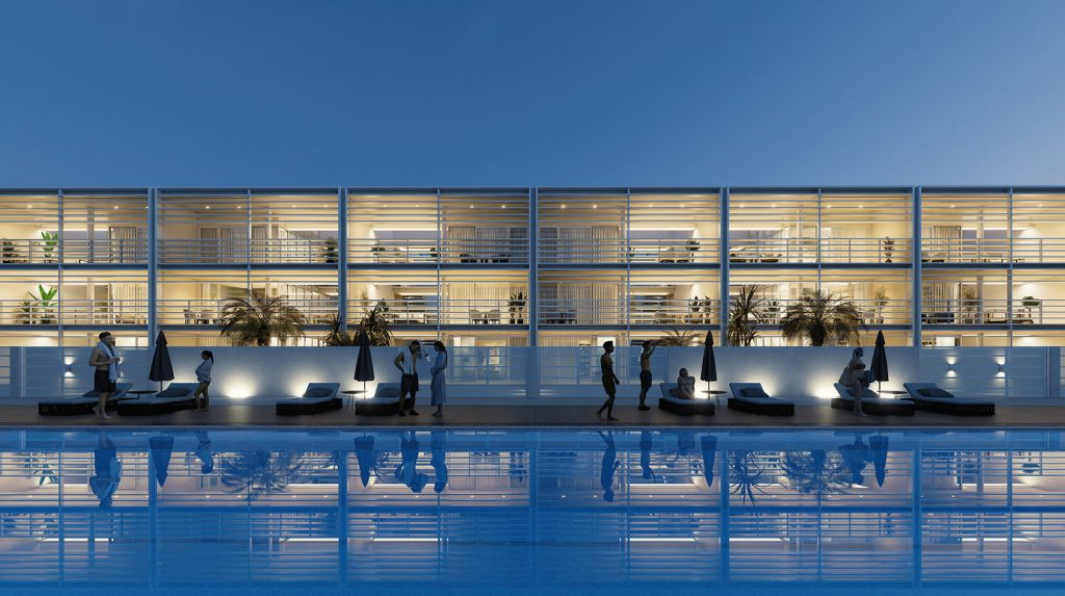
source: D5 render
Real-time tools process graphics instantly using your graphics card, just like a modern video game. You can tweak lighting, adjust materials, move furniture, and see the final result right in front of you without waiting.
- Speed: A crisp 4K exterior image takes just 2 to 5 minutes to render on a card like the RTX 4090.
- Real-life Example: Imagine an agent calls at 5:00 PM needing 8 exterior shots and a short 10-second video clip by tomorrow morning. With Lumion or D5 Render, you can frame all 8 views, set the sun angle, and output the entire set in under an hour of total render time.
Traditional ray-traced engines calculate light bounces pixel by pixel. They produce unmatched photorealism, perfect material reflections, and hyper-realistic interior lighting, but they take far longer to calculate.
- Speed: A single complex 4K interior still can easily take 1 to 2 hours to render on a local computer.
- Real-life Example: If a high-end luxury penthouse listing requires 5 interior stills rendered in V-Ray, rendering them on your single office PC could take 8 to 10 hours—leaving zero time for post-processing or client fixes. To hit a 24-hour deadline with V-Ray, you must use AI denoisers and split the job across multiple cloud GPU machines.
How Does the Cloud Let You Hit a 24-hour deadline?
Cloud rendering lets you hit tight deadlines by shifting heavy calculations from your local workstation to high-spec remote hardware, while allowing you to split large render jobs across multiple machines simultaneously to drastically reduce completion times.
When working on a tight deadline, rendering locally locks up your primary graphics card and CPU, preventing you from starting post-processing work. Using a cloud service frees up your local machine while remote nodes process your scenes in the background.
Selecting the right cloud depends on your rendering software and workflow requirements:
| Service | Model | Best For | Key Strengths | Limitations |
| iRender | IaaS (Dedicated Remote PC) | Real-time (Lumion/Enscape/D5) & Offline apps | Full desktop control; strong RTX 4090 GPUs; runs any software natively in parallel | Metered billing until shutdown; ~15 min initial setup |
| GarageFarm | SaaS (Per-frame) | Urgent offline render batches | Easy onboarding; 24/7 human customer support | Offline engines only; no real-time app support |
| RebusFarm | SaaS (Per-frame) | High-reliability offline jobs | Built-in Scene Checker prevents mid-render errors | Offline engines only; no direct remote control |
| Fox Renderfarm | SaaS (Per-frame) | Large budget-friendly offline batches | Cost-effective for massive render queues | Offline engines only |
For real-time tools like Lumion, Enscape, or D5 Render, SaaS render farms simply won’t work. They lack the live Windows interface and direct GPU access these apps demand. In these cases, an IaaS provider like iRender is essential, providing a full remote desktop to install and run software natively. (For traditional offline engines like V-Ray, SaaS options like RebusFarm remain a solid choice thanks to built-in scene checkers that catch errors early).
The real game-changer for tight deadlines is parallel cloud rendering. Instead of queuing a batch of five 4K stills on a single local PC and waiting 10 hours, designers can spin up five RTX 4090 cloud nodes on iRender and render them all simultaneously in under two hours.
What Do You Cut When the Clock Is Against You?
When time runs short, don’t sacrifice your post-processing time or safety buffer. Instead, cut the hidden 3D heavy lifters, technical details that slow down your render engine but won’t change whether a property sells.
Focus on what buyers actually notice: strong composition, great lighting, and realistic atmosphere. If you need to trim render times, make these quick adjustments:
- Lower your sampling and use AI denoising: Lower your GI and anti-aliasing passes, then let an AI denoiser clean up the noise.
Example: In V-Ray or Corona, rendering a clean interior without an AI denoiser might take 45 minutes per shot. Dropping samples and turning on GPU AI Denoising delivers a clean image in under 10 minutes.
- Replace heavy 3D displacement: Swap complex 3D displacement on secondary surfaces for flat bump or normal maps.
- Simplify background geometry: Swap out heavy 3D trees and neighboring buildings outside windows for 2D backdrops or an HDRI.
- Limit client draft rounds: Stick to just one early preview round to get lighting and camera angles approved before going all-in.
Need to Deliver Real Estate Renders by Tomorrow?
Spin up high-performance NVIDIA RTX 4090 cloud nodes on demand with iRender. Distribute your render batches across multiple remote servers, run your choice of real-time or offline software without hardware limits, and hit your tightest project deadlines. New accounts receive a 100% First-Deposit Bonus to instantly double their rendering power, alongside a free trial to test your workflow.
👉 Accelerate Your Deadline with iRender GPU Cloud Servers
Frequently Asked Questions
- Can you really deliver arch-viz renders in 24 hours?
Yes, but only for a realistic scope like 3 to 5 exterior stills or a short real-time video clip. Delivering in 24 hours requires locking the project scope early, optimizing your 3D scene, rendering in parallel across cloud GPUs, and leaving at least 2 to 3 hours for post-processing and safety buffers.
2. What is the fastest way to render real estate images?
Real-time engines like Lumion, Enscape, or D5 Render are the fastest option, rendering a crisp 4K image in just a few minutes. Offline engines like V-Ray or Corona deliver higher realism but take much longer per frame. Use real-time software when speed is your top priority, and offline engines when maximum detail is required.
3. How does cloud rendering help meet a tight deadline?
Cloud rendering allows you to split a heavy batch of renders across multiple powerful machines at once (parallel rendering). Instead of waiting 10 hours for a queue to finish on your local PC, you can render everything in 1 to 2 hours while keeping your local workstation free for post-processing.
4. Can I use a render farm with Lumion or Enscape for a rush job?
Traditional SaaS (file-upload) render farms cannot run Lumion or Enscape because real-time tools require an active Windows desktop and direct GPU interaction. You need an IaaS provider like iRender, where you rent a full remote Windows PC to open and run your software natively. Standard SaaS farms only work for offline engines like V-Ray or Corona.
Related post: Why Real-Time Arch-Viz Tools Still Need a Render Farm in 2026