Why Your Single GPU Isn’t Enough for Modern Arch-Viz (And the Cheaper Fix)
A single GPU is plenty for one Lumion or Enscape still, but it turns into the bottleneck on animations, large batches of stills and multi-deliverable deadlines, where you wait on one card to grind through hundreds of frames one after another. The part that surprises people is that buying a second GPU often does not help: real-time apps like Lumion, Enscape and D5 use one GPU per render, so the second card sits idle. What clears the work faster is running renders in parallel, several frames or several scenes at once, which is where renting a few GPUs in the cloud beats buying a second card you cannot fully use. If your heavy job is an offline engine such as V-Ray, Corona or Redshift, a render farm already does this by spreading frames across many nodes. Numbers below are illustrative, so test against your own scenes.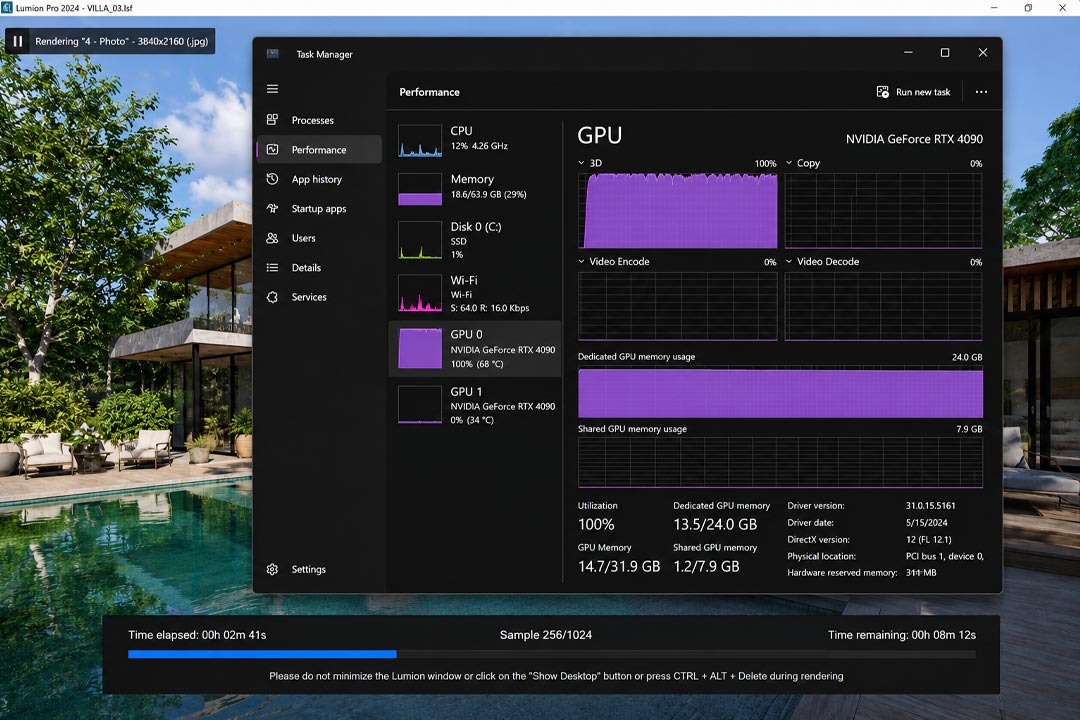
Why One GPU Stops Being Enough as Your Work Grows
For a single hero shot, one good card is all you will ever want. The pain starts the day a client asks for a walkthrough. A thirty second animation at 25 frames a second is 750 frames, and your GPU renders them in a queue, one, then the next, then the next. If each 4K frame takes around thirty seconds, you are looking at roughly six hours of the machine doing nothing but that, and you cannot touch it the whole time. Swap the animation for a set of twelve real estate stills with revisions, and you get the same story in a different shape: the card is fine, there is just one of it, and the work stacks up behind it.
Modern arch-viz makes this worse than it used to be. Path traced output, denser vegetation, 4K and beyond, plus clients who expect both stills and a flythrough from the same scene. None of that is harder for the GPU to do once. It is the volume, run back to back on one card, that eats your evenings. We touched on the bigger picture of moving past local hardware in why architects are abandoning local render nodes for cloud GPU.
Does Buying a Second GPU Actually Fix It?
I made this mistake personally. Years ago I dropped the money on a second RTX card expecting my Lumion animations to fly, and watched it sit at zero percent on every single render while the first card sweated. Lumion never touched it. That stung, because a second card is not just the card; it is a bigger power supply and the right motherboard too. Before you spend anything, look at what your renderer can actually do with more GPUs, because the answer changes completely depending on which tool you use.
| Your app or renderer | Does a 2nd GPU speed up ONE render? | The faster route |
|---|---|---|
| Lumion, Enscape, Twinmotion | No, one GPU per render | Run several scenes or camera angles at once on separate machines |
| D5 Render | Mostly built around one strong card; extra GPUs give little for a single shot | One powerful 24GB card, or parallel machines for a batch |
| Redshift, Octane, V-Ray GPU | Yes, scales well across GPUs | A multi-GPU machine, or a render farm |
| Corona, Arnold CPU | No, these ignore extra GPUs entirely | More CPU cores, or a CPU render farm |
The lesson from that wasted purchase is that for real-time apps you do not make one render faster with more cards. You make the whole job faster by doing many renders at the same time. Four machines each rendering a different chunk of your animation finish the batch in about a quarter of the time, give or take the few minutes it takes to set them up and move files around. That is the door the cloud opens, and it is far cheaper than owning four cards that gather dust between projects.
The Cheaper Fix: Rent Power Only When You Need It
Where you rent depends on your renderer, and since this site reviews these services on their own merits, here is the split that matters. If your heavy job is an offline engine, V-Ray, Corona, Arnold or Redshift, a SaaS render farm is exactly the tool for “one GPU is not enough,” because it spreads your frames across a large pool of nodes automatically. If your heavy job is a real-time app, those farms cannot run it, and you rent several GPU machines you control instead, then close them when the batch is done.
| Service | Model | Runs real-time apps? | Best for “one GPU isn’t enough” | Watch out for |
|---|---|---|---|---|
| iRender | IaaS | Yes | Parallel real-time renders, or a multi-GPU server (up to 8x RTX 4090) for GPU offline engines | You set each machine up (~15 min first time); billing runs until you shut down |
| Xesktop / AWS EC2 | IaaS | Yes | Same idea, alternative GPU servers | Pricier; AWS needs heavy manual setup |
| GarageFarm | SaaS | No | Offline batches; biggest help for beginners thanks to strong human support | No real-time apps; per-frame pricing climbs on huge jobs |
| RebusFarm | SaaS | No | Offline batches, with a scene checker and good Corona support | No real-time apps; automated flow suits experienced users more |
| Fox Renderfarm | SaaS | No | Large offline batches on a budget | No real-time apps; users report more failed frames to recheck |
For the real-time crowd, which is most architects in Lumion or Enscape, iRender is the one I reach for. You can spin up several single GPU machines to render different parts of an animation in parallel, or rent one server packing up to eight RTX 4090s when you are running a GPU offline engine that actually scales. A single RTX 4090 sits around eight to nine dollars an hour, with the per GPU rate easing on bigger configurations, so check the current pricing before you plan a big job. You install your own software on the machine, which is what they mean by your renders, your rules, so a parallel render comes out matching your local look exactly. The catches are the familiar ones: roughly fifteen minutes of setup the first time before your config is saved, and a billing clock that runs until you shut each machine down, which matters double when you have four of them running. New accounts get a 100 percent bonus on the first deposit, there is 10 to 20 percent Credit Back after, and a free trial lets you test the parallel approach on a real animation before paying.
Stuck waiting on one card for a whole animation?Run the frames in parallel across several RTX 4090 machines on iRender, or rent a multi-GPU server for GPU engines. 100 percent first-deposit bonus, 10 to 20 percent Credit Back, and a free trial.
See iRender’s GPU server options and current bonus
Frequently Asked Questions
- Will a second GPU make my Lumion or Enscape renders faster?
No. Lumion and Enscape use a single GPU for each render, so a second card stays idle while the first does all the work. Adding one speeds up nothing for these real-time apps. The way to clear a heavy job faster is to render in parallel, with several scenes or chunks of an animation running at the same time on separate machines. That is far cheaper through cloud rentals than buying a second card you cannot use in the app.
2. When does a single GPU stop being enough for arch-viz?
For one still image, a single good GPU is fine. It becomes the bottleneck on animations, where hundreds or thousands of frames render one after another, on large batches of stills with revisions, and on deadlines where one scene has to produce several deliverables. In all of those the card is not weak, there is just one of it and the work queues up behind it. Running renders in parallel is what removes the queue.
3. Is it cheaper to buy more GPUs or rent them in the cloud?
For occasional heavy jobs, renting wins clearly. A second or third card means buying the cards, a bigger power supply and often a new motherboard, and for real-time apps the extra cards do not even help. Renting several RTX 4090 machines for a few hours during a crunch, then shutting them down, costs a fraction of owning hardware that sits idle between projects. If you render heavy work every day, owning starts to make sense, which we cost out in our workstation comparison.
4. Can a render farm solve the single GPU bottleneck?
The answer comes down to your renderer, and the split is sharp. For offline engines like V-Ray, Corona, Arnold or Redshift, a SaaS farm such as GarageFarm, RebusFarm or Fox Renderfarm is built for exactly this, spreading frames across many nodes. For real-time apps like Lumion, Enscape and D5, those farms cannot run your scene at all, so you rent several GPU machines on an IaaS service like iRender and render the parts in parallel yourself.
Related post: My PC Crashes Every Time I Render in Lumion. Here’s What’s Actually Happening