


Lumion vs D5 Render in 2026: Which Arch-Viz Tool Should You Choose?
In 2026, Lumion and D5 Render remain the top contenders in real-time architectural visualization. Both promise photorealistic output with faster-than-ever workflows, but they serve different users in meaningfully different ways. Lumion, the long-standing industry veteran, has built its reputation on an intuitive interface, an expansive asset library, and seamless BIM integration — making it the go-to choice for architecture firms that prioritize speed and ease of use over granular control. D5 Render, the younger challenger, has rapidly matured into a serious competitor by leveraging Unreal Engine–based rendering technology, offering superior ray tracing quality, a more flexible material system, and a price point that’s hard to ignore, especially for freelancers and smaller studios watching their software budget.
So which tool actually deserves a place in your pipeline? The answer depends on your project scale, hardware setup, team size, and how much you’re willing to trade render quality for speed and this comparison breaks it all down.
I. The 2026 Landscape- Overview of Lumion and D5 Render
Just a few years ago, “real-time rendering” was mostly for fast previews. It was quick, but the quality wasn’t real enough.
In 2026, things will be different. Thanks to new technology like Ray Tracing 2.0 and AI, real-time renders now look amazing. You can create professional images and movies that look like real photos. But there is a catch: these softwares need very strong computers to run smoothly.
Lumion is a real-time 3D rendering software designed for architects and designers to quickly turn 3D models into high-quality images, videos, and animations. It is known for its easy drag-and-drop workflow, large library of assets like trees and people, and fast rendering speed, making it ideal for creating impressive visual presentations with minimal technical effort.
Lumion stands out for its real-time rendering, allowing users to instantly see changes as they edit, along with a large asset library filled with trees, people, vehicles, and environments. Its drag-and-drop workflow makes it very beginner-friendly, while advanced effects like weather, water, sky, and lighting help create visually rich scenes.

Source: Lumion
D5 Render is a powerful, real-time ray tracing rendering software used primarily in architecture, landscape, and interior design to create high-fidelity, photorealistic images, videos, and panoramas.
D5 Render offers powerful real-time rendering powered by ray tracing, allowing users to achieve highly realistic lighting, reflections, and shadows instantly. It features a clean, intuitive interface, LiveSync integration with tools like SketchUp and Revit, and a growing cloud-based asset library. With built-in AI tools such as auto materials and image upscaling, D5 Render helps speed up the workflow while maintaining high visual quality, making it a strong choice for modern, photorealistic architectural visualization.
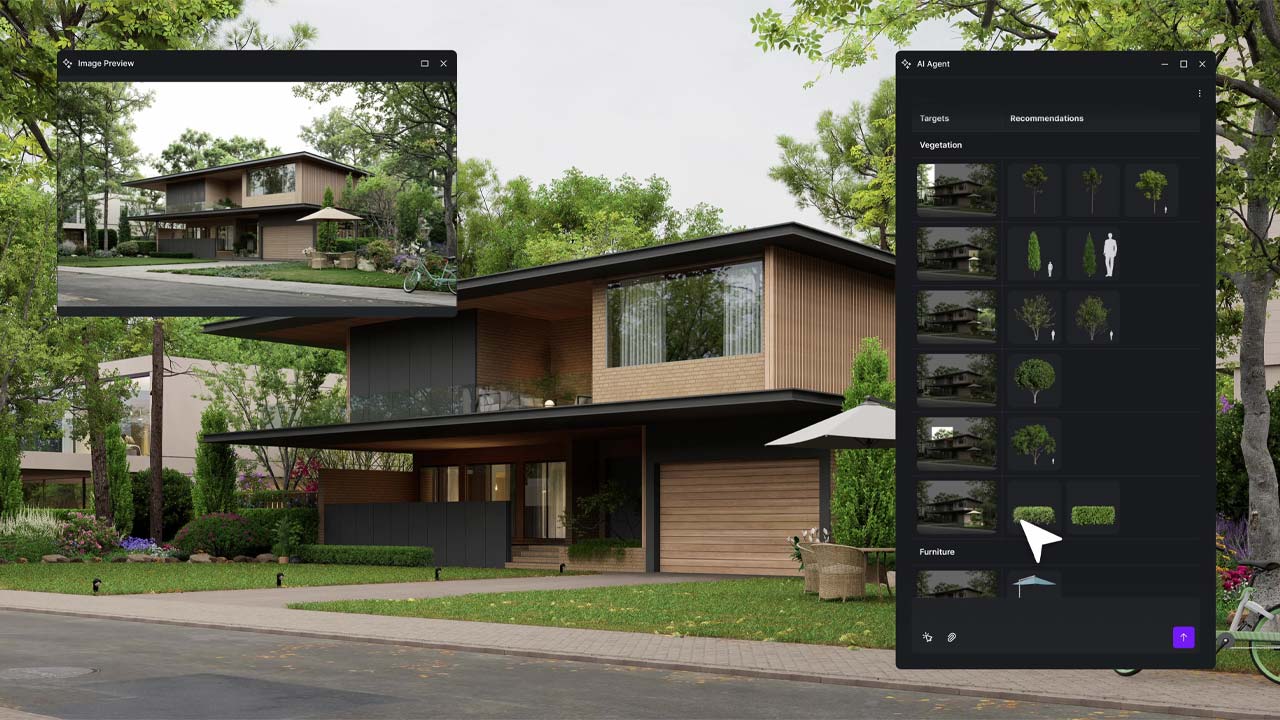
Source: D5 RENDER FORUM
II. Lumion vs D5: Core Comparison
Both tools are powerful, but they have very different strengths. Let’s dive into the details and see how they actually perform in a real-world workflow.
1. Quality vs Quantity
Lumion has spent over a decade building its library, and it shows. It is famous for being a complete ecosystem. With over 7,000+ high-quality assets, you almost never have to leave the software.
- Landscape King: If your project has a lot of nature, Lumion is unbeatable. It has a massive variety of “Fine-detail” trees and plants that react to the wind and seasons.
- Life in the Scene: Its library of animated people, animals, and vehicles is huge. You can make a busy city street or a quiet park feel “alive” in minutes.
- The Benefit: Everything is built-in. You don’t need to spend hours searching on 3rd party websites or worrying about file formats. Just search, click, and place. It’s a huge timesaver for large-scale outdoor projects.
D5 Render might have fewer items than Lumion, but every single asset feels curated and high-end. It doesn’t focus on “everything”. It focuses on what looks best for modern design.
- Interior Specialist: D5’s furniture, lighting fixtures, and decor assets are extremely stylish. They look like they came straight out of a luxury design magazine.
- Smart Features: In 2026, D5’s library is “intelligent.” It uses AI-powered placement. For example, if you want to put books on a shelf or plants in a garden, the AI can scatter them naturally for you so they don’t look like robots.
- Connectivity: Unlike Lumion, D5 is very open. It has built-in bridges to massive online libraries like Quixel Megascans, Poly Haven, and Sketchfab. This means even if a model isn’t in the D5 library, you can bring it in with one click.
- The Benefit: Your scenes look “fresh” and modern. You get access to the latest trends in furniture and ultra-realistic textures without the heavy file size of a traditional library.
2. Performance and Speed
When it comes to performance and speed, both Lumion and D5 Render offer real-time rendering capabilities, but they differ significantly in how efficiently they handle complex scenes. Lumion relies on a combination of CPU and GPU resources, which can lead to performance drops when working with heavy models or large environments. Users often experience slower viewport responsiveness, especially as scene complexity increases.
2.1. Performance
D5 Render is built for speed from the ground up. Because it uses Real-Time Ray Tracing, what you see while you are working is almost exactly what the final picture will look like. It feels very smooth and “live.” Lumion has also added Ray Tracing, but in very large scenes with many trees or complex buildings, the preview can become “heavy” and start to lag. In 2026, D5 still feels a bit faster and more responsive when you are moving the camera around your project.
However, D5’s performance advantage depends heavily on having a powerful RTX GPU. Without high-end hardware, users may not fully benefit from its real-time capabilities. Lumion, while less efficient in some cases, can still provide stable performance across a wider range of systems, making it more accessible for users with mid-range setups.
2.2. Speed
When it is time to export your final video or high-resolution image, D5 Render usually wins the race. In many tests, D5 can render a high-quality animation much faster than Lumion—sometimes in half the time. Lumion focuses on “Cinematic Quality,” which means it takes more time to calculate every detail of light and atmosphere. If you are in a rush to show a client a video by tomorrow, D5 is the more efficient tool for a quick turnaround.
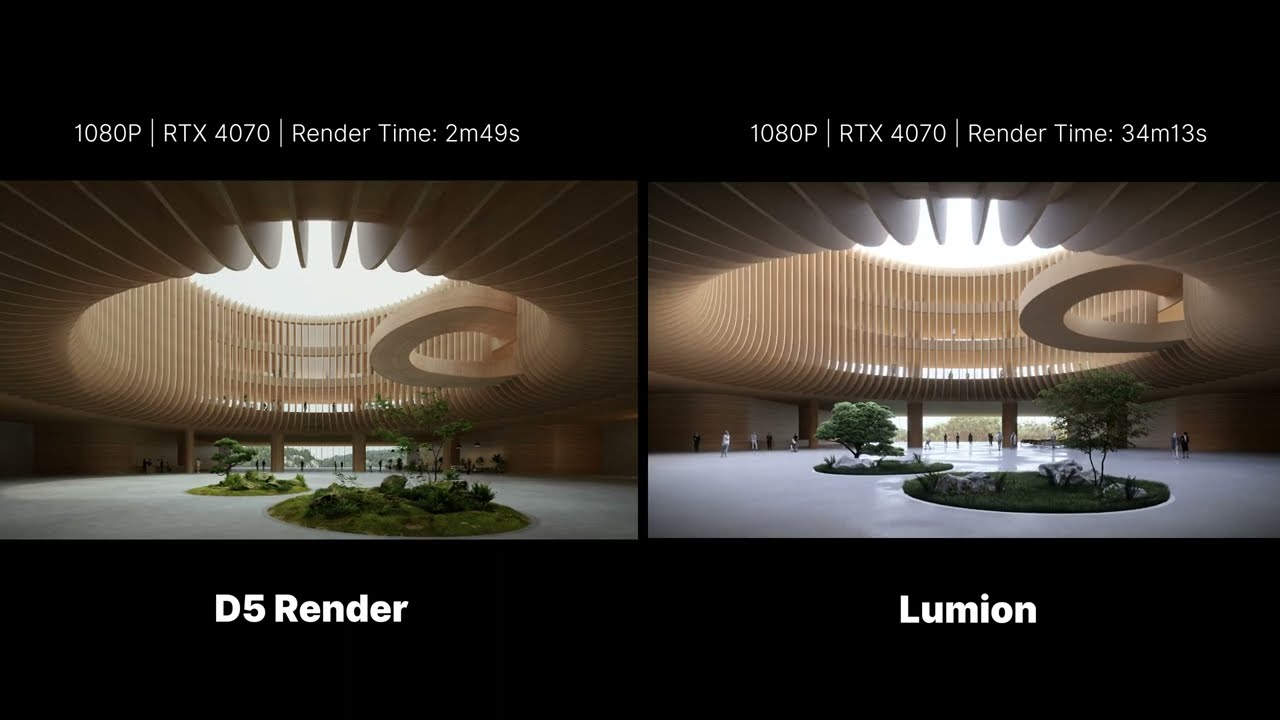
As you can see, D5 only took 1/10 of the time Lumion took to render this 6-second animation, and that was with Lumion using only 2-star quality.
3. System Requirements
To help you understand the technical side of these tools in 2026, here is a detailed comparison of the system requirements for Lumion and D5 Render.
| Component | Lumion | D5 Render |
| Rendering Architecture | Hybrid (CPU + GPU) | GPU-first (real-time ray tracing) |
| Minimum GPU | Integrated GPU with ray tracing (e.g., Intel Arc / Radeon 760M), PassMark 5,500 | GTX 1060 (6GB) or RX 6400 |
| Recommended GPU | RTX 2060 (6GB), PassMark > 10,000 | RTX 3060 / 3060 Ti |
| High-end GPU (Pro Work) | RTX 3060 (12GB) or higher, PassMark 14,000 | RTX 3090 / 4090 |
| Ray Tracing Requirement | Required (Lumion View uses RT-capable GPU) | Required |
| VRAM Requirement | 6GB minimum, 12GB recommended | 6GB minimum, 12GB+ recommended |
| CPU Requirement | CPUMark 2,500 (min), 3,000 (high-end) | Moderate dependency |
| RAM Requirement | 16GB min, 32GB recommended | 16GB min, 32GB recommended |
Looking at the table, we can see that these two programs work very differently. D5 Render is all about the power of your graphics card (GPU). It is built to work with the newest technology, so if you have a very strong card like an RTX 4090, it will be incredibly fast. It is the best choice if you want to see your changes instantly and finish your pictures or videos in a short time. However, you must spend more money on a great GPU to get the best results.
Lumion is a bit more balanced. It uses both your computer’s “brain” (CPU) and its graphics card (GPU). This makes Lumion a great all-in-one tool. It is very good at handling big projects with lots of trees, grass, and people because it shares the work across your whole computer. While D5 needs a top-tier GPU to be the best, Lumion is more reliable for different types of work. In simple terms: choose D5 Render for pure speed and modern tech, but choose Lumion if you want a steady tool for large, detailed landscapes.
4. Workflow
4.1. CAD/BIM Integration & Live Sync
In 2026, both tools have mastered LiveSync, but they handle it differently.
D5 Render supports Livesync with SketchUp, Revit, Rhino, ArchiCAD, 3ds Max, Blender, and Cinema 4D. Its seamless Revit/SketchUp sync eliminates file exports entirely, meaning geometry updates in your modeling software reflect instantly inside D5 without re-importing. For firms running iterative design cycles, this removes a persistent friction point.
Lumion integrates primarily with SketchUp and Revit via LiveSync. The connection works, but you cannot edit your models inside Lumion , it’s a one-way visualization layer. Manual re-imports are still required in certain situations, particularly with complex scene structures or mid-project geometry swaps.
In short, D5 wins on integration breadth and sync reliability. Lumion’s LiveSync is sufficient for simpler pipelines but shows its age in multi-software studios.
4.2. Scene Setup & Asset Placement
D5 uses a Cloud Library. This is great because your computer stays light, and you get new, trendy furniture and 3D people every week. However, you need a stable internet connection to browse and download these items. D5 Render has caught up substantially with a growing asset library including high-quality vegetation, furniture, people, vehicles, street furniture, and realistic PBR materials. Assets are optimized for real-time ray tracing and visually consistent, so scenes look professional quickly without extensive fine-tuning.
Lumion keeps its library on your hard drive. This is a huge advantage for large firms that need high security or for designers working in areas with slow internet. Lumion has long been the benchmark for scene environment creation such as foliage, skies, weather effects, and human figures are its bread and butter. Its strength lies in the atmosphere. The UI is purpose-built for a fast scene population, and experienced users can build a convincing exterior in under an hour.
4.3. Lighting workflow
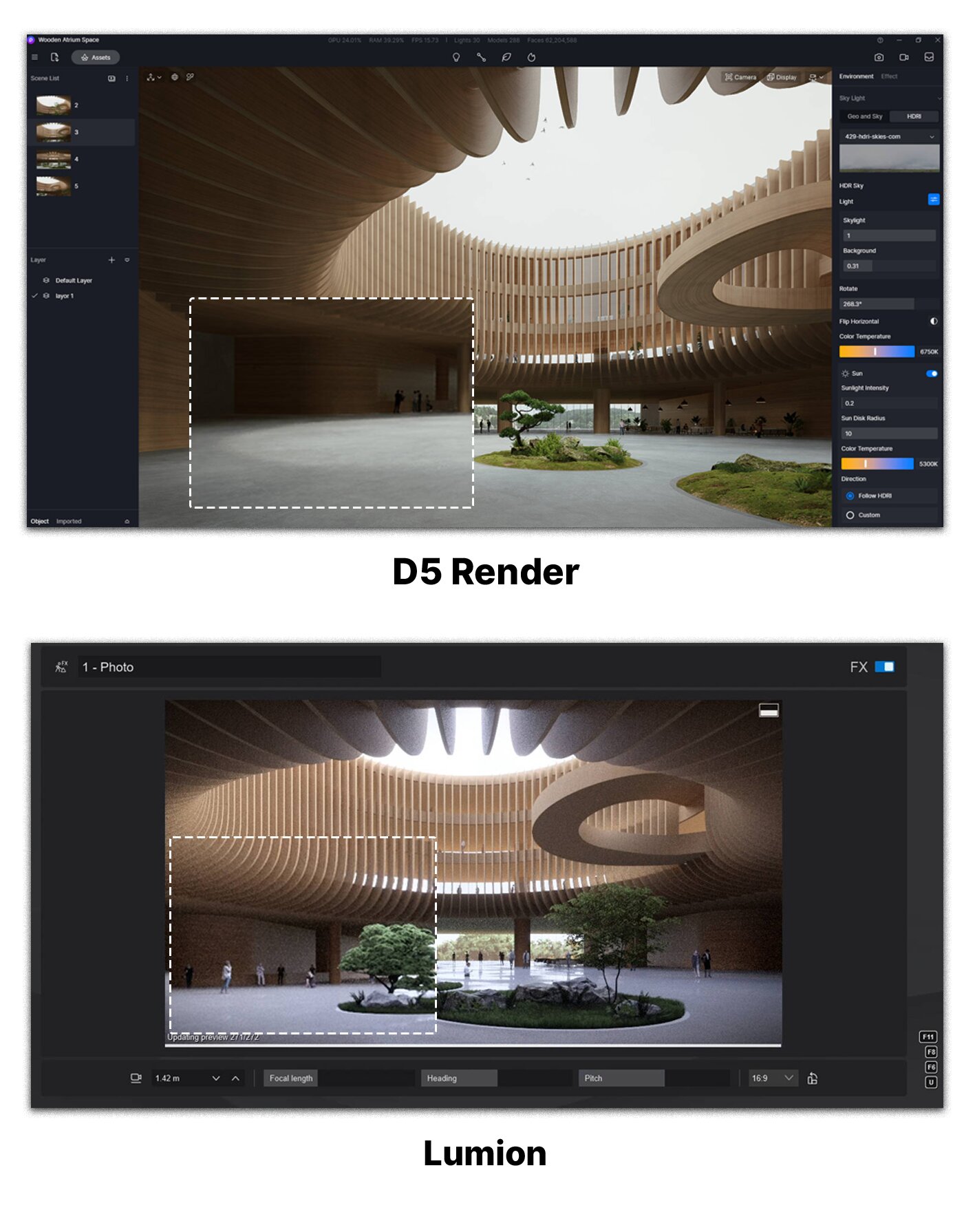 source: D5 Render
This is arguably the most important workflow distinction.
D5 Render uses full real-time ray tracing as its core engine. When you adjust the sun’s position, cast shadows shift immediately across the terrace or facade. When you change a facade material from concrete to glass, you instantly see how environmental reflections evolve in real time. D5 also introduced AI Atmosphere Matching — drag and drop a single reference photo and D5 replicates the exact lighting atmosphere in 10–15 seconds. For teams presenting multiple mood options to clients, this is a significant time saver.
Lumion uses a hybrid approach( real-time preview) combined with a final render step that often requires additional tweaking. With Lumion, the process is less direct and more often requires additional steps or recalculations.
4.4. Animation workflow
D5 Render is significantly faster at animation output (you can see the test scene in 2.2 part). Camera path setup in D5 is functional but not yet fully mature. Some users find the camera path tools require more practice to use efficiently. D5 Render has more than 1,037 animated models and particles including nature, vehicle, animal, character, and ornament, providing a richer variety for architectural animations. Its animations benefit from raytracing, enhancing realism.
Lumion has a more established animation toolset with better keyframe control and cinematic effects baked into the interface. For users who regularly produce narrative walkthroughs with layered effects (rain, wind, people movement), Lumion’s animation workflow is more polished and intuitive.
Lumion doesn’t state how many animated models there are in its content library. Yet it should be noted that animated models are not converted to a raytracing engine in Lumion.
For reference, while Lumion 2023 comes with 227 new models, D5 has released over 450 new models since its latest update D5 2.4, including 220+ animated trees and flowers for architecture and landscape design.
5. Licensing & Price
5.1. Price
D5 Render offers three tiers: a permanent free Community edition, a Pro subscription, and a Teams plan for studios. D5 Pro costs $30/month or $360/year (billed annually, working out to $30/month). The annual plan saves approximately 21% versus monthly billing. D5 for Teams starts at $59/month per seat or $708/year per seat, with a minimum of two seats.
Lumion restructured its product lineup in April 2025, replacing the old Standard/Pro naming with three distinct products. As of 2026, Lumion View is priced at $199/year, Lumion Pro at $999/year. Lumion Studio which bundles Pro as a floating license plus Lumion View renews at a standard price of $1,299/year. A 20% discount is available on all plans for 3-year commitments.
5.2. Licensing
D5 Render Pro is a named-user license — one person, one account, installable on multiple machines but only one active session at a time. The Teams plan adds collaboration features but remains per-seat.
Lumion offers both. Lumion View and Lumion Pro (standalone) are named-users. However, Lumion Studio includes Lumion Pro as a floating license. Multiple users can access it from different computers as long as there’s an available seat. It’s cost-efficient for teams where members use Lumion at different times. For studios where not everyone needs Lumion simultaneously, this floating license arrangement can significantly reduce the effective per-user cost. This is a genuine Lumion advantage for mid-to-large studios: buying two floating seats under Studio may serve four or five users across different time zones, which a fixed per-seat model like D5 Teams cannot replicate.
Both tools offer free educational access, but with different terms.
D5 Render Education: Students and educators can apply for a free D5 Education license that includes many Pro features, no watermarks, and no cost. The main limitation is that it’s a fixed-seat license — it only works on one specific computer.
Lumion Students: Free license available directly from Lumion’s website. Students can request a free license directly from Lumion at lumion.com/product/students. However, some users report the student license process is difficult, particularly the requirement to provide card details for the free student subscription.
Which Arch-Viz Tool Should You Choose?
After comparing workflow, ease of use, asset management, and licensing in detail, the honest answer is: neither tool is universally better . The right choice depends entirely on who you are, how you work, and what you’re optimizing for. Here’s how to think through it clearly.
If you’re building or modernizing a visualization pipeline from scratch, D5 is the best option. D5’s lower entry cost, broader software integration, and AI-assisted tools make it the pragmatic choice for studios that aren’t locked into an existing Lumion workflow. At $360/year versus $999/year for Lumion Pro, the savings alone can justify the switch — and the rendering quality in 2026 is genuinely competitive.
Real-time lighting accuracy is non-negotiable for your deliverables. If your clients are evaluating material choices or interior lighting in real time during design reviews, D5’s full ray tracing engine delivers this without baking or manual recalculation. Your team uses a multi-software pipeline. D5’s live sync covers SketchUp, Revit, Rhino, ArchiCAD, Blender, 3ds Max, and Cinema 4D. If your studio has designers working across different tools, D5 handles the handoff more fluidly than Lumion.
On the other hand, you should choose Lumion if your studio already runs Lumion workflows and has established templates, scenes, and material libraries built up over years. Switching to D5 isn’t free — there’s migration cost in time, retraining, and rebuilding scene libraries. Unless there’s a clear performance or quality gap driving the switch, Lumion’s familiarity has real productivity value that doesn’t show up in feature comparison tables. Besides, if you run a large studio with overlapping rendering needs, Lumion Studio’s floating license model is the one scenario where Lumion’s pricing becomes genuinely competitive. If you have eight designers but only three render simultaneously, two or three floating seats under Studio can serve the whole team at a lower per-user cost than D5’s fixed seat model.
Final Thoughts
In 2026, choosing between Lumion and D5 Render is no longer a simple question of “which is better,” but rather which fits your workflow and resources best. If you want to be an artist who paints with “feeling,” choose Lumion. It is the tool that turns a simple 3D model into a beautiful, windy forest or a rainy street that tells a story. It is expensive, but it gives your work a “soul” that clients can feel. If you want to be a tech-pro who works at “light speed,” choose D5 Render. It is the tool that uses AI to do the boring work for you, so you can focus on building your dream. It is fast, smart, and friendly to your wallet.
The best part? There is no wrong answer. Both tools are better than ever. The real question is: What kind of creator do you want to be today? Pick the one that makes you excited to open your computer tomorrow morning. Happy rendering!
See more: Best Lumion Render Farm 2026: Cloud Rendering Guide for Architects


