Why Is Cloud Rendering So Expensive? A Cost Breakdown for Architects
The first time someone sees a cloud GPU priced at eight or nine dollars an hour, the reaction is almost always the same flinch. It sounds steep next to the computer already sitting on the desk, which feels free. That comparison is where most of the “cloud is expensive” feeling comes from, and it is mostly an illusion built on three habits, not on the rate itself.
I have run the numbers both ways across a lot of projects, and the verdict is less dramatic than the sticker shock suggests. Cloud rendering is rarely expensive when it is matched to the work. It gets expensive when you leave machines running, rent more than you need, and ignore the discounts sitting right there. Let me take those apart.
Your own workstation is not free. It is just prepaid, and the cost is hidden in a number you stopped looking at years ago.
The “free” workstation that already cost you thousands
Before the hourly rate looks expensive, account for what the desk machine actually costs. A render-capable workstation is a few thousand up front, plus the graphics card you will replace in a couple of years, plus electricity, plus the hours it sits idle between deadlines earning nothing. Spread across its life, a workstation has a real cost per render that nobody puts on an invoice, so it feels free while quietly being anything but. Cloud rendering shows you the price out loud, per hour, which is transparent but jarring. The fair comparison is not “free versus nine dollars an hour.” It is the true cost per render of owning against the true cost per render of renting, and we work that through in detail in render farm vs new workstation.
Where the cost actually comes from
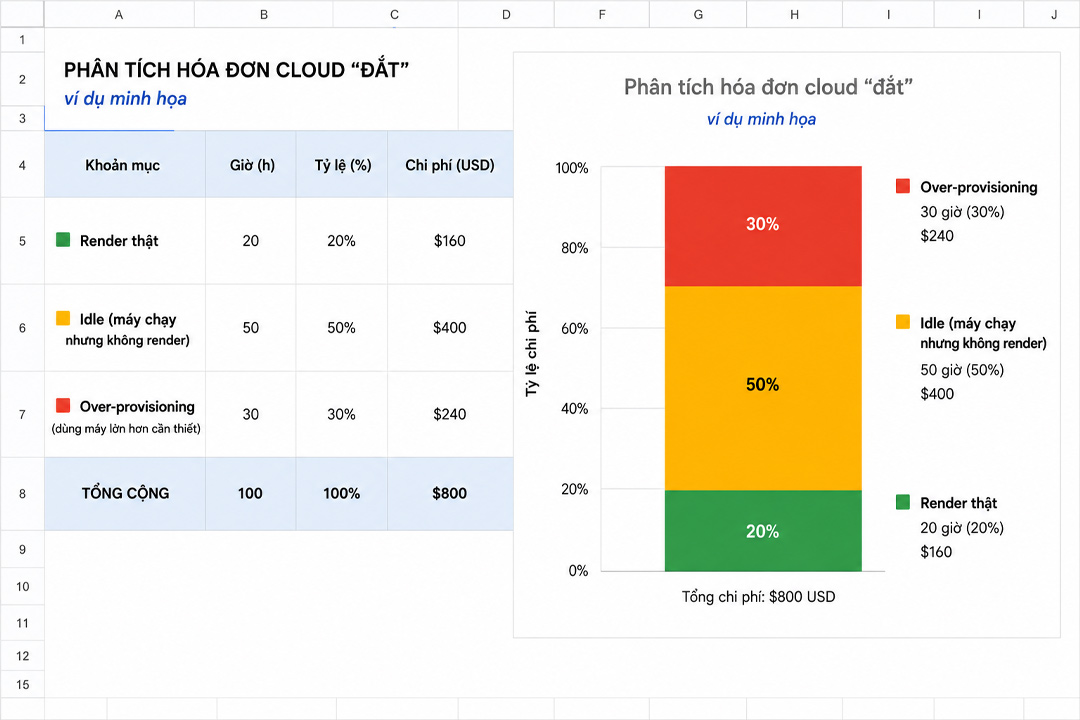
When a cloud bill genuinely runs high, it is usually one of a handful of causes, and almost all of them are avoidable once you know to watch for them.
| What drives the bill up | What is really happening | How to keep it down |
|---|---|---|
| Idle billing | The meter runs from boot until you shut the machine down, not just while it renders. A forgotten server bills all night. | Shut machines down the moment a job finishes; set a reminder or use auto-shutdown |
| Over-provisioning | Renting an 8-GPU server for a job that one or two cards would clear, so you pay for power you never use | Match the machine to the job; scale up only for genuinely parallel work |
| Ignoring promotions | Paying full rate while a first-deposit bonus and Credit Back sit unused | Apply the deposit bonus and Credit Back; they cut the effective rate meaningfully |
| Wrong pricing model | Using a per-hour machine for a job better suited to per-frame, or the reverse | Match the billing model to the work, covered below |
The biggest of these, by a distance, is idle billing, and it stings enough to deserve its own piece, which is the surprise cloud render bill. The pattern is always the same: the render finishes at 11pm, you are asleep, and the machine bills until you wake up. The rate was never the problem; it was the eight hours of nothing you paid for on top of it.
Per-frame or per-hour: the two pricing models, and which is cheaper
Render services charge in one of two ways, and matching the model to your work decides whether cloud feels cheap or expensive. SaaS render farms like GarageFarm, RebusFarm and Fox Renderfarm charge per frame. You submit a finished scene, their nodes render it, and you pay for the frames produced, with no risk of an idle meter because there is no machine of yours sitting on. That model is excellent for offline engines, V-Ray, Corona, Arnold, where the work is a defined batch of frames. The cost is predictable and you are billed for output, not time.
IaaS services like iRender charge per hour for a whole machine you control, around eight to nine dollars an hour for a single RTX 4090 (iRender pricing, as of June 2026). That gives you full freedom to install anything and run real-time apps that the per-frame farms cannot touch, but it puts the clock in your hands, which is where idle billing creeps in. For interactive work, real-time apps, or anything needing a specific setup, per-hour is the only option that fits. For a straightforward batch of offline frames, per-frame is often cheaper and lower-risk. The fair reading is that neither is universally cheaper. The expensive outcome comes from using the wrong one for the job.
Among the per-frame farms, the character differences are worth a line each: GarageFarm is the easiest to start with and has support that actually answers, RebusFarm pairs a scene checker with broad plugin coverage and strong CPU rendering, and Fox Renderfarm is usually the cheapest on large offline batches. For per-hour machines that run real-time tools, iRender is the one I reach for most, with Xesktop and AWS EC2 as alternatives, AWS carrying the most setup overhead.
When cloud rendering really is the more expensive choice
To keep this fair, there are cases where renting loses. If you render heavy scenes most working days, the hours add up until owning a workstation, or a small local farm, costs less over a year than renting that much time. If your projects are large, steady and predictable, owning amortizes well. And if you consistently forget to shut machines down, the idle waste can erase the savings on its own. Cloud rendering rewards spiky, unpredictable, occasional heavy loads. It punishes constant, all-day rendering by someone who treats the meter casually. Knowing which describes you is the whole decision, and if you are unsure, start with do you really need a render farm.
Bringing the effective rate down
If renting fits your pattern, a few habits cut the real cost well below the headline number. Shut every machine down the instant a job ends, since idle hours are pure waste. Right-size the machine instead of reflexively renting the biggest one. Use the first-deposit bonus and Credit Back, which lower the effective hourly rate rather than just looking good in an ad. And run a test on a small job first so your cost estimate is grounded in your scenes, not a generic figure. For the specific worked example of a Lumion project, including what a typical still, batch and animation actually cost, see how much it costs to render a Lumion project in the cloud.
Worried about the bill more than the rate?iRender bills per hour for a dedicated RTX 4090, with a first-deposit bonus, Credit Back on every session, and a free trial so you can ground your own cost estimate before spending. The one habit that keeps it cheap is shutting the machine down when you finish.
See iRender pricing and current bonus
FAQ
- Is cloud rendering actually more expensive than owning a workstation?
Often no, once you count the full cost of owning. A workstation is a few thousand up front, plus a graphics card you replace every couple of years, plus electricity and the hours it sits idle. Spread over its life, it has a real cost per render that feels free only because it is prepaid. Cloud shows the price per hour out loud, which is jarring but fair. For occasional heavy work, renting usually costs less; for daily heavy rendering, owning tends to win.
2. Why did my cloud render bill come out so high?
Usually idle billing. The meter runs from when the machine boots until you shut it down, not just while it renders, so a server left on after a job finishes bills the whole time. The other common causes are over-provisioning, renting more GPUs than the job needs, and not applying available promotions. The headline rate is rarely the real problem; the waste around it is.
3. Is per-frame or per-hour pricing cheaper for rendering?
Neither is universally cheaper; the right one turns on the kind of work. Per-frame SaaS farms suit defined batches of offline frames, with predictable cost and no idle risk, but they cannot run real-time apps. Per-hour IaaS machines suit interactive work, real-time tools and custom setups, with full control but an idle meter to watch. Using the wrong model for the job is what makes cloud feel expensive.
4. How do I reduce my cloud rendering costs?
Shut machines down the moment a job finishes, since idle hours are the biggest waste. Right-size the machine rather than renting the largest one by default. Apply the first-deposit bonus and Credit Back, which lower the effective rate. Match the pricing model to your work, per-frame for offline batches, per-hour for real-time. And test a small job first so your estimate reflects your own scenes.
Related post: My Computer Is Unusable While Rendering. Here’s How Architects Reclaim Their Workstation