How Much Does It Really Cost to Render a Lumion Project on the Cloud?
The cost swings enormously with the job, which is why a flat answer is useless. A single 4K Lumion still takes only a few minutes on a cloud RTX 4090, so the render itself costs well under a dollar. A batch of a dozen stills runs to a few dollars. A short animation might be $30 to $40, and a long, detailed 4K walkthrough can reach the hundreds, because it is thousands of frames. Cloud machines bill per hour, around eight to nine dollars for a single RTX 4090, so your cost is render time times rate, plus a little setup. Because Lumion is a real-time app that SaaS render farms cannot run, this is per-hour IaaS pricing, not per-frame. The numbers below are illustrative; run a test on your own scene for a real figure.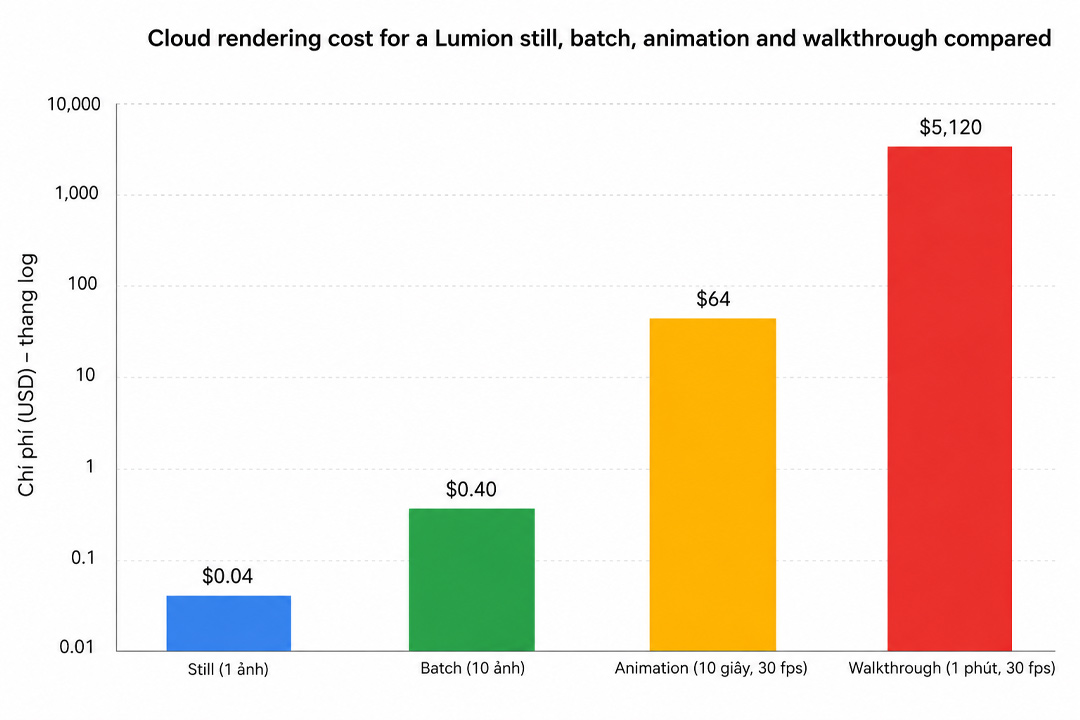
Why there is no single price
People want one number, and Lumion will not give them one, because the work behind “a render” ranges from a single image to thousands of them. A cloud GPU is priced by time, so what you actually pay is however long the machine runs at the hourly rate. A still that resolves in a few minutes barely touches the meter. A walkthrough that occupies the machine for fifteen hours obviously does not. Same software, same rate, wildly different bills, and the difference is entirely the size of the job.
This is also why comparing cloud to your electricity bill at home misleads you. At home a long render feels cheap because the cost is buried in your monthly power. In the cloud it is itemized, so a big job looks expensive even when, hour for hour, you are getting far more done. The broader version of that mental trap is in why cloud rendering feels expensive.
Worked examples on a single RTX 4090
Here is what typical Lumion jobs look like in time and cost, at an illustrative rate of about eight dollars an hour for one RTX 4090. Treat the times as a realistic middle, since per-frame speed depends heavily on the scene, the preset and the output resolution.
| Lumion job | Rough time on one RTX 4090 | Approx render cost at ~$8/hr |
|---|---|---|
| Single 4K interior still | a few minutes | under $1 |
| Batch of 12 stills | about 45 to 60 minutes | around $6 to $8 |
| 30 second animation (750 frames) | about 4 hours | around $32 to $36 |
| 2 minute 4K walkthrough (3,600 frames) | roughly 60 to 90 hours of GPU time | several hundred dollars |
Two things in that table are worth sitting with. First, the still is so cheap that the cost is basically the few minutes of machine time, which is why for one-off images the cloud is almost free in practice. Second, the walkthrough is not expensive per hour, it is expensive because it is enormous, thousands of frames each taking a minute or more. You can split that GPU time across several machines to finish faster, which we cover in cutting an all-night animation to an hour, but the total GPU hours, and so the total cost, stay roughly the same whether you use one machine slowly or four machines quickly.
The promos that change the real number
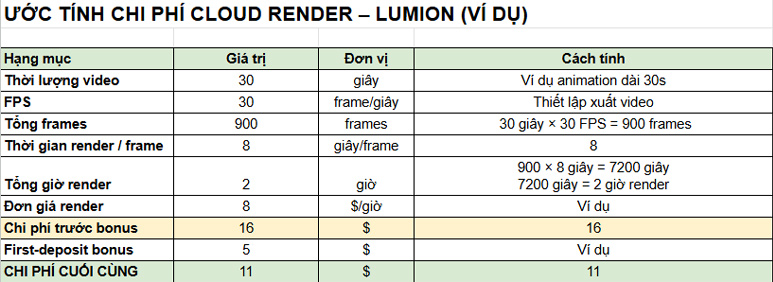
The headline rate is not what you end up paying if you use what is on offer. A first-deposit bonus matches your initial top-up, which effectively halves the cost of your early renders until it is used up. Credit Back returns a portion of each session’s spend, lowering the rate you pay over time. Stacked sensibly, these can bring the effective cost down a good deal below the sticker rate. The one cost that no promo offsets is idle time, the machine left running after the render finishes, which we dig into in the surprise idle bill. A walkthrough that should cost a few hundred dollars can quietly double if you leave the server on all weekend, so the shutdown habit protects your budget more than any discount.
Why this is per-hour, and not a per-frame farm price
If you have priced offline renderers on a SaaS farm, you may expect a per-frame quote here. Lumion does not work that way in the cloud. Because it is a real-time app, the per-frame farms, GarageFarm, RebusFarm, Fox Renderfarm, cannot run it at all, so there is no per-frame Lumion option. They remain strong choices for offline engines like V-Ray or Corona, each with their own character, but for Lumion specifically your only cloud route is renting a whole machine by the hour. iRender is the one I reach for, since you get a dedicated RTX 4090 with 24GB of VRAM and your own Lumion install (RTX 5090 machines are listed as coming soon on the same service). Costs aside, the workflow point is that you control the machine, so your scene renders exactly as you built it.
Want a real figure instead of an estimate? iRender’s free trial lets you render your own Lumion scene and read the actual cost, and a first-deposit bonus halves the price of your early jobs. Just shut the machine down when you finish. Price your own scene on iRender
FAQ
- How much does it cost to render a Lumion still in the cloud?
Very little. A single 4K interior still resolves in a few minutes on a cloud RTX 4090, so at about eight dollars an hour the render itself costs well under a dollar. For one-off images, cloud rendering is close to free in practice, since you are only paying for a few minutes of machine time. The cost only becomes significant when you move to animations with hundreds or thousands of frames.
2. How much does a Lumion animation cost to render in the cloud?
It scales with frame count. A 30 second clip at 25 frames a second is 750 frames, roughly four hours of GPU time, so around $32 to $36 at an illustrative eight dollars an hour. A two minute 4K walkthrough is 3,600 frames and can reach 60 to 90 hours of GPU time, putting it in the hundreds. Splitting the work across several machines finishes it faster but keeps the total GPU hours, and so the cost, about the same.
3. Can I render Lumion on a per-frame render farm to save money?
No. Per-frame SaaS farms like GarageFarm, RebusFarm and Fox cannot run Lumion, because it is a real-time app that needs a live desktop on a single GPU. Your only cloud option for Lumion is renting a whole machine by the hour on an IaaS service like iRender. Per-frame pricing is available for offline engines such as V-Ray or Corona, but not for Lumion, so the comparison does not apply.
4. How can I lower the cost of cloud rendering a Lumion project?
Use the promotions: a first-deposit bonus effectively halves your early renders, and Credit Back lowers the rate over time. Trim the scene and tune the preset so each frame renders faster. And above all, shut the machine down the instant the job finishes, since idle hours add cost that no discount offsets. A test render on a small job first gives you a grounded estimate before committing to a big one.
Related post: My Computer Is Unusable While Rendering. Here’s How Architects Reclaim Their Workstation