


Why Your 4K Arch-Viz Stills Take Hours Each on a Single GPU
A 4K image has four times the pixels of 1080p, so before anything else, your renderer is doing roughly four times the work per frame. Add the high sample counts that path-traced arch-viz needs to come out clean rather than grainy, plus heavy scenes and reflections, and a single offline still can sit on one GPU for hours. The fastest wins are not more hardware: a good denoiser can cut sample counts dramatically, and smarter sampling and resolution choices shave more. When you have a whole batch of 4K stills due, a render farm spreads them across many nodes so they finish together instead of one after another. Times below are illustrative; benchmark your own scene.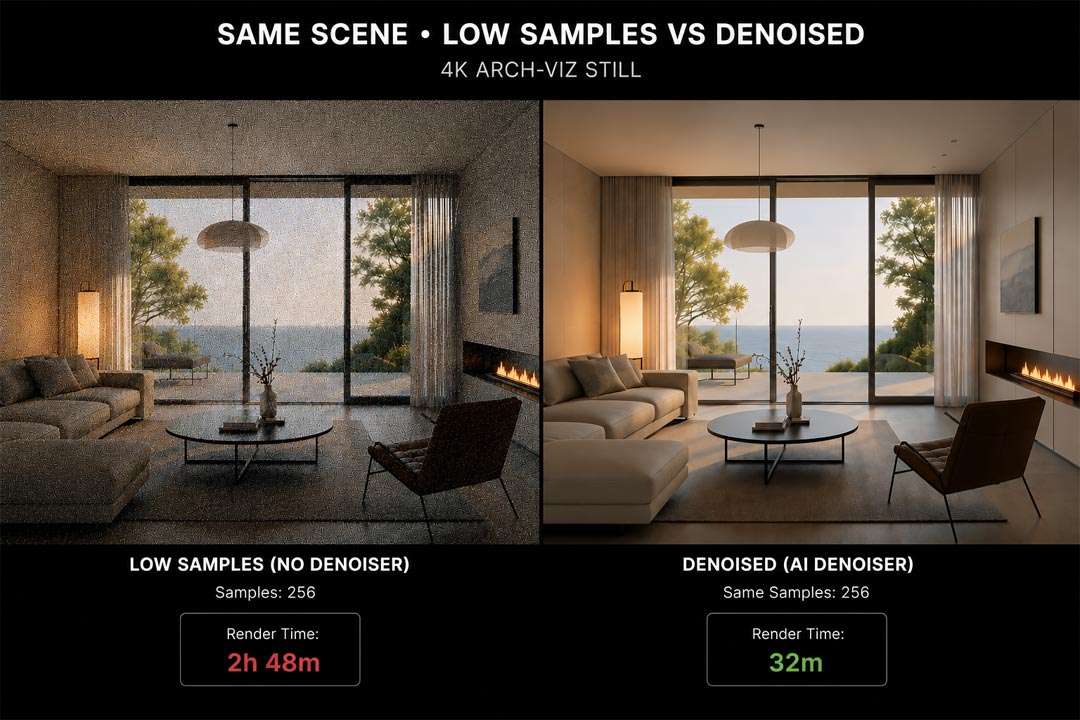
Why 4K is so much heavier than it looks
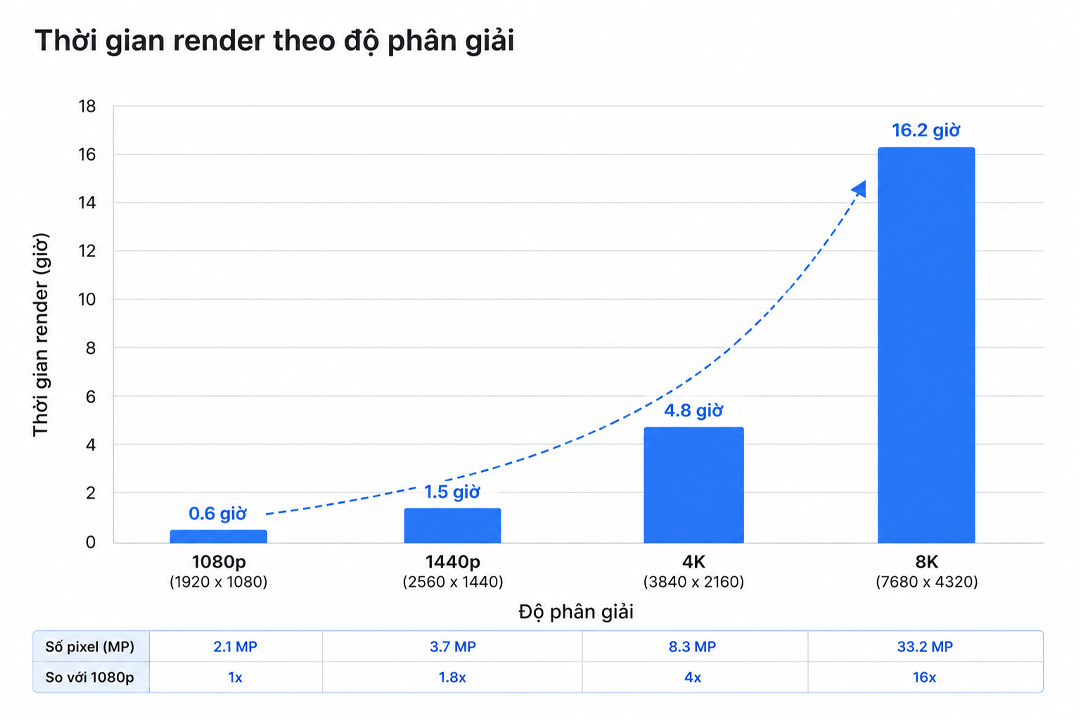
The jump from 1080p to 4K feels like one notch on a dropdown, but it is not linear. A 4K frame is 3840 by 2160 pixels against 1920 by 1080, which is four times the pixels. Your renderer has to compute light for every one of them, so all else equal, a 4K still takes around four times as long as the same shot at 1080p. Push to 8K and you are at sixteen times. That scaling is baked into the resolution and has nothing to do with how good your scene is.
On top of the pixel count sits the real time sink for offline engines like V-Ray and Corona: noise. Path tracing builds an image by firing rays and averaging them, and a clean, grain-free result needs a lot of samples. The last bit of noise is the most expensive to remove, so chasing a perfectly clean 4K frame can double or triple the time of an already heavy render. That is where the hours come from, not the resolution alone.
| Resolution | Pixels vs 1080p | Rough relative render time |
|---|---|---|
| 1080p (1920 x 1080) | 1x | baseline |
| 1440p (2560 x 1440) | ~1.8x | nearly double |
| 4K (3840 x 2160) | 4x | around four times, more with high samples |
| 8K (7680 x 4320) | 16x | rarely worth it for stills |
The fixes that cut hours without new hardware
Before renting anything, get the sampling under control, because that is where most of the wasted time hides. Turn on a denoiser, OptiX, NVIDIA’s AI denoiser, or Intel Open Image Denoise, and you can render at far fewer samples and let the denoiser clean the rest, often cutting render time by half or more on a noisy interior. Set a noise threshold so the renderer stops once the image is clean enough rather than grinding on invisible improvements. Render drafts at 2K and reserve 4K for the final, since most review happens long before pixel-peeping. And optimize the scene itself, lighter geometry and sensible texture sizes, the same housekeeping that helps every render. Done together, these often turn a multi-hour 4K still into something far shorter on the same card.
When it is a batch, not a single still
One slow 4K still is a sampling and scene problem. Twenty of them due tomorrow is a throughput problem, and that changes the answer. Because engines like V-Ray and Corona are offline renderers, a batch of 4K stills is exactly what a SaaS render farm is built for. You submit the set, the farm spreads the images across many nodes, and they render in parallel rather than queuing on your one GPU overnight. This is one of the clearest cases where a per-frame farm earns its place, and it does not carry the idle-billing risk of a per-hour machine, since you pay for the frames produced.
The farms differ in character. GarageFarm is the easiest to start with and has support that answers, useful when a batch throws an error partway through. RebusFarm runs a scene checker that catches a missing texture before it costs you a re-render across the whole set, and handles CPU-heavy Corona well. Fox Renderfarm is usually the cheapest for a large batch. For a single very heavy still rather than a batch, or for interactive look development, a stronger single GPU helps more than a farm, which is where renting a per-hour machine fits. iRender offers a dedicated RTX 4090 for that, with a first-deposit bonus and a free trial to benchmark your scene, and the per-hour idle clock to mind. Whether GPU or CPU rendering suits your engine is its own question, covered in V-Ray GPU vs CPU for architecture.
A single 4K still still crawling after you have tuned the samples? A faster GPU is the next lever. iRender rents a dedicated RTX 4090 by the hour, with a free trial to benchmark your exact scene before you commit. Benchmark your scene.
If the slow render is part of a deadline crunch, the planning side is in why render times eat deadlines, and the animation version of this scaling problem is in cutting an all-night animation to an hour.
FAQ
- Why does a 4K render take so much longer than 1080p?
Because 4K has four times the pixels of 1080p, so your renderer computes light for four times as many points, taking roughly four times as long for the same shot. On top of that, offline engines need high sample counts to remove noise, and the last bit of grain is the most expensive to clear, which can double or triple an already heavy render. The resolution sets the baseline, and the noise chasing adds the hours.
2. How can I make 4K arch-viz stills render faster?
Start with a denoiser like OptiX or Intel Open Image Denoise, which lets you render at far fewer samples and clean up the rest, often halving the time. Set a noise threshold so the renderer stops once the image is clean enough, render drafts at 2K and keep 4K for the final, and optimize the scene with lighter geometry and sensible textures. These usually cut a multi-hour still down sharply on the same hardware before you consider renting anything.
3. Should I use a render farm for a batch of 4K stills?
Yes, if your engine is offline like V-Ray or Corona. A SaaS render farm spreads a batch of stills across many nodes so they render in parallel instead of queuing on one GPU, and you pay per frame with no idle-billing risk. GarageFarm is easiest to start with, RebusFarm adds a scene checker, and Fox is usually cheapest on large batches. For a single very heavy still or interactive work, a stronger single GPU helps more than a farm.
4. Does a denoiser reduce quality on arch-viz renders?
Modern denoisers are good enough that the time saved usually outweighs any softening, especially on interiors where noise is worst. The approach is to render with enough samples that the image is mostly resolved, then let the denoiser clean the remaining grain, rather than relying on it to fix a barely-started render. Used that way, you get a clean 4K still in a fraction of the time, with quality that holds up for client presentation.
Related post: Why Is Cloud Rendering So Expensive? A Cost Breakdown for Architects


