


“Out of VRAM” Error in D5 Render: Why 8GB GPUs Fail on Large Scenes
The “out of VRAM” error in D5 Render means your scene needs more video memory than your graphics card has. It hits 8GB cards because large arch-viz scenes, especially exteriors thick with vegetation and 4K textures, can demand 12 to 18GB or more, while a simple interior often stays under 8GB. D5 loads geometry, textures and lighting into VRAM, and once that fills there is nowhere to put the next asset, so it errors or stalls. You can usually get a heavy scene to load again by shrinking texture sizes, using proxies for vegetation, deleting unused assets and lowering the output resolution. When the scene genuinely needs more memory than an 8GB card holds, the real fix is a 24GB card, bought or rented in the cloud. Worth knowing up front: D5 is a real-time app that SaaS render farms cannot run, so a cloud fix means renting a full GPU server. Figures below are illustrative.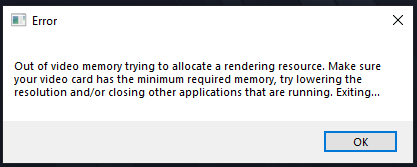
What Does “Out of VRAM” Actually Mean in D5?
VRAM is the memory built into your graphics card, separate from the system RAM on your motherboard. D5 is a GPU renderer, so when you open a project it loads the whole scene into that card memory: every mesh, every texture, the lighting, the reflections, all of it has to fit. An 8GB card gives D5 8GB to work with, and not a byte more. The moment the scene needs more than that, D5 has nowhere to put the next texture and throws the out of VRAM error, or freezes trying.
The reason 8GB specifically keeps tripping people up is that it was a comfortable amount a few years ago and is now right on the edge for arch-viz. A bedroom or a small office will sit inside it without complaint. A landscaped exterior will not. I watched a colleague burn an afternoon convinced D5 was broken, when the truth was that the 200 trees and the 4K ground textures in his scene had quietly used up every megabyte the card had.
Why Do Large Arch-Viz Scenes Eat So Much VRAM?
A handful of things drive VRAM use far more than the rest, and they are exactly the things arch-viz exteriors are made of. Vegetation is the big one, since every tree and grass patch carries geometry and its own textures. High resolution textures are next, because an 8K material sitting on a wall the camera barely sees still loads fully into memory. Then come high output resolutions, heavy reflections and large terrain. Here is a rough picture of where different scenes land. The jump from interior to vegetated exterior is the part that catches people, and it is anything but gradual:
| Scene type in D5 | Typical VRAM use | 8GB card | 12GB card | 24GB card |
|---|---|---|---|---|
| Single room interior | ~4 to 6 GB | Fine | Fine | Fine |
| Furnished interior, big windows | ~7 to 9 GB | On the edge | Fine | Fine |
| Landscaped exterior, lots of vegetation | ~12 to 18 GB | Fails | Tight | Fine |
| Large 4K urban or dense scene | ~16 to 22 GB | Fails | Fails | Fine |
How Do I Fix the Out-of-VRAM Error Without a New Card?
Before you spend on hardware, there is a fair amount of room to claw back. Start with the D5 VRAM indicator so you can see how close you are running, then attack the biggest users first. Textures usually come first, because dropping oversized maps from 8K to 2K where the camera will never notice frees a surprising amount. Vegetation comes next: lean on D5’s scatter and proxy handling rather than placing thousands of unique high detail plants, and thin out anything off camera. Delete imported objects the shot does not show, since they still load into memory even when hidden behind a wall. Lowering the output resolution while you test, then raising it only for the final, keeps memory down during the slow part of the work. And close Chrome and any other GPU hungry app, because they are quietly taking a slice of the same card. If you want the deeper version of scene-side optimization, we go further in solving D5 Render out of memory on big scenes.
When 8GB Just Is Not Enough: Getting to 24GB
There is a point where trimming stops helping and starts hurting the work. If a vegetated exterior wants 16GB and your card has 8, no amount of texture shrinking gets you there without gutting the scene the client approved. At that stage you need more VRAM, which in practice means a 24GB card such as an RTX 4090. Buying one is a real outlay, and you can read our full buy versus rent breakdown in render farm vs new workstation. The other path is renting that card in the cloud only when a heavy scene demands it.
This is where the choice of service narrows hard, and since we review them independently, the narrowing matters. D5 is a real-time GPU app, so the automated SaaS render farms cannot run it, the same way they cannot run Lumion or Enscape. The only cloud route is an IaaS server you control by remote desktop:
| Service | Model | Runs D5 Render? | VRAM you get | Where it fits, and the catch |
|---|---|---|---|---|
| iRender | IaaS | Yes | RTX 4090, 24GB | Opens scenes that fail on 8GB; you set up the machine and watch the billing timer |
| Xesktop / AWS EC2 | IaaS | Yes | Configurable GPU servers | Cost more; AWS needs heavy manual setup |
| GarageFarm | SaaS | No | n/a for D5 | Excellent and beginner friendly for offline engines like V-Ray and Blender, but cannot open a D5 file |
| RebusFarm | SaaS | No | n/a for D5 | Strong scene checker and Corona support for offline work; no D5 |
| Fox Renderfarm | SaaS | No | n/a for D5 | Cheap for big offline batches; users note more failed frames; no D5 |
Among those, iRender is the one I point people to first for a VRAM wall, because the RTX 4090 server gives you a full 24GB, which clears every row in that table above, and you install your own D5 build so the scene behaves the way it does at home. Their line is your renders, your rules, and that control is the whole point when you are trying to render the exact scene that failed locally. The catches are the usual ones: around fifteen minutes of setup the first time before your config is saved, a billing clock that runs until you shut the server down, and cards that are RTX 4090 rather than 5090. New accounts get a 100 percent bonus on the first deposit, there is 10 to 20 percent Credit Back after, and a free trial lets you load the scene that keeps erroring and watch it open on 24GB before you pay.
Scene too big for your 8GB card?Open it on an RTX 4090 with 24GB of VRAM on iRender and render it clean. 100 percent first-deposit bonus, 10 to 20 percent Credit Back, and a free trial to test the exact scene first.
See iRender’s D5 Render GPU servers
Frequently Asked Questions
- What does the out-of-VRAM error in D5 Render mean?
It means your scene needs more video memory than your graphics card has. D5 loads the entire scene, geometry, textures, lighting and reflections, into the card’s VRAM, and an 8GB card gives it only 8GB to work with. When a large scene needs more than that, D5 runs out of room for the next asset and throws the error or freezes. The fix is either to reduce what the scene loads or to use a card with more VRAM.
2. Why does my interior render fine but my exterior runs out of VRAM?
Because exteriors carry the things that eat VRAM. A furnished interior often stays under 8GB, but a landscaped exterior with lots of vegetation and 4K ground textures can demand 12 to 18GB, since every tree and grass patch adds geometry and textures that all load into card memory. That jump from interior to vegetated exterior is steep, not gradual, which is why the same card that handled your rooms suddenly fails on the garden shot.
3, How do I reduce VRAM use in D5 without ruining the scene?
Drop oversized textures from 8K to 2K where the camera will not notice, use D5’s scatter and proxy handling for vegetation instead of thousands of unique high detail plants, delete imported objects the shot does not show, and lower the output resolution while testing. Close other GPU apps like Chrome too. Watch the D5 VRAM indicator as you go so you can see which change frees the most. These steps load most heavy scenes back onto a smaller card.
4. Can I use a render farm like RebusFarm for a D5 scene that runs out of VRAM?
No. D5 Render is a real-time GPU app that needs a live desktop session, so SaaS farms like RebusFarm, GarageFarm and Fox Renderfarm cannot open a D5 file at all. They are built for offline engines such as V-Ray and Corona. To render a VRAM-heavy D5 scene in the cloud you need an IaaS server like iRender, which gives you an RTX 4090 with 24GB of VRAM, enough to open scenes that fail on an 8GB card.
Related post: My PC Crashes Every Time I Render in Lumion. Here’s What’s Actually Happening


