



My D5 Render Video Export Is Stuck for Hours: Diagnosis and Speed-Up
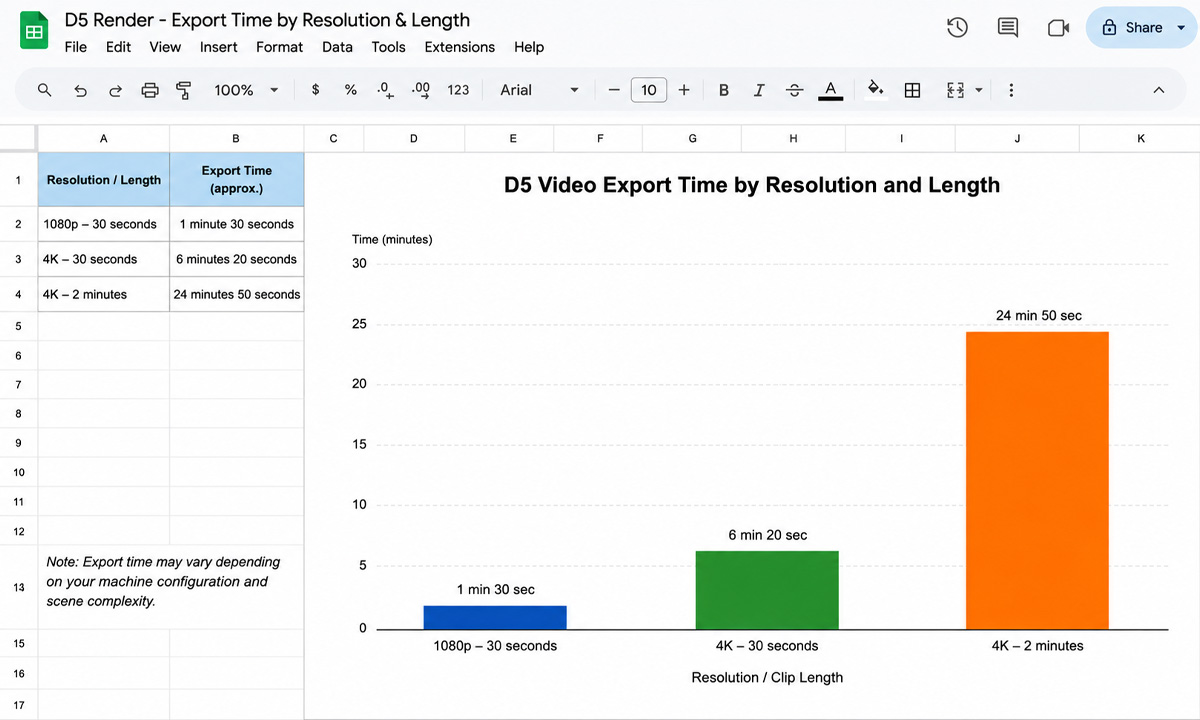
First, work out whether it is genuinely stuck or just slow, because the fix is completely different. A D5 video export renders every frame of the clip one after another, so a two minute video at 30 frames a second is 3,600 frames, and a heavy 4K scene can legitimately take many hours. That is slow, not stuck. It is only stuck if the frame counter has stopped moving, which points at a memory overflow, a driver hiccup or a full output drive. Check the frame counter first: if it is still climbing, it is working and you need to speed it up; if it has frozen, you need to fix what halted it.
Stuck or slow: how to tell the difference
This first call saves you from chasing the wrong fix for an hour. People assume “stuck” the moment an export runs long, then start killing processes and reinstalling drivers when the export was simply doing its job on a big scene. Watch the frame counter for a few minutes. The table below sorts the two situations and what each points to.
| What you observe | What it means | What to check |
|---|---|---|
| Frame counter still advancing, slowly | Slow, not stuck. It is a big render. | Resolution, frame count, ray tracing quality, scene weight |
| Frame counter frozen on one frame | Genuinely stuck | VRAM overflow on that frame, a corrupted asset, driver crash |
| Export quit or errored partway | Halted by a system limit | Output drive full, GPU memory exhausted, an unstable overclock |
| Whole machine frozen during export | Hardware maxed out | GPU and RAM saturated; close other apps, lower export settings |
I once spent forty minutes convinced an export had died, when the frame counter was crawling forward roughly one frame a minute on a 4K scene packed with vegetation. Nothing was wrong. It was just an enormous job that needed either patience or a faster card.
If it is genuinely stuck
When the counter has frozen, the usual cause is the scene asking for more graphics memory than your card has on a particular frame, which crashes the export. Lighten the scene the way you would for any VRAM problem: smaller textures, vegetation proxies, fewer hidden objects, the same approach we detail in the out of VRAM error in D5. Then confirm the basics: your output drive has free space, your GPU driver is current, and any overclock is set back to stock. If one specific frame always halts the export, something in the scene at that camera position is the trigger, so inspect what comes into view there.
If it is just slow
A slow export is not a fault, it is a big render, and you speed it up the same way you would any animation. Question the output settings first: a draft does not need full 4K or maximum ray tracing, and dropping to 1440p with a lighter preset for review can cut the time sharply. Trim the frame count where you can, since 24 or 25 frames a second instead of 30 saves hundreds of frames on a two minute clip, and a tighter edit saves more. Optimize the scene so each frame renders faster. Those choices shrink the job before you spend anything on hardware.
When the scene just needs more GPU than you have
Past a point, the export is slow because your card is the limit, and no settings change that without gutting the quality. D5 is a real-time GPU application, built around a single strong card, so the way to render faster is a more powerful GPU with more VRAM, in practice a 24GB card such as an RTX 4090. Because D5 is real-time, the traditional render farms cannot help here. GarageFarm, RebusFarm and Fox Renderfarm distribute frames across nodes for offline engines like V-Ray or Corona, not for D5, which needs a live desktop session on one GPU. They are strong tools for offline work, but a D5 export is outside what they do.
So the cloud route for D5 is a per-hour machine you control. iRender is the one I reach for, giving you a remote RTX 4090 with 24GB of VRAM that renders the export faster and holds scenes your local card runs out of memory on, with your own D5 install so the output matches what you built. The cards are RTX 4090 rather than the newer 5090, and the per-hour meter runs until you shut the machine down, so set it to power off when the export finishes. A free trial lets you time your own export on the 4090 before paying, which is the only way to know the real speed-up for your scene.
FAQ
- Is my D5 video export stuck or just slow?
Watch the frame counter for a few minutes. If it is still advancing, even slowly, the export is working and is simply a big render, since D5 renders every frame in sequence and a heavy 4K clip can take hours. If the counter has frozen on one frame, or the export quit, it is genuinely stuck, usually from a graphics memory overflow, a full output drive or a driver crash. Telling the two apart decides whether you speed it up or fix what halted it.
2. Why is my D5 export taking so many hours?
Because a video is a large number of frames rendered one after another. A two minute clip at 30 frames a second is 3,600 frames, and a 4K scene with ray tracing and vegetation can take a minute or more per frame, which adds up to many hours on a single card. It is the frame count and the per-frame heaviness combined, not a fault. Lowering resolution and frame rate for drafts, and optimizing the scene, shortens it.
3. How do I fix a D5 export that freezes on one frame?
A frozen frame usually means the scene exceeded your graphics card’s memory at that camera position. Lighten the scene with smaller textures, vegetation proxies and fewer hidden objects, and check that your output drive has free space, your GPU driver is current, and any overclock is back to stock. If the same frame always halts the export, inspect what comes into view there, since something in that shot is the trigger.
4. Can I render a D5 export on a render farm?
Not on a traditional one. D5 Render is a real-time application that needs a live desktop session on a single GPU, so SaaS farms like GarageFarm, RebusFarm and Fox cannot run it. To render a D5 export faster in the cloud you rent a per-hour machine on an IaaS service like iRender, which gives you a remote RTX 4090 with 24GB of VRAM. Those per-frame farms remain useful, but only for offline engines such as V-Ray or Corona.
Related post: How Much Does It Really Cost to Render a Lumion Project on the Cloud?


