


Lumion Pro vs Lumion on Cloud GPU: When Local Just Isn’t Fast Enough
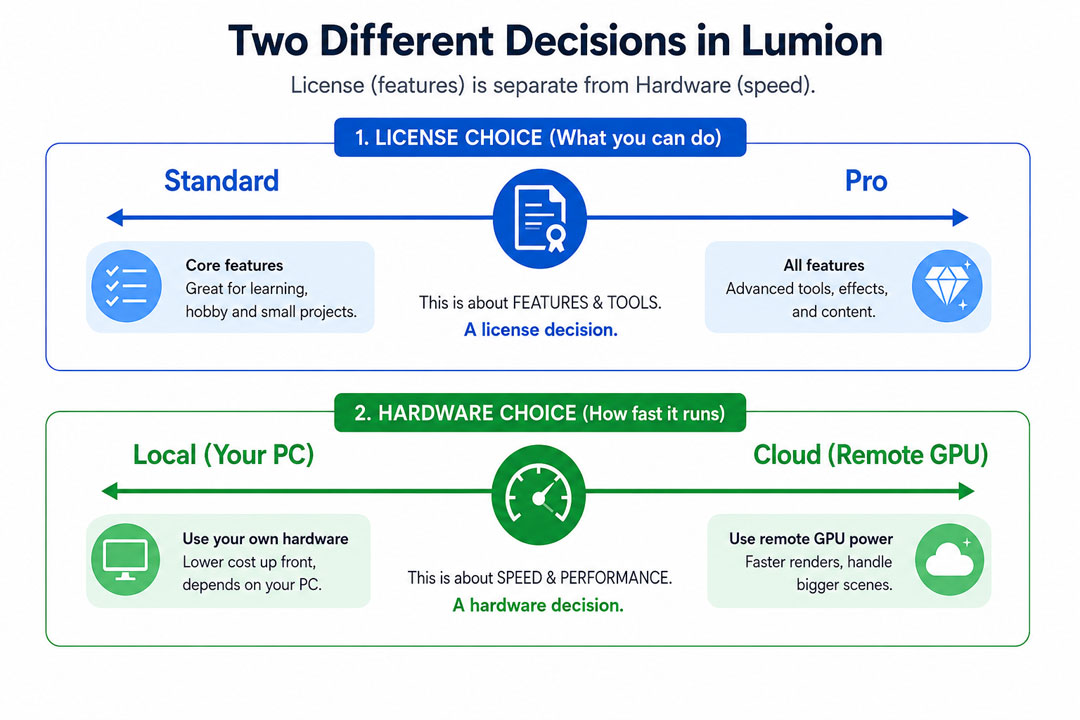
This comparison gets framed as a choice all the time, and it is built on a mix-up. Lumion Pro and a cloud GPU are not two competing ways to do the same thing. One is a software license, the other is hardware. You can run Lumion Pro on a cloud GPU, on a laptop, or on a desktop, and the license has nothing to do with how fast any of them renders.
So before you pick a side that does not exist, let me untangle what each actually is, because the real decision underneath the question is a good one: when your local machine stops keeping up, do you upgrade it or move the heavy work to a rented GPU?
What Lumion Pro actually changes, and what it does not
Lumion Pro sits above Lumion Standard on the license ladder. Moving up unlocks the larger object and material library, the import options for bringing in external models, and the higher-end output and effects. What it does not touch is render speed. A scene rendered in Pro and the same scene rendered in Standard take the same time on the same hardware, because the rendering is done by your graphics card either way. Pro gives you more to work with. It does not give you a faster machine.
This matters because architects frustrated by slow renders sometimes look at upgrading to Pro hoping it will help, and it will not. If the pain is speed, the fix lives in hardware, not the license tier. If the pain is a missing import feature or a thin content library, that is when Pro earns its cost.
The real question: local hardware or a cloud GPU
Strip away the license confusion and you are left with the decision that actually affects your render times. Your Lumion, whatever license, runs on a GPU. That GPU is either inside your own machine or rented in the cloud. Here is how those two stack up for the parts that matter day to day:
| What matters | Local machine | Cloud GPU (rented) |
|---|---|---|
| Up-front cost | High, paid once for the hardware | None; pay per hour of use |
| Render speed ceiling | Fixed by the card you bought | Rent a stronger card or several at once |
| VRAM for big scenes | Whatever your card has | 24GB on an RTX 4090, on demand |
| Animations and batches | One machine, one queue | Run several machines in parallel |
| Always available | Yes, it is yours | Spin up when needed, shut down after |
| Ongoing cost risk | Electricity, upgrades, depreciation | Idle billing if you forget to shut down |
When local just isn’t fast enough
A capable local machine is the right home base for most Lumion work. You only really feel its limit in a few recurring situations. Long 4K animations turn into overnight or multi-day jobs on one card. Big vegetated exteriors fill a smaller card’s VRAM and stall or crash, which is its own headache covered in Lumion crashing on big scenes. Tight deadlines arrive where one machine cannot finish in time no matter how you tune it. And the machine being locked up for hours during a render stops you working on anything else. When those start happening often, a local upgrade or a cloud GPU becomes worth the money.
The case for cloud over a hardware upgrade is strongest when the heavy load is occasional and spiky. Buying a stronger card or a second workstation makes sense if you render heavy scenes every day, which we cost out in render farm vs new workstation. If your crunch comes in bursts around deadlines, renting power only for those bursts keeps your money free the rest of the time.
Why a render farm is not part of this particular choice
People sometimes bring traditional render farms into this question, and for Lumion they do not belong in it. Farms like GarageFarm, RebusFarm and Fox Renderfarm distribute frames across automated nodes, which works for offline engines such as V-Ray or Corona but not for Lumion, since Lumion renders live on a single GPU and needs a desktop session. Those farms are strong tools for what they do, GarageFarm with approachable support, RebusFarm with its scene checker and Corona handling, Fox with low pricing on large offline batches, but none of them runs Lumion. So for Lumion specifically, the cloud option is an IaaS service where you rent a whole Windows machine, not a per-frame farm.
That service is where iRender fits. You rent a remote machine with an RTX 4090 and 24GB of VRAM, install your own Lumion license, Pro or Standard, and render as if it were local, just faster and with more memory headroom. You handle the setup, around fifteen minutes the first time, and the billing clock runs until you shut the machine down, so the cost discipline is remembering to power it off. New accounts get a free trial to confirm the speed gain on a real scene, plus a bonus on the first deposit. The exact numbers for a Lumion project are worked through in how much it costs to render a Lumion project in the cloud.
How to decide, in practice
Match the fix to the pain. If you are missing import features or content, that is a Lumion Pro upgrade and has nothing to do with speed. If renders are slow but heavy work is occasional, rent a cloud GPU for the crunch and keep your current machine for daily work. If you render heavy scenes most days, buy the hardware and amortize it. And if you are not sure whether your workload justifies any of this yet, start with do you really need a render farm before spending anything.
Local machine hitting its limit on Lumion?Run your existing Lumion license on a remote RTX 4090 through iRender and keep your own machine for everyday work. There is a free trial to measure the speed gain on your scene, and a first-deposit bonus to start.
See iRender’s Lumion GPU servers
FAQ
- Does Lumion Pro render faster than Lumion Standard?
No. Lumion Pro and Standard render at the same speed on the same hardware, because rendering is done by your GPU, not the license. Pro adds the larger content library, more import options and higher-end features, but it does not make a scene render any faster. If your problem is slow renders, upgrading to Pro will not help; you need a stronger GPU, locally or in the cloud. If your problem is missing features or content, that is what Pro is for.
2. Should I run Lumion locally or on a cloud GPU?
A capable local machine suits most Lumion work and is the right default. A cloud GPU earns its place when your local machine cannot keep up: long 4K animations, big scenes that fill your VRAM, or deadlines one machine cannot meet. If that heavy work is occasional, renting a cloud GPU for the crunch is usually cheaper than buying hardware. If you render heavy scenes daily, owning a stronger machine tends to win over time.
3. Can I run my Lumion Pro license on a cloud machine?
Yes. You install your own Lumion license, Pro or Standard, on a rented cloud Windows machine and run it there exactly as you would locally. The cloud machine just provides faster hardware, typically an RTX 4090 with 24GB of VRAM. Your license is unrelated to where the GPU lives, so a Pro user gets all their Pro features while rendering on cloud horsepower. Note that traditional render farms cannot run Lumion, so this is a rented full machine, not a per-frame farm.
4. Is a render farm an option for Lumion?
Not a traditional one. SaaS render farms like GarageFarm, RebusFarm and Fox distribute frames across nodes for offline engines such as V-Ray and Corona, and Lumion is a real-time app they cannot run. The cloud option for Lumion is an IaaS service like iRender, where you rent a whole Windows machine with a GPU and run Lumion on it yourself. Those per-frame farms remain good choices, just for offline renderers rather than Lumion.
Related post: How Much Does It Really Cost to Render a Lumion Project on the Cloud?


