


Can Freelance Architects Afford a Render Farm? A Realistic Budget Guide
Yes, and more easily than buying the hardware, because pay-per-use cloud rendering fits irregular freelance income. The fear most freelancers carry is that a render farm means a monthly subscription or a commitment they cannot justify between projects. It does not. You pay only for the hours or frames you actually render, so a quiet month costs nothing and a busy one scales up on demand. For a freelancer whose income arrives in lumps, that is a better match than sinking a few thousand into a workstation that sits idle half the year.
I freelanced for years before joining a studio, and the cash-flow math was always the real constraint, not the rendering. A tool that bills only when work comes in solves the exact problem a freelancer has.
Why the subscription fear is misplaced
The word “render farm” makes people picture a recurring bill, like a software subscription that drains your account whether you use it or not. Cloud rendering does not work that way. Both kinds of service, per-frame farms and per-hour machines, charge for usage. Render nothing in March and you pay nothing in March. That single fact changes the affordability question entirely, because you are no longer asking “can I commit to this every month,” you are asking “can this one project absorb a small render cost,” and almost any paid project can.
What it actually costs per job
The figures below are illustrative and assume a single cloud GPU at around eight dollars an hour for real-time work like Lumion, with per-frame farm costs for offline engines depending on the job. The point is the order of magnitude, not the exact cents.
| Typical freelance job | Rough cloud render cost | What buying hardware for it would cost |
|---|---|---|
| A handful of interior stills | a few dollars | Hard to justify a GPU upgrade for this alone |
| A set of 4K exterior stills with revisions | $10 to $25 | A 24GB card is several hundred to over a thousand |
| A 30 second client animation | $30 to $40 in GPU time | Plus a stronger machine to render it in reasonable time |
| An occasional 2 minute walkthrough | into the hundreds, a few times a year | A workstation that sits idle between these |
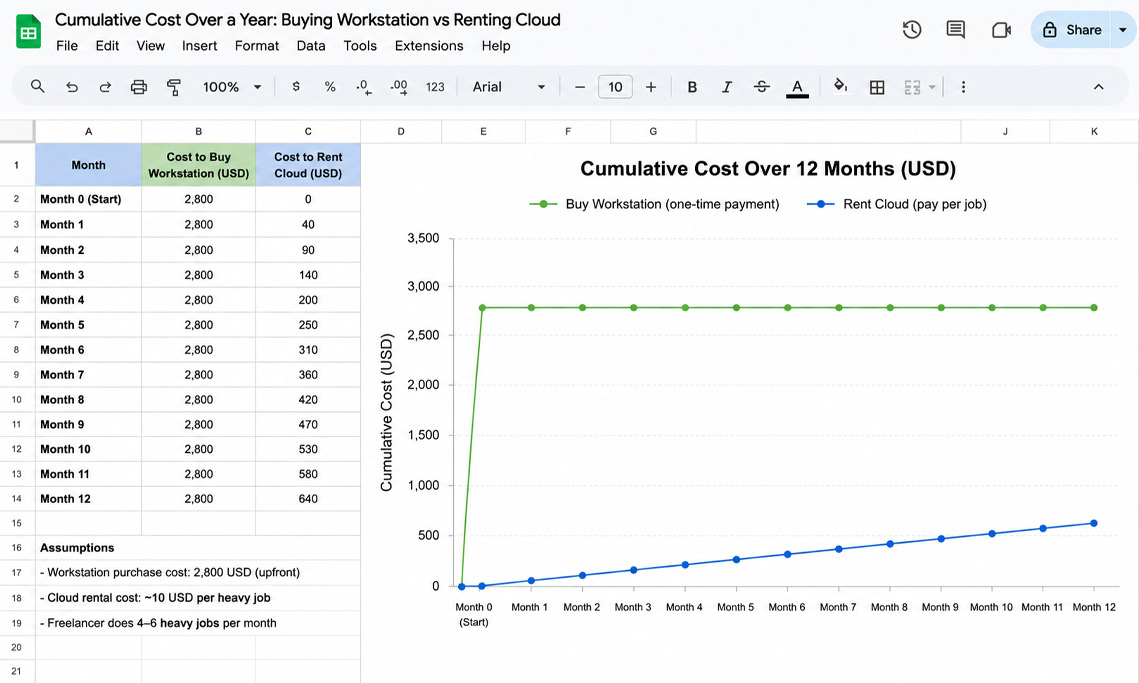
Look at the right-hand column. The case for renting gets stronger the less often the heavy job comes. A freelancer who renders a big walkthrough three times a year would spend more on the workstation to do it well than on renting the power for all three combined. The full ownership math, including the costs people forget, is in why buying a workstation costs more than you think.
Stretching a freelance budget further
A few things make cloud rendering even kinder to a freelance budget. New accounts usually get a first-deposit bonus that matches your initial top-up, so your early renders effectively cost half. Credit Back returns a portion of each session, lowering the rate over time. If you are still studying or recently qualified, some services offer a student discount worth asking about. And a free trial lets you render a real job before spending anything, which is the safest way to learn the cost on your own scenes rather than a generic estimate.
The one cost that catches freelancers out is idle billing on per-hour machines, where the meter runs until you shut the machine down. Leave a server on overnight by accident and the saving evaporates, so the habit to build early is powering off the moment a job finishes, covered in the surprise idle bill.
Choosing a service as a freelancer
Which service fits depends on your renderer, and the differences are worth knowing rather than smoothing over. If you work in offline engines like V-Ray or Corona, a per-frame SaaS farm is predictable and has no idle risk, which suits a careful freelance budget. GarageFarm is the gentlest to start with and has support that answers, which matters when you are figuring it out solo. RebusFarm adds a scene checker and handles Corona well. Fox Renderfarm is usually the cheapest on large offline batches. If you work in real-time apps like Lumion or Enscape, those farms cannot run your scene, so you rent a per-hour machine instead. iRender is the one I point freelancers to there, with a dedicated RTX 4090, the promotions above, and the idle billing to watch.
One caveat worth stating: if your work is almost all small stills that your current machine handles in minutes, you may not need any of this yet. Cloud rendering earns its place when a job is too big or too slow for what you own, not as a default for every render. If you are unsure where your workload sits, do you really need a render farm is the place to start.
Freelancing and only need power now and then? iRender bills per hour with a free trial and a first-deposit bonus, so a quiet month costs nothing.<a href="https://irendering.net/?utm_source=radarrender&utm_medium=referral&utm_campaign=freelance-render-budget" target="_blank" rel="noopener"> See pricing →
FAQ
- Do render farms require a monthly subscription?
No. Both per-frame render farms and per-hour cloud machines charge only for what you render. There is no recurring fee that drains your account between projects, so a month with no rendering costs nothing. That pay-per-use model is what makes render services affordable for freelancers, whose income arrives unevenly. You top up an account or pay per job, and the cost tracks your actual workload rather than the calendar.
2. Is it cheaper for a freelancer to rent cloud rendering or buy a workstation?
For most freelancers, renting is cheaper. A render-capable workstation is a large up-front cost that sits idle between projects, while cloud rendering charges only when you use it. If your heavy renders are occasional, a few animations or walkthroughs a year, renting the power for those costs far less than owning hardware to do them well. Buying starts to win only when you render heavy scenes most working days.
3. How much should a freelance architect budget for cloud rendering?
It scales with the job. A few interior stills cost a few dollars, a set of 4K exteriors with revisions runs roughly $10 to $25, a 30 second animation is around $30 to $40 in GPU time, and an occasional walkthrough can reach the hundreds. Most freelancers can absorb these into the project fee easily, since the render cost is small next to what the job pays. Use a first-deposit bonus and a free trial to lower and confirm your real numbers.
4. Which render service is best for a freelance architect?
It comes down to your renderer. For offline engines like V-Ray or Corona, a per-frame SaaS farm is predictable with no idle risk: GarageFarm for easy onboarding and support, RebusFarm for its scene checker and Corona strength, Fox for cheap large batches. For real-time apps like Lumion or Enscape, those farms cannot run your scene, so a per-hour IaaS machine like iRender fits, with promotions that help a tight budget and idle billing to watch.
Related post: Why Is Cloud Rendering So Expensive? A Cost Breakdown for Architects


