


Lumion Keeps Crashing on Big Scenes: Causes and Fixes for Architects
When Lumion crashes only on your big scenes while smaller ones run fine, the scene is asking for more than your graphics card can hold. Lumion loads the whole scene into VRAM, and a large exterior packed with vegetation, high resolution textures and imported models can push past an 8 or 12GB card, at which point Lumion runs out of room and falls over. The first fixes are all on the scene side: cut oversized textures, use proxies for vegetation, purge unused assets, and split a monster scene into manageable pieces. Most big-scene crashes clear with those alone. When a scene genuinely needs more memory than your card has, the remaining fix is a card with more VRAM, owned or rented in the cloud. Figures below are illustrative.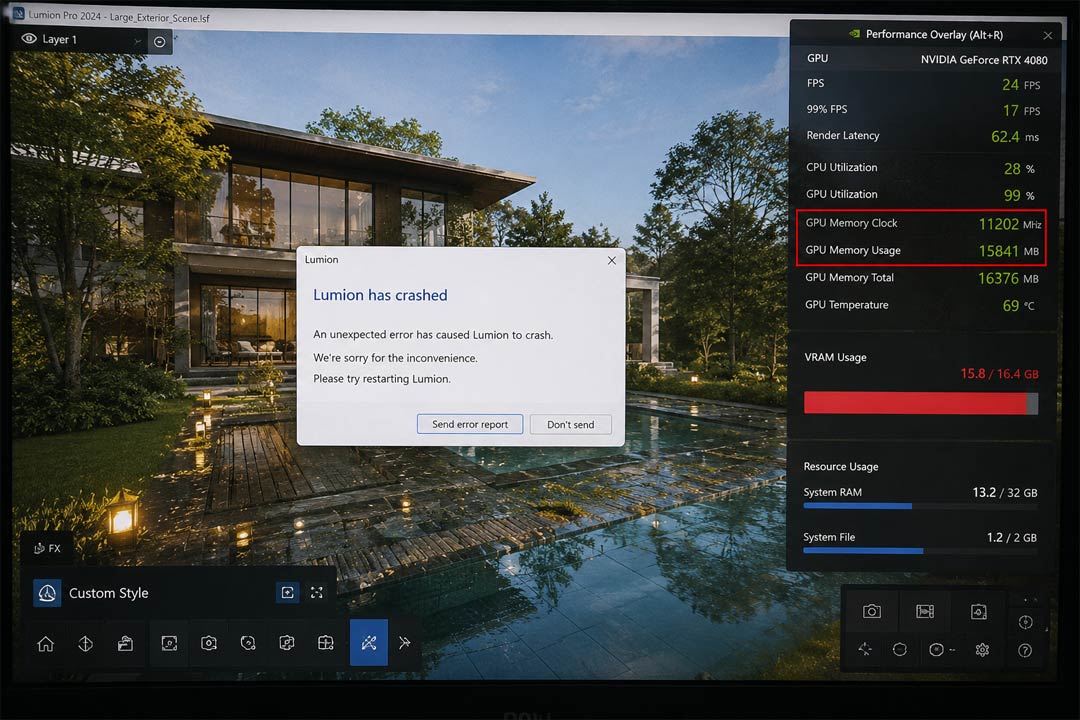
Why size, not the software, is usually the cause
It is tempting to file this under “Lumion is buggy,” and sometimes a specific build does misbehave, but the pattern of small scenes working and big ones crashing points somewhere else. Lumion has to hold the entire scene in your graphics card’s memory while it renders: every mesh, every texture, all the vegetation, the lighting. A small interior fits comfortably. A large exterior with a planted courtyard, 4K materials and a few imported BIM models can ask for two or three times the memory, and when it asks for more than the card has, there is nowhere to put the next asset and the program crashes.
If you are not sure whether memory is the cause or whether it is something else like heat or the power supply, the component-by-component way to find out is in why your PC crashes when you render in Lumion. This article assumes the scene size is the trigger, since that is what “only on big scenes” usually means.
What in your scene is most likely too big
A handful of culprits account for nearly all of the bloat, and they are worth attacking in order of how much memory they free.
| What is too heavy | What it triggers | How to fix it |
|---|---|---|
| High resolution textures (8K everywhere) | VRAM fills fast; an 8K map the camera barely sees still loads fully | Drop to 2K or 4K where detail will not be missed; this often frees the most |
| Dense unique vegetation | Thousands of individual high-detail plants stack up geometry and textures | Use Lumion’s library plants and scattering rather than thousands of unique imports |
| Heavy imported models | Over-detailed BIM or CAD geometry loads at full weight | Decimate or simplify before import; remove interior detail the shot never sees |
| Hidden and off-camera objects | They still load into memory even when not visible | Delete what no camera in the project will ever show |
| One enormous all-in-one scene | Everything competing for memory at once | Split into separate scenes per shot or area, each lighter |
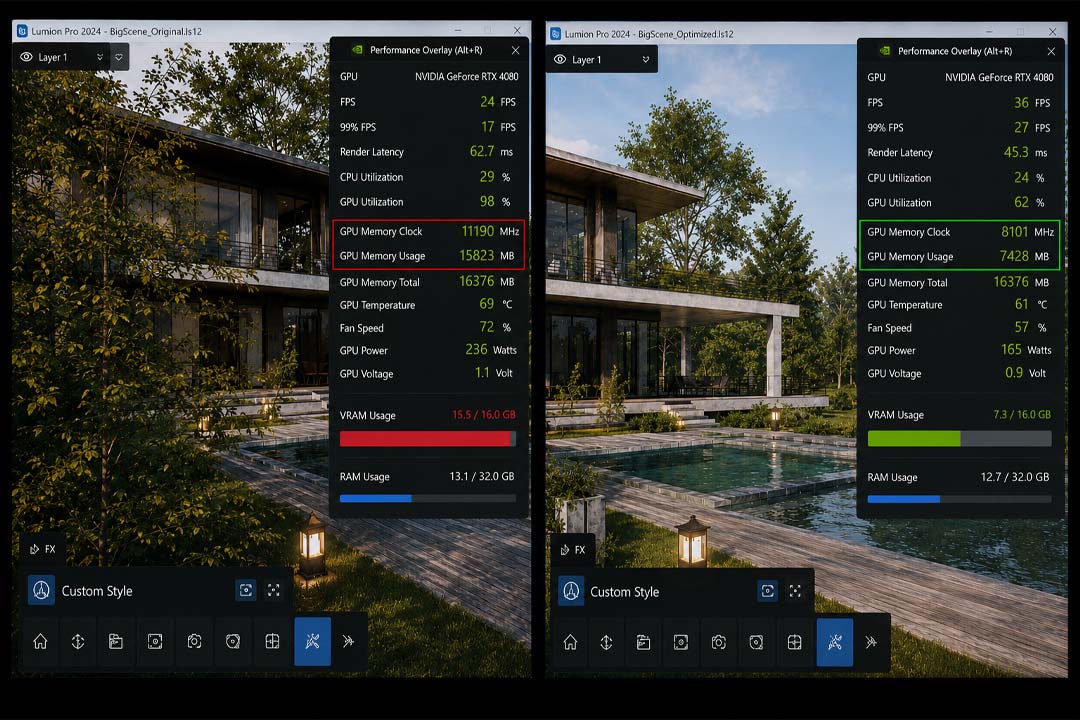
Work through those in order and watch the memory reading drop. I have rescued scenes I was sure needed new hardware just by finding three 8K textures doing 2K work and a thousand imported grass blades that a scatter would have handled. The optimization is unglamorous, but it is free, and it solves the majority of big-scene crashes outright.
When the scene is genuinely too big for the card
There is a point where trimming starts to cost you the quality the client signed off on. If a vegetated exterior legitimately needs 16GB and your card has 8, you can keep cutting, but you are now degrading the work to fit the hardware. That is the line where more VRAM becomes the real answer, in practice a 24GB card such as an RTX 4090.
This is the same VRAM wall that hits D5 users, which we cover from that angle in the out of VRAM error in D5. Because Lumion is a real-time app, traditional render farms cannot run it, so renting more memory means renting a whole machine on an IaaS service rather than sending the scene to a per-frame farm. The farms, GarageFarm, RebusFarm and Fox Renderfarm, are excellent for offline engines like V-Ray and Corona but cannot open a Lumion file at all. iRender is the service I point Lumion users to for this, giving you a remote RTX 4090 with 24GB of VRAM that opens scenes an 8GB card crashes on, with your own Lumion install so the scene behaves the way you built it. The cards are RTX 4090 rather than the newer 5090, and you set the machine up yourself the first time, around fifteen minutes.
FAQ
- Why does Lumion crash only on my large scenes?
Because big scenes ask for more graphics memory than your card has. Lumion loads the entire scene into VRAM, and a large exterior with vegetation, 4K textures and imported models can need two or three times the memory of a small interior. When the scene exceeds the card’s VRAM, Lumion has nowhere to put the next asset and crashes. Small scenes fit and run fine, which is why the crashes track scene size rather than a software fault.
2. How do I stop Lumion crashing on big scenes without new hardware?


