How to Render an Architectural Animation Overnight Without Leaving Your PC On
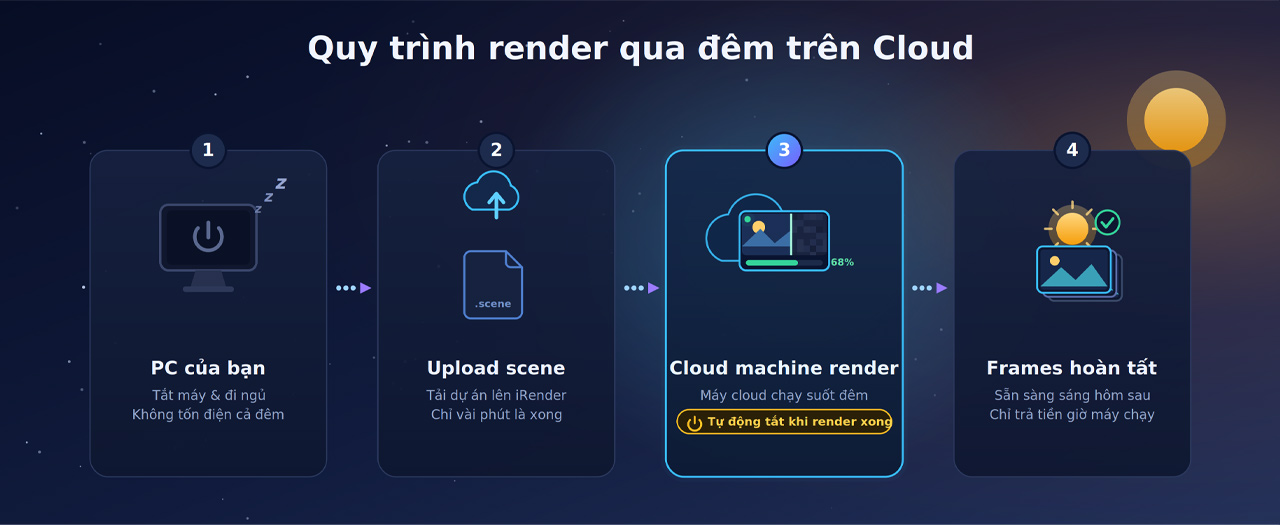
The trick is to render on a machine that is not yours. An overnight animation does not have to mean your own computer running hot and loud in an empty office until morning. You upload the scene to a cloud machine, start the render there, and switch your own PC off and go home. The render finishes on remote hardware while your electricity bill, your fans and your wear and tear all stay out of it. The one thing to get right is making sure the cloud machine shuts itself down when the job ends, so you are not simply moving the all-night running from your PC to a billed server.
I used to leave my workstation grinding overnight and felt the cost in three ways: the power, the heat in a closed room, and the quiet worry of a machine running unattended for eight hours. Moving the overnight job to the cloud removed all three, and the office was a lot cooler for it.
Why leaving your own PC on all night is a poor habit
It works, which is why people keep doing it, but it carries costs that pile up. A render-grade machine pulls serious power for eight hours every night you do this. It runs hot the whole time, in a room with nobody there to notice if cooling fails. It wears the components through sustained full load. And it leaves you with a locked machine you cannot use, which is the same lockout we cover in why your computer is unusable while rendering. For a one-off it is fine. As a routine, it is wear and electricity you do not need to spend.
The overnight cloud workflow, step by step
The setup is straightforward once you have done it once. The aim is to hand the whole job to remote hardware and walk away.
Render farm or cloud machine: which suits an overnight job
Where you send the overnight render depends on your renderer, and both routes let your own PC sleep. If your animation comes from an offline engine like V-Ray or Corona, a SaaS render farm is built for this. You submit the job and their nodes render it across many machines overnight, billed per frame, with nothing of yours left running. GarageFarm suits you if you want support on hand for an overnight submission, RebusFarm adds a scene checker that catches asset problems before they waste the night, and Fox Renderfarm is usually the cheapest for a big batch. If your animation is in a real-time app like Lumion, Enscape or D5, those farms cannot run it, so you rent a cloud GPU machine and render there yourself.
For the real-time route, iRender is the one I reach for, since you can run your exact Lumion build on a remote RTX 4090, or spin up several machines to split the frames and finish before morning. The promotions help on an overnight job, a first-deposit bonus and Credit Back lowering the effective cost, and there is a free trial to rehearse the upload-and-shutdown routine once before you rely on it. The single thing to get right is that auto-shutdown, because a cloud machine left running after the render finishes is the exact surprise bill we describe in the surprise idle bill.
Stop running your own machine to exhaustion every night. Render the animation on a remote RTX 4090 with iRender, set auto-shutdown, and switch your PC off. A free trial lets you rehearse the routine first. => See how overnight cloud rendering works
If your real problem is the animation taking all night in the first place rather than where it runs, the speed fixes are in cutting an all-night Lumion animation to an hour, and the deadline planning around it is in why render times eat deadlines.
FAQ
- How do I render overnight without leaving my computer on?
Render on a cloud machine instead of your own. Upload the scene to a cloud GPU server or a render farm, start the job there, and switch your own PC off. The render finishes on remote hardware overnight, so your electricity, heat and wear stay out of it. For real-time apps like Lumion you rent a cloud GPU machine; for offline engines like V-Ray you can use a render farm. Either way, set the cloud machine to shut down when the job ends.
2. Is it bad to leave my PC rendering all night?
For a one-off it is fine. As a routine it costs you in three ways: real electricity for eight hours of full load, sustained heat in an unattended room, and wear on the components from running flat out. It also leaves the machine locked and unusable. None of that is dangerous occasionally, but doing it every night adds up, which is why many architects move recurring overnight renders to the cloud.
3. Will a cloud machine keep billing me overnight if I forget it?
Yes, on a per-hour service the meter runs until you shut the machine down, so a server left on after the render finishes bills the idle hours. That is why auto-shutdown matters: set the machine to power off when the job completes, so you do not trade leaving your own PC on for leaving a billed cloud machine on. Per-frame render farms avoid this entirely, since you pay for frames rather than machine time
4. Can I render a Lumion animation overnight on a render farm?
Not on a traditional one. SaaS render farms cannot run Lumion, since it is a real-time app that needs a live desktop on a single GPU. To render a Lumion animation overnight you rent a cloud GPU machine on an IaaS service like iRender, start it before you leave, and set auto-shutdown. Offline engine animations, in V-Ray or Corona, can go to a per-frame farm overnight instead.
Related post: Why Arch-Viz Walkthroughs Take Days to Render (And How to Speed Them Up)