Enscape Batch Rendering Is Painfully Slow: A Faster Cloud Workflow
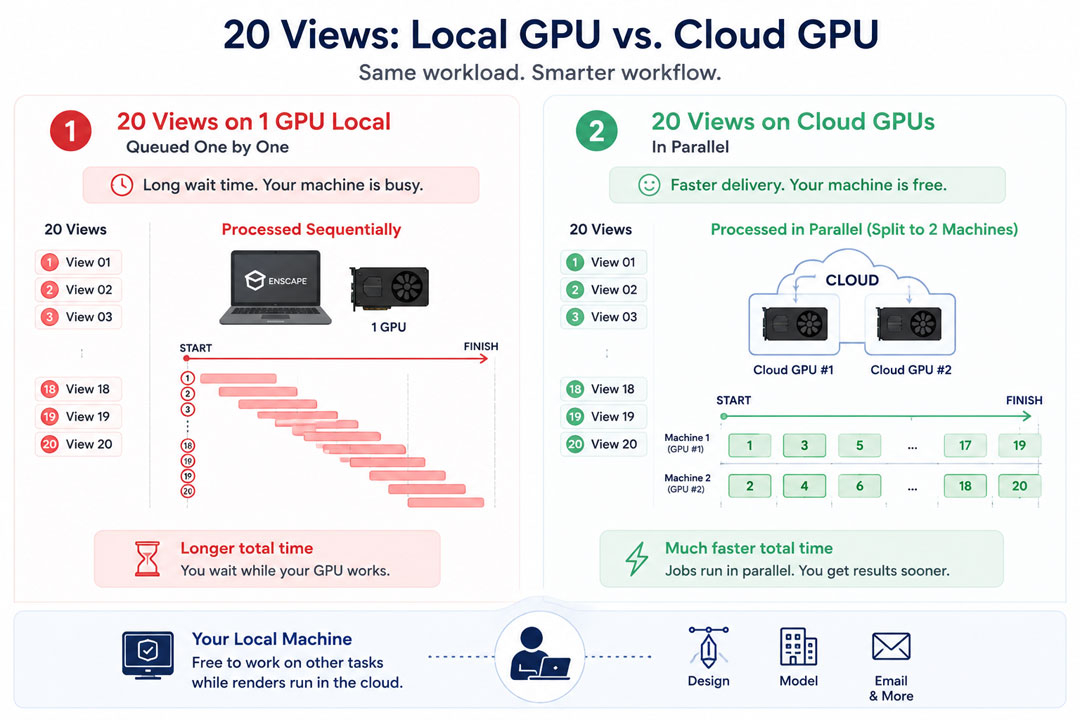
Enscape’s batch render goes through your saved views one at a time on a single GPU, so a set of twenty high-resolution stills queues up and renders sequentially, locking your machine for the whole run. It is not broken, it is just one card doing one image after another. The faster workflow is to move that batch onto a powerful cloud GPU, which renders each view quicker and, more importantly, frees your own computer so you can keep working. Because Enscape is real-time, this means a rented machine you control, not a per-frame render farm, since farms cannot run Enscape at all. Timings below are illustrative.
Why the batch crawls
The slowness is structural, not a setting you missed. Enscape renders on your GPU in real time, and a batch is simply it producing each saved view in turn at full quality and resolution. There is no distributing the work, the way an offline render farm splits frames across many nodes. One card takes view one to the finish, then starts view two. So a batch of twenty 4K stills is twenty full renders back to back, and if each takes a few minutes, the set ties up your machine for an hour or more while you can do nothing else on it. Scale the resolution up or add heavy reflections and the per-view time climbs, and the whole batch with it.
People sometimes assume a render farm will rescue this, and for Enscape it will not. GarageFarm, RebusFarm and Fox Renderfarm distribute frames for offline engines like V-Ray and Corona, and Enscape is a real-time app none of them can open. They are excellent at offline batches, just not Enscape ones. That leaves the cloud route that does work for Enscape: renting a whole machine with a stronger GPU.
A faster cloud workflow, step by step
What it costs and what to watch
At an illustrative eight to nine dollars an hour for a cloud RTX 4090, a batch that takes a couple of hours of machine time costs in the region of fifteen to twenty dollars, less if a first-deposit bonus is in play. The cost to watch is the same one that catches everyone on per-hour machines: idle billing. If you leave the machine running after the batch finishes, it keeps charging, so the shutdown step is not optional, and it is the same trap we describe in the surprise idle bill. iRender is the service I use for Enscape batches, with a dedicated RTX 4090, a free trial to time your own set, and a first-deposit bonus. It is RTX 4090 rather than the newer 5090, and you handle the setup the first time. If the batch is part of a deadline crunch, the planning side is in why render times eat deadlines.
Tired of a batch locking your machine for the afternoon? Offload it to a remote RTX 4090 with iRender, keep working, and collect the stills when it is done. A free trial lets you time your own set first. → See iRender’s Enscape servers.
FAQ
- Why is Enscape batch rendering so slow?
Because Enscape renders on a single GPU and a batch processes your saved views one after another, not in parallel. Each view is a full render at your chosen resolution and quality, so a set of twenty 4K stills is twenty renders back to back, tying up your machine for the whole run. There is no way to distribute the work the way an offline render farm splits frames, so the batch time is simply the sum of every view rendered in turn.
2. Can I speed up an Enscape batch with a render farm?
Not a traditional one. SaaS render farms like GarageFarm, RebusFarm and Fox cannot run Enscape, since it is a real-time app needing a live session on a single GPU. The way to speed up an Enscape batch in the cloud is to rent a whole machine with a stronger GPU on an IaaS service like iRender, run the batch there, and optionally split the views across two machines for a large set. Those per-frame farms remain useful for offline engines only.
3. How do I render an Enscape batch without locking my computer?
Run the batch on a cloud machine instead of your own. Set up your views locally, then open the project on a rented cloud GPU, start the batch there, and keep working on your own computer while it renders remotely. When the batch finishes, collect the stills and shut the cloud machine down so it stops billing. This keeps your workstation free for the hour or more a big batch would otherwise occupy.
4. How much does it cost to render an Enscape batch in the cloud?
It tracks machine time. At an illustrative eight to nine dollars an hour for a cloud RTX 4090, a batch needing a couple of hours of machine time costs roughly fifteen to twenty dollars, less with a first-deposit bonus. Running two machines to finish faster doubles the hourly spend but halves the wall-clock time. The one extra cost to avoid is idle billing, so shut the machine down the moment the batch completes.
Related post: My D5 Render Video Export Is Stuck for Hours: Diagnosis and Speed-Up