How to Avoid Wasting Money on Idle Cloud Render Time (Honest IaaS Guide)
Every dollar wasted on a per-hour cloud machine comes from the same place: the meter runs from boot until you shut down, not just while you render. So idle waste is anything you pay for when the machine is on but not working, a render that finished hours ago, a long lunch, a forgotten weekend. Killing it comes down to a few habits: shut the machine down the instant a job ends, use auto-shutdown as a safety net, right-size the machine to the job, and put alerts and a quick dashboard check in place so a machine you left on shows up in minutes, not on the invoice. Do those and the per-hour model becomes as cheap as it should be.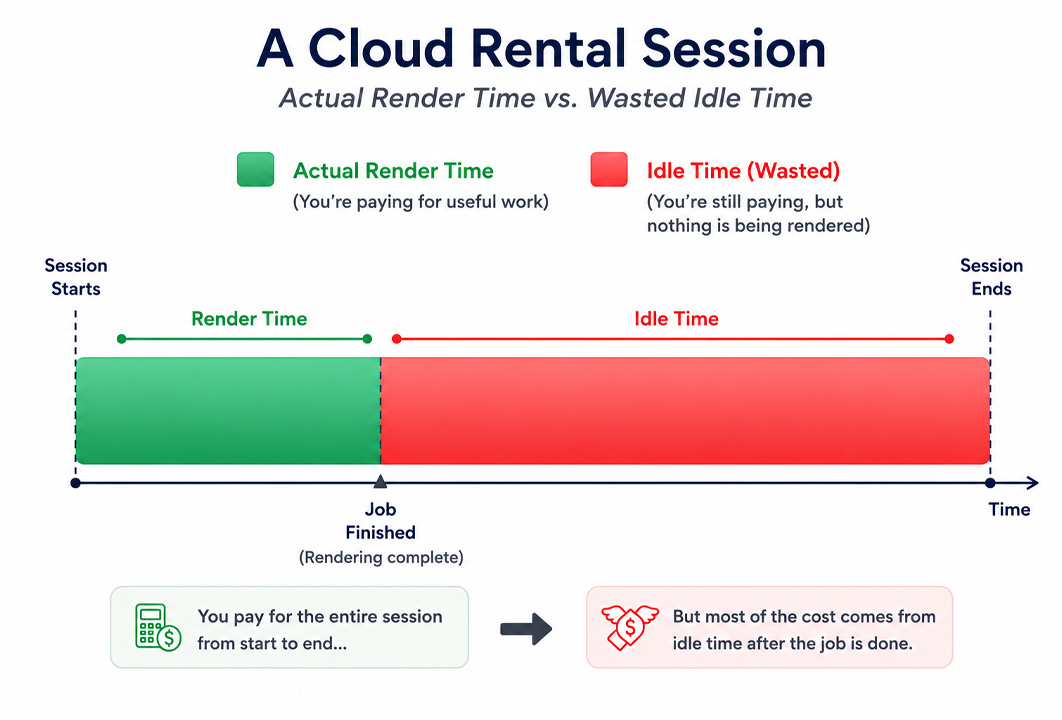
Understand the meter first
The whole guide rests on one mechanic, so it is worth being plain about it. When you rent a per-hour cloud machine, the IaaS model, you are renting the entire computer, and you pay for every hour it is powered on and assigned to you. Rendering or not makes no difference to the meter. This is unlike a per-frame render farm, where you pay for output and there is no machine of yours to leave running. The freedom of a whole machine you control is exactly why people choose IaaS, and the idle meter is the cost of that freedom. Manage the meter and the model is excellent. Ignore it and it punishes you, as the stories in the surprise idle bill show.
The habits that kill idle waste
Where the waste actually hides
It helps to know which moments leak money, because they are not always obvious. The render finishing while you are asleep is the famous one, but there are quieter leaks too.
| Hidden idle moment | What it costs you | How to close it |
|---|---|---|
| Machine left on after a finished render | Hours of full rate for zero work | Shut down immediately; auto-shutdown as backup |
| Long upload or download with the GPU idle | Paying GPU rate while only the network works | Prepare and compress files before starting; keep transfers tight |
| Setup and installation time | The meter runs during the first configuration | Save your machine image or config so setup happens once, not every session |
| Walking away mid-session | Idle hours during breaks and meetings | Shut down for any break longer than the restart is worth |
| Over-provisioned multi-GPU server | Paying for cards the job never uses | Right-size; reserve big servers for parallel batches |
Being straight about IaaS versus SaaS on cost
Since this guide is about the per-hour model, it is only fair to say where the per-frame model wins. A SaaS render farm charges for frames rendered, so it carries no idle risk at all, there is no machine of yours to leave on. For a defined batch of offline frames in V-Ray, Corona or Arnold, that predictability is a real advantage, and GarageFarm, RebusFarm and Fox each do that well, GarageFarm with easy onboarding, RebusFarm with its scene checker, Fox with low batch pricing. What the per-frame model cannot do is run real-time apps like Lumion, Enscape or D5, install custom software, or give you an interactive machine, which is the whole reason IaaS exists. So the choice is not which is cheaper outright. It is per-frame for offline batches where you want no idle risk, and per-hour for real-time and custom work where you accept the meter and manage it.
iRender is the per-hour service I use, and like every IaaS provider it has the idle clock, so all of the above applies. What softens the cost is auto-shutdown to catch the nights you forget, a free trial to learn the routine before real money is involved, and the promotions, a first-deposit bonus and Credit Back, that lower the effective rate. The worked cost of an actual project, with these habits applied, is in how much it costs to render a Lumion project.
Want the control of a per-hour machine without the waste? iRender has auto-shutdown and a free trial so you can build the habit before it costs you. → See iRender’s pricing and shutdown options.
FAQ
- What counts as idle time on a cloud render machine?
Any time the machine is powered on and billing but not doing useful render work. That includes a render that finished while the machine kept running, long file uploads or downloads with the GPU sitting idle, setup and installation time, breaks where you walked away, and extra GPUs on an over-sized server that the job never uses. On a per-hour service the meter does not care whether you are rendering, so all of that idle time costs the full rate.
2. How do I stop wasting money on idle cloud rendering?
Build a few habits. Shut the machine down the instant a job finishes, and remember that closing the remote window is not the same as powering off. Turn on auto-shutdown as a safety net, right-size the machine so you are not paying for unused GPUs, set an alarm for when long renders should end, and check the billing dashboard at the start of each session. Together these remove almost all idle waste.
3. Does auto-shutdown prevent idle charges?
It prevents the worst of them. Auto-shutdown powers the machine off after a render completes or after a set idle period, which protects you on the nights and weekends you forget, exactly when idle waste is largest. It is a safety net rather than a substitute for shutting down yourself, since it may wait for a set period before acting, but enabling it is the single most effective protection against the big overnight and weekend bills.
4. Is per-frame or per-hour rendering better for avoiding waste?
Per-frame carries no idle risk, since you pay for frames rendered with no machine of yours to leave on, which makes it the lower-waste choice for defined offline batches in engines like V-Ray or Corona. Per-hour gives you a whole machine to run real-time apps and custom setups, which per-frame cannot do, but you have to manage the meter. So for offline batches where you want zero idle risk, per-frame wins; for real-time and custom work, per-hour with disciplined shutdown is the way.
Related post: Why Buying a Workstation Costs More Than You Think (3-Year Math for Arch-Viz)