Best Lumion Render Farm 2026: Cloud Rendering Guide for Architects
In 2026, architectural videos look beautiful and realistic, but they require a lot of power and can be very slow to render on a normal computer. Even the most expensive workstations can take hours or even days to finish a complex scene. This is where Cloud Rendering changes everything. Instead of upgrading your PC every year, smart architects are now moving their heaviest projects to the cloud. But with so many options, which one is actually compatible with Lumion’s unique real-time engine?
In this blog, Radarrender will break down the best Lumion render farms for 2026 to help you cut your render times from 8 hours to just 30 minutes.
Let’s dive in!
Overview of Lumion
Lumion is a powerful, real-time 3D rendering software designed specifically for architects and designers to create high-quality images, videos, and 360 degree panoramas. It transforms 3D models into lifelike, detailed scenes by providing extensive tools for lighting, materials, and landscaping, enabling rapid visualization of designs.
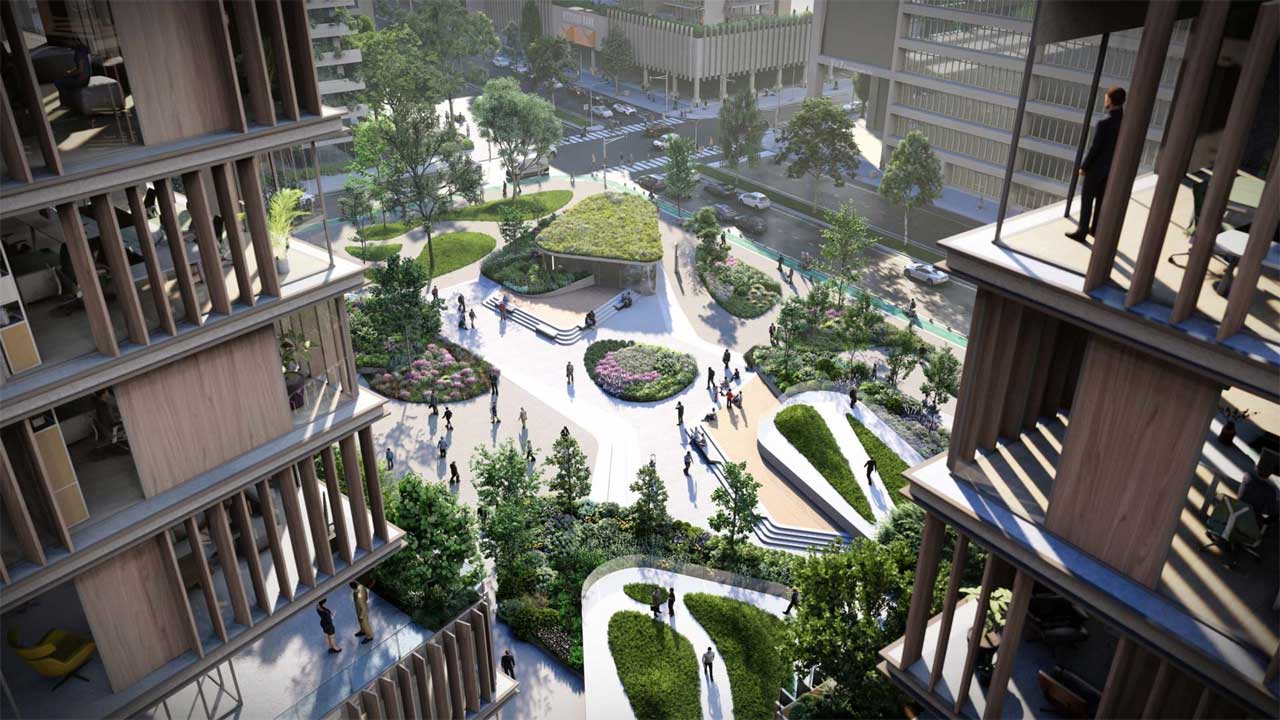
source: Lumion
Why is Lumion the first choice for Architects in 2026?
In 2026, Lumion is the top choice because it turns complex 3D models into beautiful, lifelike images in minutes. It is famous for its “Drag and Drop” simplicity, you don’t need to be a tech expert to add realistic trees, moving people, or perfect sunlight to your design.
The 2026 version is especially powerful, using AI and Ray Tracing to make glass, water, and shadows look exactly like a real photograph. It allows architects to focus on creativity and storytelling rather than struggling with difficult settings. Simply put, Lumion is the fastest way to make your clients fall in love with your project.
Lumion 2026 System Requirements
Before getting started with cloud rendering or choosing a render farm, it’s essential to understand the Lumion 2026 system requirements to ensure optimal performance and compatibility for your projects.
| Feature | Minimum Requirements | Recommended Requirements | High-end Requirements |
| Suitable for | Small parks, residential homes, or simple interiors | Large homes, detailed commercial buildings, or landscapes. | Airports, stadiums, detailed cities, or multi-floor high-rise. |
| Operating System | Windows 10/11 64-bit (ver. 2004 or newer) | Windows 10/11 64-bit (ver. 2004 or newer) | Windows 11 64-bit (latest version) |
| Graphics Card (GPU) | G3DMark score: 8,000+
NVIDIA GTX 1060, RTX 3050, or better. |
G3D Mark
score: 14,000+ NVIDIA RTX 3060, RTX 2000 ADA, RX 6700 XT, or better. |
G3D Mark
score: 22,000+ NVIDIA RTX 3090, RTX 4080/4090, RTX 5080/5090 (New), RTX A6000. |
| GPU Memory (VRAM) | 6 GB or more | 10 GB or more | 16 GB or more (24GB recommended) |
| Processor (CPU) | Single-thread CPUMark: 2,200+ | Single-thread CPUMark: 2,600+ | Single-thread CPUMark: 3,000+ |
| CPU Examples | Ryzen 5 1600X, Intel i7-4790S, or better. | Ryzen 5 3600, Intel i5-8600, or better. | Intel i7-12700K, i9-14900K, Ryzen 9 7950X, or better. |
| System RAM | 16 GB minimum | 32GB or more | Ideally 64 GB or more |
| Storage (Free Space) | 105 GB or more | 105 GB or more | 105 GB or more |
Lumion 2026 Compatibility: The New Ray Tracing Standard
In 2026, Ray Tracing is no longer just a fancy extra feature, it is the heart of Lumion. The new Ray Tracing 2.0 engine found in Lumion 2026 makes water, glass, and shadows look incredibly realistic because they react to light exactly like the real world.
However, to enjoy these beautiful visuals, you need to be aware of a few key changes:
- The “VRAM Wall”: Lumion 2026 is very hungry for power. While old graphics cards (like the GTX series) might still open the program, they can’t handle the new Ray Tracing features. To render smoothly, your computer must have a modern GPU with plenty of memory (VRAM). Without it, your project might lag or even crash.
- Smart AI Upscaling: This is a huge time-saver! Lumion 2026 now includes an AI Image Upscaler. This means you can render a fast, simple video at 1080p resolution and let the AI “boost” it to 8K quality. This smart trick can save you up to 70% of your total rendering time.
- Seamless Software Sync: Whether you use Revit, SketchUp, or Rhino, Lumion 2026 stays perfectly in sync. With the latest LiveSync technology, every change you make in your 3D model shows up instantly in Lumion. This ensures your workflow stays fast and stress-free.
Benchmark RTX 4090
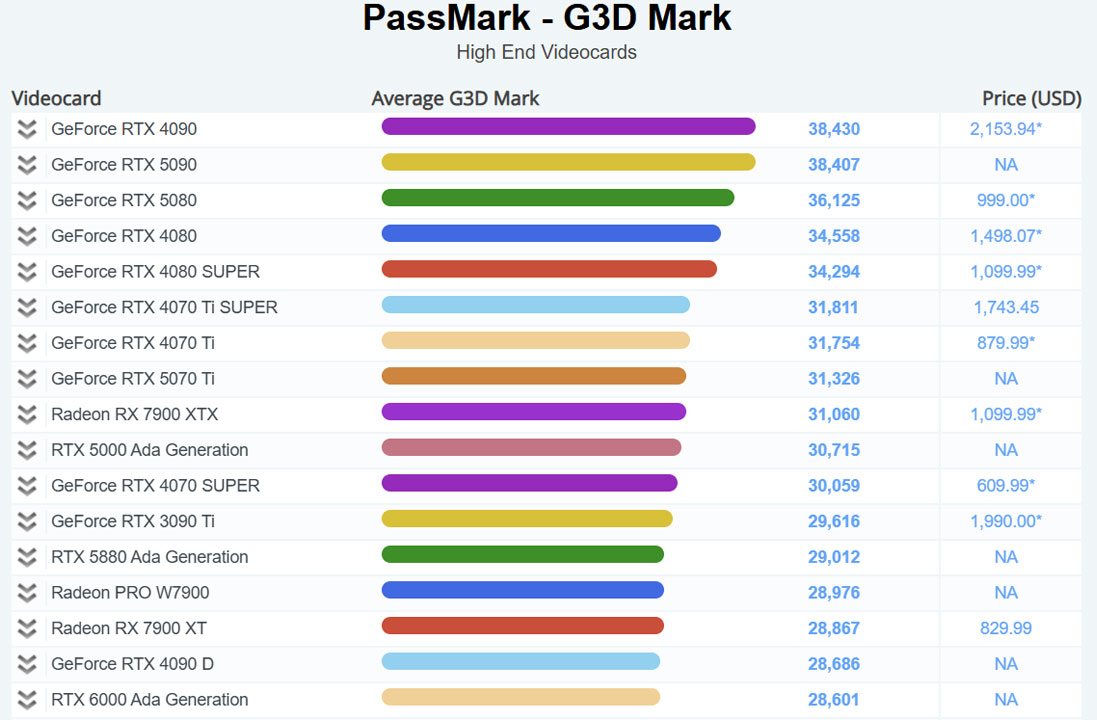
If you are using Lumion 2026, the NVIDIA RTX 4090 is no longer just a “nice-to-have” luxury, it has become the gold standard for professional architects. To understand why, we need to look at the G3DMark score. While Lumion’s high-end requirement is 22,000 points, the RTX 4090 crushes this with a massive score of over 38,000 points.
Best Lumion Render Farm 2026
Even with the smartest AI tools and the latest shortcuts, you still need a very powerful computer to work. If your local computer is struggling to keep up or if you simply don’t want to tie up your machine for days, it is time to look at Cloud Rendering.
However, choosing a render farm for Lumion is different than for other software. Because Lumion requires an active Windows environment and a high-end GPU to function, not every farm can handle it. Below, we have narrowed down the top render farms that are fully compatible with Lumion 2026 and equipped with the RTX 4090 power you need to meet your deadline.
iRender
iRender provides a high performance and configurable server system to customers who need to utilize the power of CPUs & GPUs such as 3D rendering, AI training, VR&AR, simulation, etc.
If you want the fastest speed for Lumion 2026, iRender is the best choice. While other services give you a simple virtual computer, iRender gives you a power server with the NVIDIA RTX 4090, the strongest graphics card in 2026.
Using iRender is also very simple and flexible. You connect to their server through a Remote Desktop, which feels exactly like using a second, super-powerful PC. You can install your own Lumion license, customize your settings, and manage your files privately. If you ever get stuck, their 24/7 live support team is always there to help you immediately. For architects facing tight deadlines in 2026, iRender is not just a tool, it is a “secret weapon” that ensures you always deliver professional, photorealistic results on time, every time.
- CPU: AMD Ryzen™ Threadripper™ PRO 3955WX, AMD Ryzen™ Threadripper™ PRO 5975WX
- GPU: 1/2/4/6/8 x Nvidia RTX 4090
- VRAM: 24GB
- RAM: 256GB
- Storage (NVMe SSD): 2TB
- Price: $8.2 – $52 per node per hour
Cloudalize
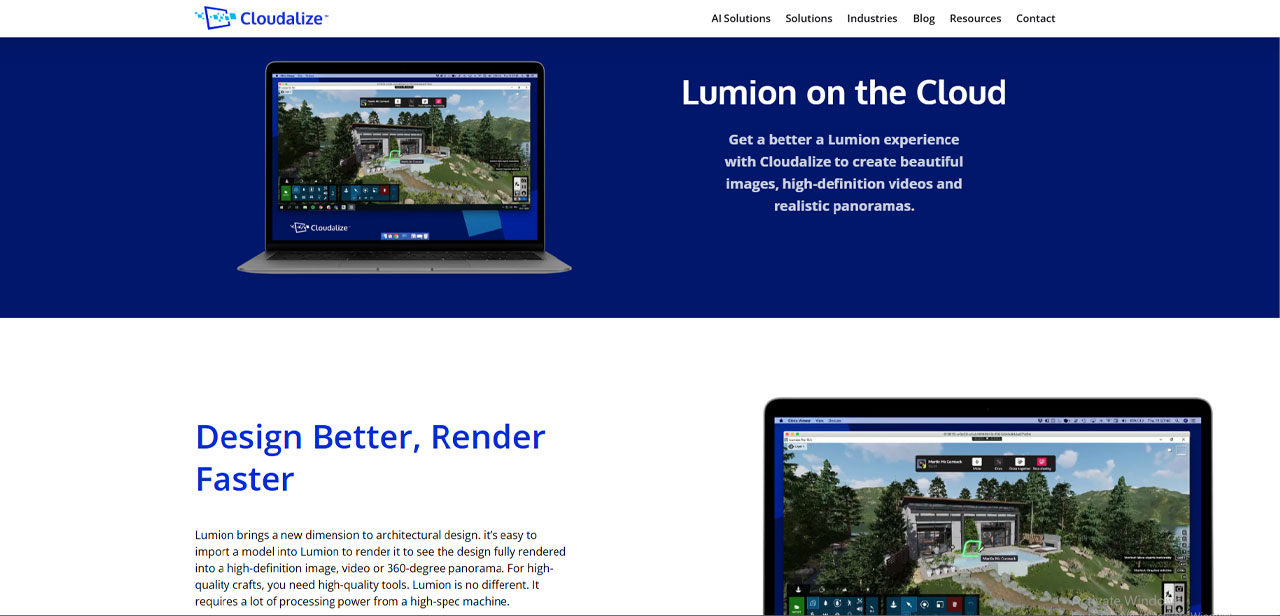
Cloudalize is a fully managed Desktop-as-a-Service platform that transforms any device into a powerful, high-performance workstation using advanced GPU technology. Through a simple web browser, users can seamlessly access their cloud desktop on a wide range of devices, including iPads, MacBooks, and Android or Windows systems. Built on a Windows-based system, Cloudalize allows users to install and run professional and specialized software with ease. Its remote accessibility ensures that your desktop is always within reach whether you’re working from home, on-site, or attending classes providing a convenient and efficient way to stay productive anywhere.
A Cloudalize Cloud Workstation gives Lumion end users the speed and the processing power required without buying a new high-spec machine. It is a Windows-based DaaS powered by Cloudalize’s GPU-enabled proprietary technology. A Cloud Workstation is set up in minutes, accessible from the web browser of any device with connection to the Internet.
- GPU: NVIDIA Ampere A6000 and NVIDIA Quadro RTX 6000
- RAM: 4 GB RAM up to 64 GB+ RAM depending on the desktop tier.
- Storage: Available, including 2TB capacity
- Price: Hourly plan is now not available (Auxilio says it will be coming soon). Only weekly and monthly plans are available at the moment (from $99 per week or from $399 per month).
Vagon
Vagon is a cloud-based high-performance computing platform that provides users with access to powerful GPU-enabled virtual workstations over the internet. Although it is sometimes referred to as a render farm, Vagon is more accurately described as a cloud workstation service, because it allows users to fully control a remote computer rather than automatically distributing rendering tasks across multiple machines.
With Vagon, users can launch a high-spec cloud computer within seconds, directly from a web browser, and use it just like a physical PC. This makes it possible to run demanding software such as Lumion, Unreal Engine, Blender, or other 3D and visualization tools even on low-end devices like basic laptops or tablets.
In 2026, Lumion needs a very powerful computer to show realistic lights and shadows. If your laptop is old or slow, Vagon is the perfect solution. It gives you a “Super Computer” inside your web browser.
Instead of buying an expensive $5,000 workstation, you can just log in to Vagon from any device like a MacBook, an iPad, or a simple office laptop. Vagon uses high-end NVIDIA RTX GPUs that make Lumion 2026 run smoothly without lagging or crashing.
- CPU: 4.0 GHz INTEL Processors
- GPU: A10G Tensor Core GPUs, NVIDIA CUDA & OptiX Activated Tesla T4 GPUs
- RAM: 16-192GB
- Price:
Graphics Accelerated (Latest Generation) : 1.67$-11.97$/hour.
Graphics Accelerated ( Standard): 0.99$-8.99$/hour
Computing Accelerated: 0.25$-4.59$/hour.
Auxilio
Auxilio is a cloud-based render farm and remote workstation provider that offers high-performance computing resources for demanding 3D applications. Similar to platforms like iRender or Cloudalize, Auxilio provides access to powerful machines equipped with modern GPUs, allowing users to run heavy rendering software without relying on their local hardware. Instead of investing in an expensive workstation, users can connect to a remote system and perform rendering tasks efficiently in the cloud.
For users of Lumion, Auxilio can be especially useful because Lumion requires strong GPU performance and high VRAM to handle large scenes, real-time rendering, and complex visual effects. Many personal computers, especially laptops, struggle to meet these requirements. By using Auxilio, Lumion users can access high-end GPUs that deliver smoother performance, faster rendering times, and better handling of detailed projects.
- CPU: 16 Core Xeon CPU
- GPU: NVIDIA A6000 48 GB GPU
- RAM: 24GB
- Storage: 120GB SSD
- Price:
Hourly: A 6000: 0.8$/hour- R 6000: 0.6$/hour.
Weekly: A 6000: 129$/week- R 6000: 99$/week.
Monthly: 499$/month- R 6000: 399$/month.
iRender vs Cloudalize: Which one is better for Lumion 2026?
Both iRender and Cloudalize provide cloud-based GPU computing, but they are built with different purposes and workflows in mind.
In 2026, Lumion has changed a lot. It now uses Ray Tracing 2.0 and AI tools to make your pictures look real. These new features need a huge amount of power from the graphics card (GPU). This is exactly why iRender is the winner for most architects this year.
Cloudalize is like renting a “Virtual Office.” It is a great service if you have a big team and you want everyone to work on the same project from different places. It is very stable and good for daily 3D modeling. However, Cloudalize uses “Professional” graphics cards (like the NVIDIA A-series). These are built for long work hours and multitasking, but they are not the fastest when it comes to rendering a heavy Lumion video. If you use Cloudalize for a big project, you might still find yourself waiting a long time for the final render to finish.
On the other hand, iRender is built for one thing: Extreme Speed. Instead of office-grade cards, iRender gives you the NVIDIA RTX 4090. This is the most powerful card in 2026 for Lumion. While Cloudalize focuses on the “office” experience, iRender focuses on the rendering experience.
Let’s look at the detailed comparison table below:
| Feature | iRender | Cloudalize |
| Core Model | IaaS (GPU render farm / remote workstation) | DaaS (virtual desktop) |
| Main Purpose | Rendering, 3D, AI workloads | Remote work, collaboration, general GPU apps |
| GPU Power | RTX 4090, multi-GPU support | GPU-based but less transparent configs |
| Performance for Lumion | (Optimized for rendering) | (General-purpose GPU) |
| Control Level | Full control (install anything) | Controlled environment (enterprise-focused) |
| Multi-GPU Support | Yes (scale up to multiple GPUs) | Limited / not core focus |
| Ease of Use | Medium (requires setup) | Easy (plug-and-play desktop) |
| Pricing Model | Flexible price(Pay-as-you-go) and rental plan | Subscription, $99/week (~$399+/month) |
| Best For | Rendering, Lumion, Unreal, heavy scenes | Office work, remote teams, light rendering |
| Flexibility | Very high | Moderate |
Looking at the table above, it is easy to see why iRender stands out as the best choice for architects. While Cloudalize is a good “virtual office” for general work, it cannot match the raw power that iRender offers for rendering.
Try Your heaviest Lumion scenes on an RTX 4090
If you are tired of your computer lagging or waiting all night for a single video, it might be time to test a high-end cloud GPU.
Among the options we’ve tested, iRender stands out because it gives you a dedicated RTX 4090 server that you control completely. It’s not just about speed, it’s about having the peace of mind that your project will finish on time, no matter how heavy it is.
The best way to see if it fits your style is to try it yourself. They currently offer a trial bonus for new users, which is a great way to test their 4090 power on your own Lumion files without a big investment.
Final Thoughts
As we move through 2026, it is clear that architectural visualization is changing fast. Lumion 2026 is more than just a tool—it is a game-changer that makes your designs look like real life. However, to get those beautiful results without the stress of a slow computer, Cloud Rendering is no longer a luxury; it is a smart move for any modern architect. Whether you choose the incredible speed of iRender, the simple browser-based setup of Vagon, or the professional team workspace of Cloudalize, the goal is the same: to save your time and energy for what really matters—designing. Try one of these farms today, use their free bonuses, and see how much easier your life becomes. In 2026, let the cloud render farm handle the heavy work while you focus on building the future.
See more: Best Architectural Rendering Software for 3D Visualization