Why Lumion Looks Grainy in Renders (And How to Get Clean Output)
Grain in a Lumion render almost always means the image was not given enough quality to resolve cleanly. The two usual causes are a low render quality setting and ray-traced effects, global illumination, ray-traced shadows and reflections, set too low to smooth out. Lumion builds those effects from samples, and too few samples leaves visible noise, worst in dim interiors and soft shadows. The fix is to raise the render quality, increase the ray tracing and shadow quality, turn up anti-aliasing, and render at full resolution rather than upscaling a small output. Higher quality takes longer, which is where a faster GPU earns its place, but the grain itself is a settings problem first.
Where the grain comes from
Lumion is real-time, but its photo and movie modes still lean on ray-traced effects to look photoreal, and those effects are the source of the noise. Global illumination works out how light bounces around a room, ray-traced shadows soften edges realistically, and reflections trace what appears in surfaces. Each of these is built by firing rays and sampling, and when the quality is low, there are too few samples to average out into a smooth result, so you get speckled grain. It shows up most in interiors, where bounced light does most of the work, and in soft shadow areas, which is why a bright exterior can look clean while a dim lobby looks noisy in the same project.
The other contributor is aliasing rather than true grain: fine railings, distant foliage and thin lines can shimmer or look rough when anti-aliasing is low, which reads as a kind of graininess even though it is a different problem. Both clear with higher settings, just different ones.
The settings that clean it up
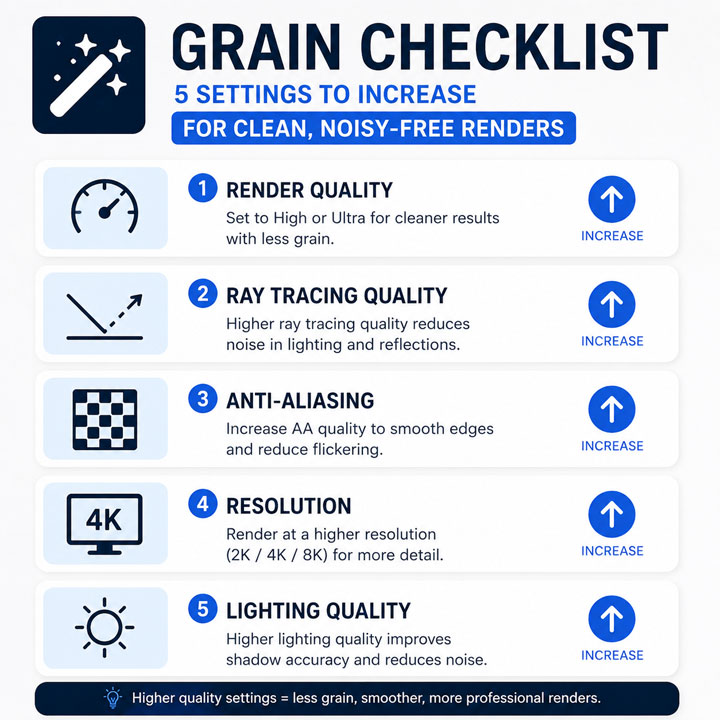
Work through these and the image resolves. They are listed roughly in the order that gives the biggest improvement for arch-viz interiors.
| Setting to raise | What it fixes |
|---|---|
| Render quality (the star setting) | The overall sample budget; the single biggest lever against grain |
| Ray tracing and shadow quality | Smooths noisy global illumination and soft shadows in interiors |
| Anti-aliasing / supersampling | Cleans shimmering railings, foliage and thin edges |
| Output resolution | Render at the final size rather than upscaling a smaller image |
| Effect-specific quality (reflections, SSAO) | Removes noise around reflective surfaces and contact shadows |
The render quality setting does most of the heavy lifting. I have fixed plenty of grainy interiors just by taking that up a notch and giving the ray-traced shadows more quality, without touching anything else. Push everything to maximum only when you need to, since each step adds render time.
Where the GPU comes in
Higher quality settings mean more samples, and more samples mean longer renders. On a weaker card, cranking everything up turns a quick still into a long wait, which is why people leave the quality low and live with grain in the first place. A faster GPU with more headroom lets you render at the clean settings without the time penalty becoming painful, so the real choice is often between a grainy fast render and a clean slow one, with a stronger card removing the dilemma. The way denoising changes this equation for offline engines is covered in why 4K stills take hours and how denoising helps, and if your card is not pulling its weight at all, that is a separate issue in Lumion not using your full GPU.
If your local card cannot render clean settings in reasonable time, a cloud GPU is the straightforward route. Because Lumion is real-time, the per-frame render farms cannot run it, so this means a rented machine rather than a farm. GarageFarm, RebusFarm and Fox handle offline engines well but not Lumion. iRender gives you a remote RTX 4090 that renders Lumion at high quality quickly, with your own install so the output matches your scene. The cards are RTX 4090 rather than the 5090, the meter runs until you shut down, and a free trial lets you render a clean version of your own grainy shot to compare.
Clean settings turning every render into a long wait? Render Lumion at full quality on a remote RTX 4090 through iRender, fast enough that you stop trading grain for time. A free trial lets you clean up your own shot first. → Try a clean render.
FAQ
- Why are my Lumion renders grainy?
Because the image was not given enough quality to resolve cleanly. Lumion’s ray-traced effects, global illumination, soft shadows and reflections, are built from samples, and a low render quality setting leaves too few to smooth out, so noise remains. It is worst in interiors and soft shadow areas, where bounced light does most of the work. Raising the render quality and the ray tracing and shadow quality removes most of it.
2. How do I get clean, noise-free output from Lumion?
Raise the render quality setting first, since it controls the overall sample budget and is the biggest lever. Then increase ray tracing and shadow quality to smooth interiors, turn up anti-aliasing to clean shimmering edges and foliage, and render at the final resolution rather than upscaling a smaller image. Push effect-specific quality for reflections and contact shadows if those areas still show noise. Work up from the render quality setting rather than maxing everything at once.
3. Does a better GPU reduce grain in Lumion?
Not directly, but it lets you afford the settings that do. Grain is removed by higher quality settings, which use more samples and take longer to render. A weaker card makes clean settings painfully slow, so people leave quality low and accept noise. A faster GPU renders those clean settings in reasonable time, so the practical effect is that a stronger card lets you get noise-free output without the long wait that would otherwise push you back to grainy renders.
4. Why are my Lumion interiors grainy but exteriors clean?
Because interiors rely far more on bounced light. Global illumination has to work out how light reflects around an enclosed room, which needs many samples to resolve smoothly, while a bright exterior is mostly lit directly and resolves with fewer. So at the same quality setting, the interior shows grain the exterior does not. Raising render quality and ray tracing quality specifically helps interiors, since that is where the noisy bounced lighting lives.
Related post: Lumion Keeps Crashing on Big Scenes: Causes and Fixes for Architects