Rate and Review Garage Farm 2025 – Radarrender
Garage farm was established in 2010 with a team of two, Tomek and Minhee. They are a UK-based business that provides cloud rendering services. There are 2 brand names from Garage including Garage and Xesktop. In terms of supporting software, you should look at Garage Farm which is a SaaS (Software-as-a-Service) model. This cloud render farm will connect with your 3D software and execute the process of rendering after you send your project from the interface of your application.
| Company Name | Garage Farm |
| Website | https://www.garagefarm.net/ |
| Country | UK |
| Type of render farm | CPU and GPU |
| Free Trial | $25 |
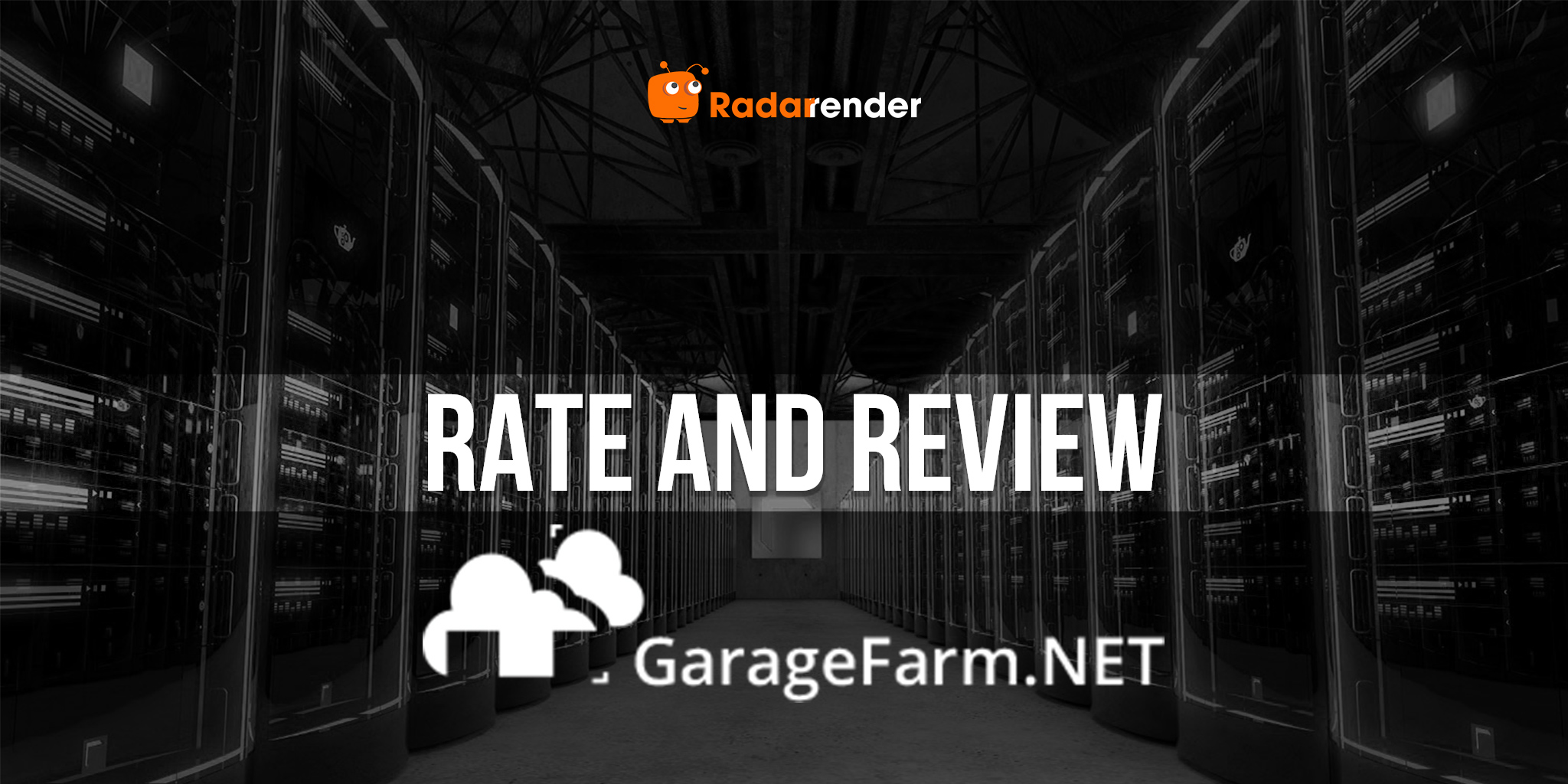
UI/UX is the first criterion when we look at a render farm. After experiencing, we have to admit that this user interface is quite difficult to use and it is not as friendly as that of Fox Render Farm or Rebus Farm which are also based on the SaaS business model. It takes you hours to figure out how to use the service ranging from installing their app called the renderBeamer app and then learn how to prepare your job on the interface of the software and integrate the Garage Farm app to your software so that you can use the plugin for setting the mode, camera settings and render settings. Next, you upload the job (it takes more time) and then submit the job & monitor the render progress. There are too many steps to prepare for the job and get the final results which make users discourage.
One of the significant criteria that rates a render farm as an excellent one is types of supported software. Regarding Garage Farm, they offer customers common CPU-based software such as 3Ds Max, Maya, Cinema 4D, and Blender. In addition, GarageFarm now officially supports Houdini via Redshift and V-Ray Standalone, expanding its appeal to VFX and simulation-heavy projects. Beyond the major DCCs, GarageFarm also supports LightWave 3D, The Foundry Modo, SketchUp, Rhinoceros3D, After Effects, VUE, and Planetside Terragen, giving artists a wide range of options.
GarageFarm provides render engines compatible with each software. Specifically, Corona and V-Ray are used for 3Ds Max; Redshift, V-Ray, and Corona are available for Cinema 4D; Mental Ray, V-Ray, and Redshift work with Maya. Blender users can choose from Cycles, Eevee, ProRender, Redshift, V-Ray, LuxCoreRender, and the internal Blender renderer. While Arnold is still not natively integrated, it can be used by contacting GarageFarm support and arranging licenses per render node, which requires additional costs.
When it comes to hardware, it can be called the outstanding advantage of Garage Farm.
Generally speaking, GarageFarm is the best choice for CPU-based rendering, especially when all supported software is rendered via CPU, taking full advantage of the number of CPU nodes to accelerate the rendering process for customers. First, let’s look at the updated CPU specs they offer:
- Intel Xeon v4: 22, 44, or 88 cores, 2.20 GHz, RAM from 60 GB up to 240 GB
- AMD Epyc (3rd gen): 32 or 64 cores, 2.44 GHz, RAM 120–240 GB per node.
The number of cores has a significant impact on CPU rendering, the more cores, the faster the render. This gives GarageFarm a clear advantage over many other SaaS-based render farms, with nodes having up to 88 cores per CPU on Intel or 64 cores per CPU on AMD. Moreover, GarageFarm can allocate 100 to 300 CPU nodes per working session, helping customers reduce rendering time from days to just hours or even minutes, depending on scene complexity. With such scalability and high-core-count nodes, GarageFarm stands out as one of the most powerful CPU render farms available.
GPU-based rendering on GarageFarm has significantly improved compared to older setups. Previously, GarageFarm only offered outdated 8 × Tesla K80 GPUs with 12 GB VRAM and 4992 CUDA cores per card, which lagged behind competitors like iRender Farm. Today, GarageFarm has upgraded its GPU nodes to modern, high-performance graphics cards, including RTX 4000 Ada (20 GB vRAM), Nvidia RTX A5000 (24 GB VRAM), Nvidia L40S (48 GB VRAM), and Nvidia RTX 6000 Pro Blackwell (96 GB VRAM). With these upgrades, GarageFarm now provides faster GPU rendering, larger memory capacity for complex scenes, and more efficient production workflows, making it a competitive choice for modern GPU rendering projects.
In terms of pricing, Garage Farm offers based on the priority levels. Priority, roughly speaking, is a price plan you can choose to render a job. You have a choice of Low, Medium, and High. Each priority offers you a different set of features and has a different rate. Of course, the higher the priority, the faster the rendering.
With CPU-based rendering, the price for low priority and medium priority, respectively, is $0.024/GHzh and $0.036/GHzh, while that of high priority is $0.072/GHzh. One of the biggest differences among these price plans is the maximum number of nodes you can use in a single rendering job: 100 nodes for low priority, 150 nodes for medium priority, and 300 nodes for high priority.
With GPU-based rendering, GarageFarm has also structured its pricing based on priority levels and project needs. For low priority, the price is $0.004 per OB hour, allowing up to 15 GPU nodes with up to 48 GB VRAM per node (single or multi-GPU). Medium priority is $0.006 per OB hour, best for larger projects with flexible deadlines, supporting up to 30 nodes with up to 96 GB VRAM per node. High priority costs $0.012 per OB hour, ideal for large projects with tight deadlines, allowing up to 60 nodes with up to 96 GB VRAM per node.
The pricing that Garage Farm offers can be considered “reasonable”, however, you need to pay more for the tax. To illustrate, if you recharge $1000, you need to pay $200 more for tax, the total amount is $1200.
Last but not least, service support is a considerable advantage of Garage Farm. They support customers 24/7 via live chat that is available on the user interface. Staff also give detailed instructions through documents for customers whenever being asked. But depending on your priority level, you will get the support speed. To illustrate, you will get full and premium support if you choose the medium priority and high priority respectively while you only get limited support if you choose the low priority.
WE RANK

LATEST NEWS
The latest creative news