How Long Should a Lumion Exterior Render Take? Benchmarks and Bottlenecks
On a strong GPU, a single 4K Lumion exterior still should take roughly 3 to 8 minutes, not hours. Lumion is real-time, so even a high-quality photo render is quick compared to an offline engine. A dense, vegetated exterior at maximum quality sits at the upper end, a cleaner scene at the lower. If your exterior still is taking 20, 30 minutes or more, that is a signal, not normal, and the bottleneck is almost always one of three things: an underpowered or wrong GPU, an unoptimized scene, or quality settings pushed higher than the shot needs. Animations are a different scale entirely, since they are thousands of these frames. Benchmarks below are illustrative; measure your own scene for a true baseline.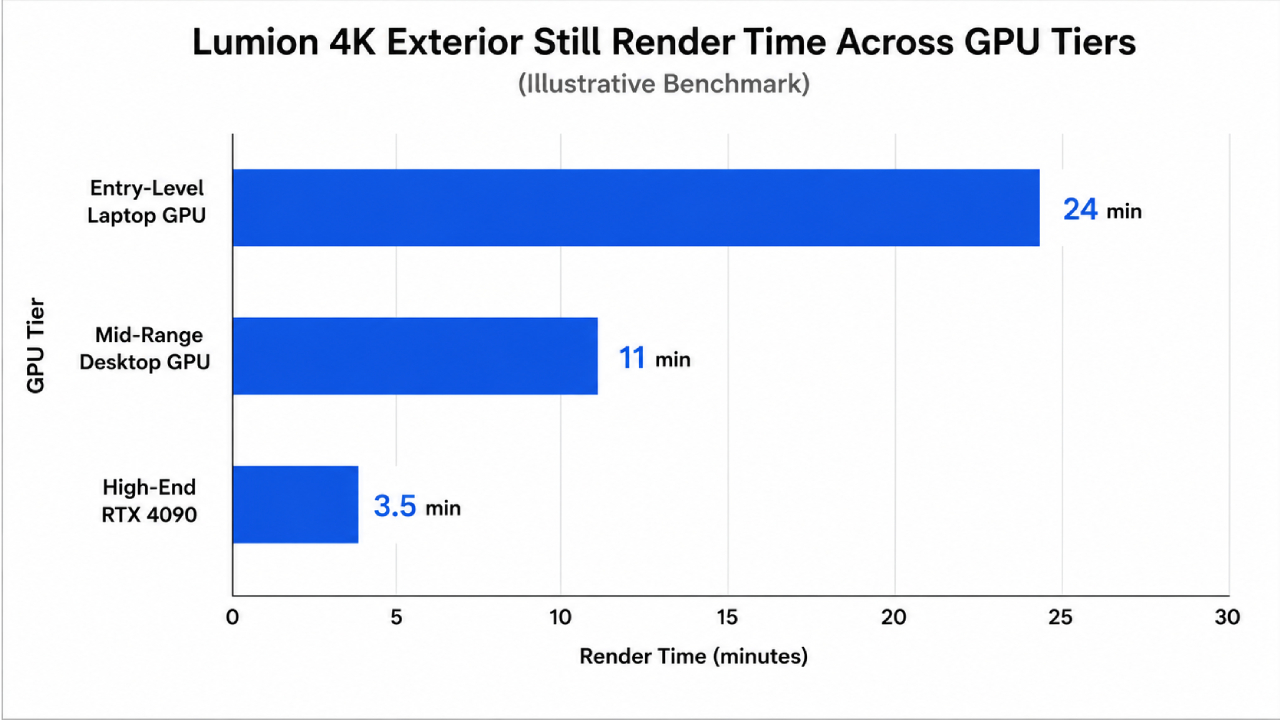
What a normal Lumion exterior render time looks like
Because Lumion renders in real time, people are sometimes surprised that a photo still takes any real time at all, and others are surprised theirs takes so long. Both come from not having a reference point. Here is a realistic set of ranges for a single exterior still, holding the scene roughly constant and changing only resolution and card. Treat these as illustrative middles, since a heavily planted scene or maxed effects push every number up.
| Output | Weaker / older GPU | Mid-range GPU | Strong GPU (RTX 4090 class) |
|---|---|---|---|
| 1080p exterior still | 2 to 5 min | 1 to 2 min | under a minute |
| 4K exterior still | 15 to 30 min or more | 6 to 12 min | 3 to 8 min |
| 4K, dense vegetation, max quality | can exceed 45 min | 15 to 25 min | 8 to 15 min |
The pattern that matters: 4K is roughly four times the pixels of 1080p, so it takes several times longer on the same card, and a weaker GPU stretches every figure. If your 4K exterior on a decent card is landing near the strong-GPU column, you are fine. If it is landing far above even the weaker-GPU column, something in the scene or settings is dragging.
The three bottlenecks when it takes too long
| Bottleneck | Tell-tale sign | What to do |
|---|---|---|
| Underpowered or wrong GPU | Everything renders slowly; on a laptop, the integrated chip may be in use | Force the dedicated GPU; upgrade or rent a stronger card |
| Unoptimized scene | Slow only on this heavy scene; huge textures, thousands of unique plants | Trim textures, use library vegetation and scattering, purge unused assets |
| Over-set quality | Slow after cranking every setting to maximum | Match quality to the shot; reserve maximum for hero images |
The wrong-GPU case is the one people miss most on laptops, where Lumion can quietly run on the integrated chip while the powerful card sits idle, which we cover in Lumion not using your full GPU. If the render is slow but also grainy, that points at settings and sampling rather than pure speed, handled in why Lumion looks grainy.
Where exteriors get genuinely slow: animations
A single exterior still being quick can lull you before an animation lands. A walkthrough is not one render, it is thousands. A two minute 4K exterior fly-through at 30fps is 3,600 frames, and even at a fast few seconds per frame that is hours on one card, or overnight on a weaker one. This is where the still-versus-animation gap becomes a deadline problem, and where a single machine stops being enough, which is the heart of why render times eat deadlines.
For animations and big still batches, a stronger card renders each frame faster, and splitting the frame range across several cloud machines finishes the whole job in a fraction of the wall-clock time. Because Lumion is real-time, that means renting machines you control rather than a per-frame farm, since GarageFarm, RebusFarm and Fox cannot run Lumion. iRender is the service I use for this, with a dedicated RTX 4090 that renders exteriors at the fast end of the benchmarks, and the option to run several machines in parallel for animations. It is RTX 4090 rather than the 5090, the meter runs until you shut down, and a first-deposit bonus plus a free trial let you benchmark your own exterior before committing.
4K exterior taking far longer than a few minutes, or an animation stretching overnight? Render it on a dedicated RTX 4090 through iRender, or split an animation across machines to finish faster. A free trial lets you benchmark your own exterior. → Benchmark on iRender
FAQ
- How long should a Lumion exterior render take?
On a strong GPU, a single 4K exterior still should take roughly 3 to 8 minutes, and a 1080p still under a minute, since Lumion renders in real time and is fast compared to offline engines. A dense, vegetated exterior at maximum quality sits at the upper end. On a weaker or older card those times stretch several fold. If a 4K exterior still is taking 20 to 30 minutes or more on a decent card, that is a sign of a bottleneck rather than normal render time.
2. Why is my Lumion exterior render taking so long?
Almost always one of three things: an underpowered or wrong GPU, an unoptimized scene, or quality settings pushed too high. On a laptop, Lumion may be running on the integrated chip while the dedicated card sits idle. A scene stuffed with huge textures and thousands of unique plants drags every render, and maxing every quality setting on a shot that does not need it adds time. Check the GPU first, then the scene, then the settings.
3. Is Lumion faster than V-Ray or Corona for exteriors?
For a single still, usually yes, because Lumion is real-time and produces a photo render in minutes where an offline engine like V-Ray or Corona can take much longer at high quality. The gap narrows for very heavy scenes and reverses in some quality-critical work where offline engines are chosen for their final fidelity. For arch-viz exteriors specifically, Lumion’s speed is a large part of why studios use it, with offline engines picked when maximum photorealism outweighs render time.
4. How long does a Lumion exterior animation take to render?
Far longer than a still, because an animation is thousands of frames. A two minute 4K fly-through at 30fps is 3,600 frames, so even at a few seconds per frame on a strong card it runs for hours, and overnight on a weaker one. This is why animations, not stills, are where exterior rendering becomes a deadline problem. Splitting the frame range across several cloud machines running in parallel is the practical way to bring the wall-clock time down.
Related post: Lumion Won’t Use My Full GPU: Troubleshooting Performance for Arch-Viz