Octane and Redshift in Cinema 4D: Which One Wins?
Cinema 4D users often choose between two popular render engines: Octane and Redshift. Both can create high-quality, realistic images, but they work in different ways. Octane is known for its speed and ease of use, while Redshift is valued for its control and ability to handle complex scenes.
This topic looks at the main differences between Octane and Redshift to help you decide which render engine is best for your Cinema 4D projects.
Let’s dive into the article!
I. Overview of Cinema 4D, Octane, and Redshift
1. Cinema 4D
Cinema 4D by Maxon is a professional 3D software widely used for motion graphics, animation, visual effects, and 3D design. One of the biggest strengths of Cinema 4D 2026 is its strong motion graphics workflow. The MoGraph system allows users to create complex animations using simple tools like cloners, effectors, and fields. In the 2026 version, these tools are more flexible and efficient, helping artists create detailed animations with less effort.
Cinema 4D 2026 also includes tools for simulation. Users can create cloth, smoke, fire, and liquid effects to make scenes look more realistic. These tools work faster and more smoothly than before, helping artists save time.
Source: Maxon
2. Octane
OctaneRender is a GPU-accelerated 3D render engine created by OTOY. It uses your graphics card to render images and animations very quickly while producing physically accurate, realistic lighting and materials. Octane is known as one of the first unbiased GPU renderers, meaning it traces light in a way that closely matches real-world physics. It supports many advanced features like layered materials, realistic hair and skin shaders, procedural displacement, and more, making it a strong choice for high-quality 3D work.
Source: OTOY
3. Redshift
Redshift is a GPU-accelerated render engine developed by Maxon. It is designed to create high-quality images and animations while using less computer memory and rendering faster. Redshift is called a biased render engine, which means it gives artists more control to optimize lighting, materials, and render settings for better performance.
Redshift is popular because it can handle large and complex scenes without slowing down. Artists can adjust settings to balance speed and quality, making it ideal for animations, motion graphics, and professional studio work. It is widely used in Cinema 4D and is fully integrated into the software.

Source: Maxon
II. Octane and Redshift: Comprehensive Comparison
1. Ease of use
When it comes to ease of use in Cinema 4D, Octane is generally considered easier and more beginner-friendly. It has a simple setup and uses realistic lighting and materials by default, so artists can achieve good results quickly. Because Octane requires fewer technical settings, it is ideal for beginners and for artists who want a smooth and simple workflow.
Redshift, on the other hand, offers more control but comes with a steeper learning curve. It includes many settings for sampling, lighting, and performance optimization, which can feel overwhelming for new users. Artists often need to spend more time adjusting these settings to get the best results. However, once learned, Redshift becomes very efficient and powerful, especially for complex scenes and professional projects.
2. Speed
When it comes to speed, both Octane and Redshift are very fast GPU render engines, but they achieve speed in different ways. The “faster” option often depends on the type of project you are working on.
Octane is known for its fast real-time feedback. It uses an unbiased rendering approach, which means lighting and materials behave very naturally. Because of this, artists can see changes almost instantly in the live viewer.
Redshift, on the other hand, is optimized for speed. It is a biased render engine, which allows users to control sampling, lighting, and memory usage. Because of this, Redshift performs extremely well with large scenes and long animations. It can handle heavy geometry, many lights, and complex materials more efficiently by using less GPU memory.
Here’s a definite example. And it’s not the interior, where it’s almost impossible to get rid of some noise in an unbiased rendering.
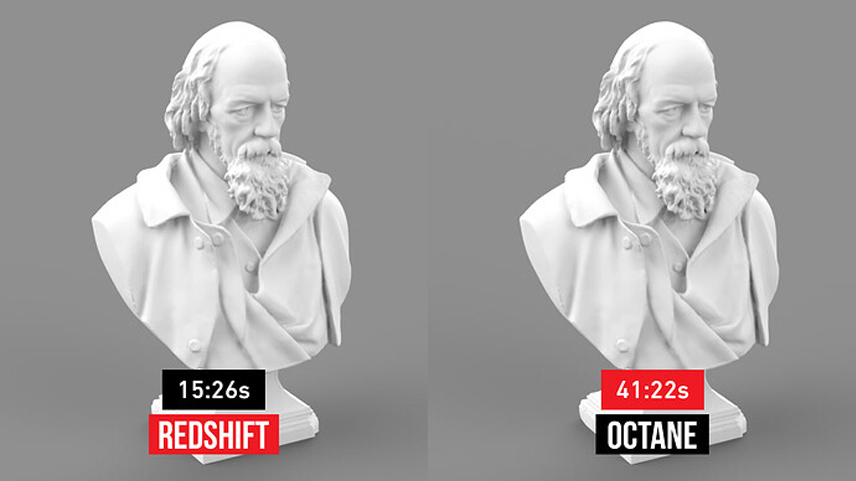
The image compares render speed between Redshift and Octane using the same 3D model. Redshift finishes the render in 15 minutes, while Octane takes 41 minutes. Both renderings look very similar in quality.
This shows that Redshift is much faster than Octane for this scene. Redshift’s optimized settings help reduce render time, while Octane takes longer because it calculates lighting more realistically.
3. GPU and Memory Efficiency
Octane uses only the GPU and its memory (VRAM) to render scenes. This makes it very fast when the scene is small or medium in size. If everything fits into the GPU memory, Octane works smoothly and gives quick results. However, when a scene has many objects, large textures, or heavy effects, the GPU memory can fill up fast.
Redshift is made to use GPU memory more efficiently. It can handle large scenes better by managing memory carefully. Redshift can also use system RAM when GPU memory is full, helping prevent crashes. This makes it easier to work with big scenes, high-resolution textures, and long animations.
In simple terms, Octane is best for light scenes that fit in GPU memory, while Redshift is better for heavy scenes that need more memory and stability, especially in professional Cinema 4D projects.
4. Visual Quality
When comparing visual quality in Cinema 4D, both Octane and Redshift can produce stunning, professional-level results. The difference is not about which one looks “good” or “bad,” but how easily and in what style they achieve high-quality visuals.
Octane is known for its very realistic and natural look. Because it is an unbiased render engine, lighting, shadows, and reflections behave more as they do in the real world. This often results in soft lighting and beautiful global illumination with very little setup.

Source: Pngtree
Redshift also delivers high-quality visuals, but it takes a more controlled approach. It is a biased render engine, meaning artists can adjust settings to guide how light and materials are calculated. It is especially strong in scenes with complex lighting, many lights, and detailed materials.

Source: Maxon
5. Renderfarm Compatibility
Octane and Redshift both work with render farms, but they differ in how smoothly and widely they integrate with farm systems — especially for Cinema 4D users.
Octane can be used on many render farms, especially those that support GPU rendering. Some farms offer direct support for Octane, allowing you to send Cinema 4D scenes with Octane settings and render them without major changes. Because Octane uses GPU acceleration, farms must have compatible GPUs (like NVIDIA cards with enough VRAM) to run your jobs properly.
Redshift has very strong compatibility with almost all major render farms, especially those focused on production pipelines. Since Redshift is widely used in studios, many farm providers have native support for Redshift with Cinema 4D, handling textures, lights, and render elements smoothly.
Here are some popular render farms that support both Octane and Redshift for Cinema 4D projects:
- Render Network (by OTOY)
- iRender
- RebusFarm
- SuperRenderfarm
- Ranch Computing
III. Conclusion
Octane and Redshift are both excellent render engines for Cinema 4D. Octane is easy to use and gives realistic results quickly, making it ideal for beginners and small projects. Redshift offers more control and better performance for large scenes and animations, though it takes more time to learn.
In the end, there is no single winner for everyone. Octane wins for simplicity and fast creative work, while Redshift wins for speed, efficiency, and production-level projects. The best choice depends on your workflow, project size, and experience level in Cinema 4D.
See more: Best Octane Render Farm in 2025 for Fast 3D Rendering Workflows